Key takeaways
- Five USB cables for desk charging and data runs compared, from a short 100W UGREEN cord to a 40Gbps Cable Matters Thunderbolt 4 cable, with lengths listed.
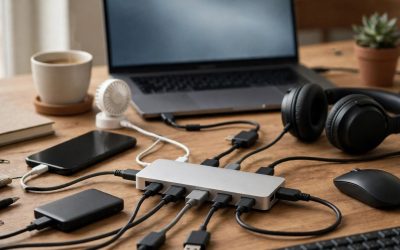
A desk usually needs more than one kind of USB cable. A short cord keeps a phone charger tidy beside a keyboard, a longer cord reaches a laptop dock at the back of the desk, and a high-bandwidth cord moves files between an SSD and a computer without turning a quick copy into a long wait.
This guide gathers five cables that cover the main desk roles: short and long USB-C charging cords, a soft silicone USB-C cord, a 40Gbps Thunderbolt 4 cord for data runs, and a braided USB-C to USB-A cord for older ports. Each pick below sticks to what its own Amazon listing states, including length, connector type, and the charging or data figures the maker prints.
As an Amazon Associate, we earn from qualifying purchases.
Quick answer
For most desks, the UGREEN 100W USB-C to USB-C cable in 3.3 ft covers daily charging with a tidy run. The Anker PowerLine III Flow adds a soft silicone finish in 6 ft, the Cable Matters Thunderbolt 4 cable handles 40Gbps data, the Anker PowerLine+ bridges older USB-A ports, and the UGREEN 10 ft cable reaches across wide desks.
How to choose
Begin with the connectors on your gear. A USB-C charger and a USB-C laptop or phone call for a USB-C to USB-C cable. An older power brick, car adapter, or desktop tower with only USB-A ports needs a USB-C to USB-A cable instead. Plugs are not interchangeable, so read the port shapes on both ends of the run before ordering.
Next, look at the figures the listing prints. Charging cords name a wattage ceiling, such as 100W or 240W. That ceiling is what the cable can carry; your charger and your device still set the actual charging speed, and no cable can push a device past its own charging limit. Data cords name a transfer figure instead. Many charging cords follow USB 2.0, while a Thunderbolt 4 or USB4 cord is listed at 40Gbps, which suits SSD runs and dock links.
Length shapes the desk as much as the figures do. A 3.3 ft cord keeps a charging spot neat, 6 ft gives slack for a laptop that moves around, and 10 ft crosses a wide desk or reaches a floor outlet. Longer runs add loose cable to manage, so coil the extra and keep it clear of chair wheels. Jacket material matters too: nylon braid shrugs off daily bends, while silicone feels soft and resists tangling in a drawer or bag.
UGREEN 100W USB C to USB C Cable (3.3FT, Black)

This is the tidy-desk pick. At 3.3 ft, the UGREEN cord runs from a desktop charger to a phone or tablet without leaving a pile of slack behind the monitor. The listing names it as a 100W cable, which covers the charging needs the maker lists for phones, tablets, and laptops that charge over USB-C, while your charger and device still decide the pace of each session.
The build pairs a nylon braid with an aluminum case on the connectors, and the listing includes a cable tie for keeping the cord coiled when it is not in use. UGREEN names a wide set of devices in the listing title, including iPhone 17 and iPhone 16 models, MacBook Pro, iPad Pro, Dell XPS, Galaxy S25, S24 and S23 Ultra, Switch, and Pixel phones.
Specs:
– Brand: UGREEN
– Model: 70427
– Connector type: USB Type C (USB-C to USB-C)
– Length: 3.3FT
– Wattage: 100 watts
– Build: nylon braid, aluminum case
– Included: 3.3 ft USB C to USB C cable, user manual, cable tie
Anker PowerLine III Flow USB-C to USB-C Cable (6ft, Black)
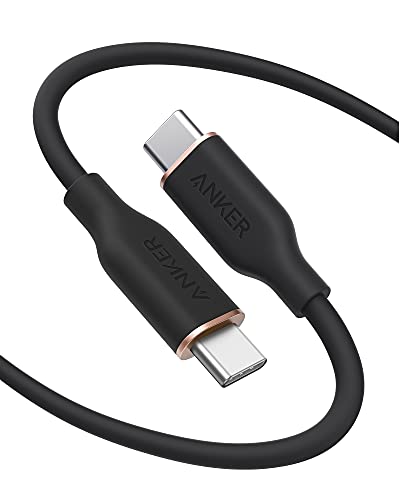
The PowerLine III Flow is the comfort pick for a cord that gets handled all day. Its silicone finish feels soft in the hand and resists tangling when you drop it into a desk drawer, and the 6 ft length reaches from a charger on the floor or a rear outlet up to a laptop or phone on the desk surface.
Anker lists this cable as USB 2.0 with a USB-C connector on both ends, and the Amazon listing title names it at 240W. Treat that figure as the ceiling the cable can carry: pair it with a suitable USB-C charger, and the phone, tablet, or laptop at the other end still sets how much power it draws. The package includes a silicone cable tie for coiling the cord neatly. As a USB 2.0 cable, it is aimed at charging and everyday sync rather than long high-speed data runs, so keep it on charging duty and let a higher-bandwidth cord handle big file moves.
Specs:
– Brand: Anker
– Model: A8553
– Cable type: USB C to USB C
– Standard: USB 2.0
– Length: 6 ft / 1.8 m
– Charging: up to 240W, as named in the listing title
– Finish: silicone, black
– Included: silicone cable tie
Cable Matters 40Gbps Active Thunderbolt 4 Cable (6.6 ft, Black)

This is the data-run pick. Cable Matters lists this cord at 40 Gigabits Per Second, with 8K video support and 240W charging, so one cable can link a laptop to a dock, carry a display signal where the listing supports it, and move large folders to an external SSD at the pace the listing states. The 6.6 ft length is longer than most high-bandwidth cords, which helps when the dock sits on the far side of the desk.
The listing describes the cable as Intel Certified Thunderbolt 4 and names compatibility with USB-C, USB4, and Thunderbolt 3 gear. It also notes support for USB Power Delivery 3.0 and DisplayPort Alt Mode, depending on device support. Check that your laptop port and dock match what the listing names, follow the maker guidance for your dock, and this cord covers the link between them.
Specs:
– Brand: Cable Matters
– Model: 107025-BLK-2m
– Connector type: Thunderbolt 4 (USB-C)
– Length: 6.6 ft
– Data transfer rate: 40 Gigabits Per Second
– Charging: 240W
– Video: 8K video support
– Compatibility as listed: USB-C, USB4, and Thunderbolt 3
Anker PowerLine+ USB-C to USB 3.0 Cable (6FT, Grey)

Older desks still run on USB-A. This PowerLine+ cord bridges that gap, with USB-C on one end and a USB 3.0 USB-A plug on the other, so a phone or tablet with a USB-C port can charge from an older power brick, a tower PC, or a monitor hub. The braided jacket suits a cord that gets plugged and unplugged many times a day.
Anker names the Galaxy S10, S9, and Sony XZ in the listing title, and the 6 ft length gives enough slack to reach from a tower under the desk up to a phone stand. Because one end is USB-A, this cord follows the limits of that port: it is a practical bridge for charging and routine file copies from older gear, not a path to USB-C Power Delivery figures.
Specs:
– Brand: Anker
– Model: A8168/69
– Connectors: USB-C to USB 3.0 (USB-A)
– Length: 6 FT
– Build: braided
– Devices named in the listing title: Galaxy S10, S9, Sony XZ
UGREEN 100W USB C to USB C Cable (10ft, Black)
Some desks are simply wide. This 10 ft UGREEN cord crosses a broad work surface, runs from a wall outlet behind a bookcase to a reading chair, or reaches a laptop stand at the far end of a bench desk. The listing names it as a 100W cable, so it covers laptop and phone charging within that ceiling, while the charger and device still set the actual pace.
The build uses a nylon braided jacket with an aluminum housing and a 250D fiber core, per the listing description. With this much length, cable care matters: route it along the desk edge, keep it out of walkways, and coil the slack so it does not pool near chair casters.
Specs:
– Brand: UGREEN
– Model: 90120
– Connector type: USB Type C (USB-C to USB-C)
– Length: 10 ft
– Charging: 100W
– Build: nylon braided, aluminum housing, 250D fiber core
Who should skip
Skip this roundup if your desk gear charges over Lightning or micro USB only, since every pick here serves USB-C devices. Skip the short 3.3 ft cord if your outlet sits far from the desk, and skip the 10 ft cord if your workspace is small, since the extra length becomes clutter. If you need video over USB-C, read each listing closely: only the Cable Matters pick names 8K video support, and the Anker Flow is a USB 2.0 charging cord.
FAQ
Can a 100W cable charge a laptop that came with a higher-wattage charger?
The cable carries up to the figure its listing names, and the laptop draws what it is built to draw. A laptop that expects more power may charge slowly or hold its level while in use. Match the cable ceiling, the charger, and the device guidance from each maker before relying on one cord for a work laptop.
Will the Cable Matters Thunderbolt 4 cable work with plain USB-C devices?
The listing names compatibility with USB-C, USB4, and Thunderbolt 3, and describes the cord as fully compatible with USB C gear. It still plugs into USB-C ports only, and features such as video depend on the device at each end, as the listing notes for DisplayPort Alt Mode and Power Delivery.
Does a longer cable charge more slowly?
Length on its own is not the figure to watch. The wattage named in the listing, your charger output, and your device limit set the pace. A 10 ft cord listed at 100W serves the same charging roles as a short 100W cord; it simply reaches farther, so route it with care.
Can the USB-A to USB-C Anker cable fast charge a newer phone?
It charges through a USB-A port, so it follows that port and the USB 3.0 connection rather than USB-C Power Delivery. The listing presents it as a braided charging cable for devices such as the Galaxy S10, S9, and Sony XZ. For a phone that relies on USB-C Power Delivery, use a USB-C to USB-C cord and a USB-C charger instead.
Final verdict
Build the desk around roles. Keep the UGREEN 3.3 ft cord at the charging spot, the Anker PowerLine III Flow where a soft 6 ft cord gets handled daily, and the UGREEN 10 ft cord for the long reach. Add the Cable Matters Thunderbolt 4 cable when data runs and dock links matter, and keep the Anker PowerLine+ on hand for USB-A ports still in service. Each figure above comes from the maker listing for that cable, so check the listing against your ports before ordering.