
Key takeaways
- Compare five wireless presenters for meetings and classes: a simple USB clicker, Bluetooth and cursor models, a digital highlighter, and an air mouse.
A wireless presenter frees you from the laptop. Instead of leaning over the keyboard to advance each slide, you hold a small remote, move around the room, and keep facing the people you are talking to. In a meeting that means walking to the screen to point at a figure. In a class it means standing beside a group of students while the deck stays under your control.
The five remotes below cover the main styles sold today: a simple USB clicker, a dual-connection model that also pairs over Bluetooth, a remote with a cursor joystick, a digital highlighting remote that suits screens of every kind, and a two-in-one air mouse. Each entry relies on facts from its own Amazon listing, and every range figure quoted is the maker’s own figure.
As an Amazon Associate, we earn from qualifying purchases.
Quick answer
For most rooms, the Logitech R400 covers the basics with a USB receiver and a red laser. The Logitech R500s adds Bluetooth for tablets and phones. Kensington’s Presenter Expert adds cursor control, the Logitech Spotlight replaces the laser dot with on-screen highlighting, and the Adesso iMouse P30 works as both a desk mouse and an air mouse.
How to choose
Connection comes first. A USB receiver is the simplest route: plug it in and the buttons act like keyboard keys, with no pairing and no app. Bluetooth models skip the receiver, which helps with tablets and slim laptops, but pairing depends on the system software named on the listing, so read that line before you buy. If you present from machines you do not own, a receiver model is the safer habit.
Range figures are maker figures, gathered in open space. Walls, glass, and a room full of people shorten them, so treat the printed figure as a ceiling and pick a model whose figure sits well above the longest distance in your room.
Pointer style shapes daily use. A red laser dot is instant and needs no software, but it is faint or invisible on many TV and monitor panels, and it never appears in a screen share. Digital highlighting and air mouse control draw the pointer inside the picture, so remote viewers see it too.
Laser care is simple and strict: never aim a laser pointer at eyes, faces, or people, keep the beam on the screen, and follow the rules of your school or venue. Where lasers are not allowed, a digital or air mouse model avoids the issue entirely.
Finally, look at power and extras. AAA models accept a fresh cell in seconds. Rechargeable models need a cable routine. Extra buttons for volume, a black screen, or a timer help some speakers and clutter the remote for others.
Logitech Wireless Presenter R400
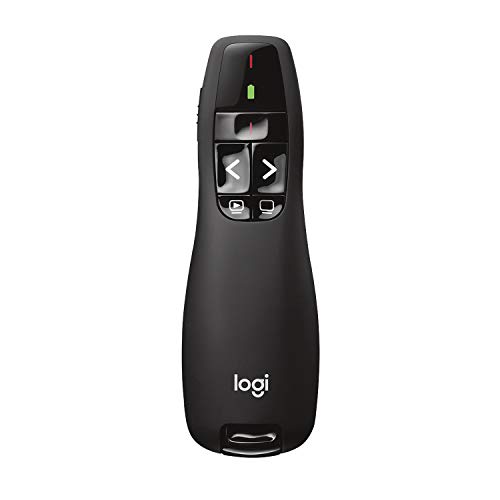
The R400 is the remote many meeting rooms already rely on, and its appeal is simple: plug the USB-A receiver into the laptop and the slideshow buttons work. The listing gives a maker range of 50 feet, which covers most boardrooms and classrooms, and the red laser dot shows up well on projector screens and flip charts. Buttons are laid out for slideshow control, so forward, back, and screen blanking can be found by touch while you face the audience. It runs on AAA batteries, and a battery indicator warns you before a session rather than during one. There is no Bluetooth and no cursor control, so it suits presenters who always work from a laptop and want zero setup on an unfamiliar machine.
Specs:
– Brand: Logitech
– Model: R400 (model number 910-001354)
– Connection: 2.4 GHz wireless with USB-A receiver
– Pointer: red laser pointer, Class 2
– Maker range: up to 50 feet
– Power: AAA batteries, with battery indicator
Logitech R500s Laser Presentation Remote

The R500s adds a second way to connect. Alongside the USB receiver, it pairs over Bluetooth Low Energy, which is the option that matters for tablets and phones that lack a free USB port or run locked-down system software. The maker range is 65 feet, the laser is a Class 1 red pointer, and the three-button layout keeps slide control simple. A single AAA battery carries a maker battery life figure of up to 12 months, and the Logi Options+ app adds button customization and battery monitoring for people who present every week. Choose it when you switch between your own laptop and a tablet, or when the meeting room computer changes from one session to the next.
Specs:
– Brand: Logitech
– Model: R500s (model number 910-005843)
– Connection: USB receiver or Bluetooth Low Energy
– Pointer: red laser pointer, Class 1
– Maker range: up to 65 feet (20 meters)
– Power: 1 AAA battery, maker battery life up to 12 months
– App: Logi Options+ for button customization
Kensington Presenter Expert with Red Laser and Cursor Control

The Presenter Expert is built for speakers who need the cursor, not only the next slide. A small joystick on the remote moves the pointer, so you can open a link, press play on a video, or select an item in a document without walking back to the laptop. It still carries a red laser for quick pointing on a projection screen. The 2.4 GHz receiver is uniquely paired to the remote and stores inside the body, which lowers the chance of leaving it behind in a shared room. The listing gives a maximum range of 50 meters, the longest maker figure in this group, and describes the laser as a Class II product with 1 mW output.
Specs:
– Brand: Kensington
– Model: Presenter Expert K72425AM
– Connection: 2.4 GHz wireless, receiver stores inside the remote
– Pointer: red laser pointer, Class II, 1 mW output
– Extra control: joystick cursor control
– Maker range: maximum listed as 50 meters
Logitech Spotlight Presentation Remote

The Spotlight takes a different route: there is no laser beam at all. Instead, companion software draws a highlight circle or a magnified view directly on the screen, following the remote as you point. Because the pointer is part of the picture, it shows on projectors, TVs, and monitors alike, and it remains visible to people watching a shared screen in a hybrid meeting, where a physical laser dot would never appear. It connects by USB receiver or Bluetooth, carries a maker range of 100 feet, and recharges quickly over USB-C rather than using disposable cells. A timer in the app helps you keep a talk on schedule. It needs that software for its main features, so it fits presenters who use their own laptop.
Specs:
– Brand: Logitech
– Model: Spotlight (model number 910-005749)
– Connection: USB receiver or Bluetooth Low Energy
– Pointer: digital highlighting and magnify modes, no laser beam
– Maker range: up to 100 feet (30 meters)
– Power: rechargeable, quick charging over USB-C
Adesso iMouse P30 Air Mouse GO Plus

The iMouse P30 is two devices in one housing. On the desk it works as a normal wireless mouse; flip a switch and it becomes an air mouse presenter, moving the cursor with hand gestures while you stand. That makes it handy for media-heavy lessons and meetings, where you might open files, scroll a page, and advance slides in the same session. The maker range is up to 100 feet over its USB wireless connection, and the included charging stand gives the remote a fixed home on the desk between sessions, so it stays charged and easy to find. Pick it when one device for both desk work and presenting sounds better than carrying a separate clicker.
Specs:
– Brand: Adesso
– Model: iMouse P30
– Modes: desktop mouse and air mouse presenter, switchable
– Connection: USB wireless receiver
– Maker range: up to 100 feet
– Charging: charging stand included
Who should skip
Skip this category if you present only from a phone and the listings you are considering name no support for it. Skip laser models if your school or venue bans laser pointers and you do not want an app-based pointer instead. Skip app-driven models such as the Spotlight if you mostly present from shared computers where you cannot add software; a receiver-only clicker like the R400 fits that life better. And if you present twice a year in a small room, the simplest clicker here already covers the job, and the extra features will sit unused.
FAQ
Does a laser pointer show up for people watching online?
No. A physical laser dot exists only in the room, so it never appears in a shared screen or a recording. If part of your audience joins online, pick a model that draws its pointer on screen, such as the Spotlight, or use an air mouse cursor that everyone can see.
How much range do I really need?
Measure the longest distance between the computer and where you plan to stand, then choose a maker figure well above it. Maker figures come from open space, and walls, furniture, and people shorten the link, so headroom matters more than the biggest number on the box.
Are laser pointers safe to use in a classroom?
Used with care, they are a normal classroom tool. Never aim the beam at eyes, faces, or people, keep it on the screen, and follow your school rules and the maker’s guidance. Where a school restricts lasers, the Spotlight or the iMouse P30 give you pointing without a beam.
Do I need to install anything before presenting?
For basic slide control with a USB receiver, no: plug in the receiver and the buttons work. Bluetooth pairing happens in system settings. The extra features are the part that needs software, such as button customization on the R500s and the highlighting system on the Spotlight.
Final verdict
Match the remote to the room. The R400 is the dependable plug-in choice for laptop-based presenting. The R500s is the flexible pick when Bluetooth pairing with tablets and phones matters. The Presenter Expert earns its place when you open links and media mid-talk and want cursor control from the floor. The Spotlight is the strongest choice for hybrid meetings and screen-based rooms, where its drawn pointer reaches every viewer. The iMouse P30 suits people who want one device that works as a desk mouse all day and as a presenter when the meeting begins.






