Key takeaways
- Five trackball mice for desks compared on listed facts: ball size, thumb or finger control, wired and wireless links, DPI, buttons, and battery figures.
A trackball mouse stays in one spot on the desk while your fingers or thumb roll a ball to move the cursor. That makes it a natural fit for small desks, keyboard trays, and crowded work corners where a regular mouse runs out of room to travel. The body never slides around, so the footprint you measure on day one is the footprint it keeps.
The five models below split into two families. Thumb-operated designs from Logitech put the ball under your thumb and keep a familiar mouse shape, while finger-operated models from Kensington and ELECOM center a larger ball under your fingertips. Some connect by cable, some by USB receiver, and some by Bluetooth.
As an Amazon Associate, we earn from qualifying purchases.
Quick answer
For most small desks, the Logitech ERGO M575 is the easy pick: a compact thumb ball, two wireless connection options, and a maker battery figure measured in months. If you prefer finger control, the Kensington Expert Mouse Wireless brings a large 55mm ball and a scroll ring, while the wired ELECOM HUGE adds eight buttons, switchable DPI, and an attached palm rest for a fixed desk.
How to choose
Decide on thumb or finger control first. A thumb ball keeps the shape of a regular mouse and asks your thumb to do the rolling. A finger ball centers a bigger sphere under your index and middle fingers and often suits careful pointer work in photo editors and dense spreadsheets.
Measure your desk space before anything else. Trackballs do not travel, but the larger finger models still occupy a wide patch of desk; the Kensington Expert Mouse Wireless is listed at 8 inches long before its detachable wrist rest goes on.
Match the connection to your setup. A wired model never needs charging. A USB receiver gives a steady wireless link but takes a port. Bluetooth leaves the port free and pairs directly with many laptops, as long as your system software supports it. Every model here lists its own compatibility, so check that list against your machine rather than assuming a fit.
Read DPI and battery numbers as maker figures. A higher listed DPI means the cursor covers more screen per roll, and several models let you switch sensitivity. Battery figures are the maker’s own estimates, so treat them as a rough guide to how often you will swap cells or plug in a cable.
Logitech ERGO M575 Wireless Trackball

The ERGO M575 is the compact thumb ball most people picture when they switch from a regular mouse. The sculpted body sits still under your palm while your thumb rolls the ball on the left side, suiting right-handed users who want a small footprint next to the keyboard. Logitech lists two ways to connect: Bluetooth Low Energy or the included USB receiver.
The listing gives a nominal tracking value of 400 dpi, adjustable up to 2,000 dpi, which covers everyday document work and multi-monitor pointing. Five buttons handle the usual clicks and back and forward navigation. Power comes from a single AA battery, included in the box, and Logitech lists up to 24 months of use with the receiver or up to 20 months over Bluetooth, as maker figures.
Specs:
– Control: thumb-operated trackball, right hand
– Connection: Bluetooth Low Energy or USB receiver
– Battery: 1 AA, included; maker figure up to 24 months via receiver and up to 20 months via Bluetooth
– Tracking: nominal 400 dpi, adjustable up to 2,000 dpi, as listed
– Buttons: 5
– Compatibility: Windows and macOS system software, as listed
Kensington Orbit Trackball with Scroll Ring

The Orbit with Scroll Ring is a wired, finger-operated model with an ambidextrous body, so either hand can drive it and shared desks are easy. Its 40mm ball sits in the center, worked by your fingertips, and a ring around the ball handles scrolling: turn the ring and pages move without your fingers leaving the ball area. Kensington lists optical tracking and two buttons, customizable through the maker’s KensingtonWorks system software on supported systems.
Because it is wired over USB, there are no batteries to track and no pairing steps. The listed size is 4.5 by 5.5 by 2 inches, a modest footprint for a finger ball, and a detachable wrist rest is included. The two-button layout is simpler than the other models here, so heavy shortcut users may look further down this list, but for documents and browsing the Orbit covers the basics well.
Specs:
– Model: K72337US
– Control: finger-operated trackball, ambidextrous
– Ball: 40mm
– Connection: wired USB
– Buttons: 2
– Extras: detachable wrist rest included
– Size: 4.5 x 5.5 x 2 inches, as listed
– Compatibility: Windows and macOS system software, as listed
Logitech MX Ergo Wireless Trackball
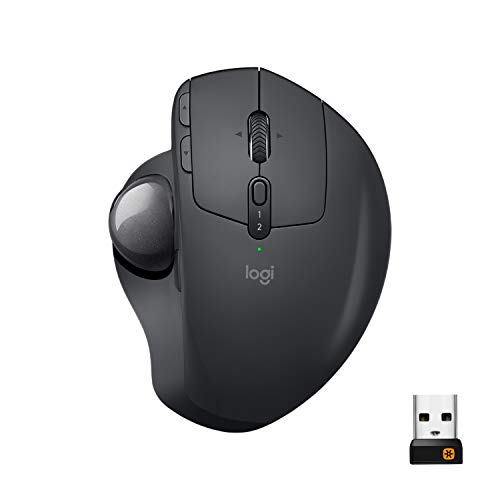
The MX Ergo is Logitech’s more advanced thumb ball, built around an adjustable hinge that tilts the whole body from 0 to 20 degrees, so you can pick the angle that feels natural for your hand position. The listing gives a nominal tracking value of 380 dpi with a range of 320 to 440 dpi, plus a precision mode that slows the cursor for fine work. Eight buttons include a tilt-and-click scroll wheel, in a larger body than the M575.
Connectivity is flexible: Bluetooth or the included Unifying USB receiver, and the listing states it can connect to two computers and move content between them with Logitech Flow on supported system software. The rechargeable Li-Po battery is listed at up to four months on a full charge as a maker figure, and it charges over USB. Wireless range is listed at about 10 meters. Choose it if you work across two machines or want the tilt adjustment; measure first, since it asks for more desk room than the M575.
Specs:
– Control: thumb-operated trackball with adjustable hinge, 0 to 20 degrees
– Tracking: nominal 380 dpi, range 320 to 440 dpi, as listed
– Buttons: 8
– Connection: Bluetooth or Unifying USB receiver; connects to two computers, Logitech Flow as listed
– Battery: rechargeable Li-Po; maker figure up to 4 months on a full charge
– Wireless range: about 10 meters, as listed
– Compatibility: Windows and macOS system software, as listed
Kensington Expert Mouse Wireless Trackball

The Expert Mouse Wireless is the classic large-ball design: a 55mm ball centered in an ambidextrous body, ringed by a scroll ring and four buttons. Your fingertips roll the ball while the scroll ring handles long pages, and Kensington lists DiamondEye optical tracking for the sensor. A detachable wrist rest clips on for support, and the symmetrical shape works in either hand.
It connects two ways, through Bluetooth 4.0 LE or the included 2.4GHz USB nano receiver, and runs on two AA batteries. The listing covers Windows, macOS, and Chrome OS system software, and button customization runs through the maker’s TrackballWorks or KensingtonWorks system software on supported systems. At a listed 3.5 by 6.1 by 8 inches, it is the biggest wireless model here. Pick it if you want the largest ball in this guide; tight desks should measure carefully or look at the Orbit above.
Specs:
– Model: K72359WW
– Control: finger-operated trackball, ambidextrous
– Ball: 55mm
– Tracking: DiamondEye optical, as listed
– Buttons: 4
– Connection: Bluetooth 4.0 LE or 2.4GHz USB nano receiver
– Battery: 2 AA
– Extras: detachable wrist rest included
– Size: 3.5 x 6.1 x 8 inches, as listed
– Compatibility: Windows, macOS, and Chrome OS system software, as listed
ELECOM HUGE Trackball Mouse

The ELECOM HUGE lives up to its name: a broad, right-handed body with an attached palm rest and a 52mm red ball worked by your index and middle fingers. Eight buttons surround the ball, including forward and back buttons and a scroll wheel with tilt input, so shortcut-heavy work keeps common actions under your fingers.
It is a wired USB model, so it suits a permanent desk and never needs batteries or charging. The optical sensor offers switchable DPI settings of 500, 1,000, and 1,500 as listed, letting you slow the cursor for detail work or speed it up for wide screens from a button on the body. The listing states support for Windows 11 and macOS system software. The HUGE asks for the most desk space in this guide, and its right-hand shape rules it out for left-handed use. In return it gives the fullest button set here and a large ball that is easy to nudge in small steps.
Specs:
– Model: M-HT1URBK
– Control: finger-operated trackball, right hand
– Ball: 52mm
– Buttons: 8
– Connection: wired USB
– Tracking: optical; DPI switchable among 500, 1,000, and 1,500, as listed
– Extras: attached palm rest
– Compatibility: Windows 11 and macOS system software, as listed
Who should skip
Skip trackballs altogether if your work depends on fast, sweeping pointer movements across several screens and you already have room for a large mouse pad; a trackball trades that sweep for a fixed footprint. Skip the Kensington Expert Mouse Wireless and the ELECOM HUGE if your desk patch is truly tiny, since both are listed at sizes that crowd a narrow tray. Left-handed users should skip the right-hand-only Logitech models and the ELECOM HUGE and look at the ambidextrous Kensington designs instead.
FAQ
Should I choose a thumb ball or a finger ball?
Thumb balls keep a familiar mouse shape and suit people who want a compact body and an easy switch from a regular mouse. Finger balls center a larger ball under your fingertips and spread the rolling work across two or three fingers. Compare the listed dimensions against your desk before you decide.
How do I clean a trackball?
Follow the maker’s guidance for your model. On most designs the ball lifts or pops out of its cup; wipe the ball with a soft, dry or slightly damp cloth and clear dust from the small support points and the sensor window with a dry cloth or a gentle puff of air. Let everything dry fully before you put the ball back, and never use harsh cleaners on the ball surface.
Will these trackballs work with my computer?
Each listing names the system software it supports, such as Windows, macOS, or Chrome OS in specific versions, and the connection it uses. Bluetooth models need a Bluetooth-ready machine, and receiver models need a free USB port. If your system is not named in the listing, treat that model as unconfirmed for your setup.
Is wired or wireless better for a small desk?
Both keep the same fixed footprint, so the choice is about upkeep and ports. Wired models like the Orbit and the HUGE never need batteries and suit a desk that stays put, at the expense of one cable to route. Wireless models clear the cable away; receiver models take a USB port, while Bluetooth models leave it free.
Final verdict
For a small desk, the Logitech ERGO M575 is the balanced pick: compact, wireless two ways, and listed with a long maker battery figure. The Kensington Orbit with Scroll Ring is the simple wired option for finger control in either hand, and the Logitech MX Ergo adds a tilt hinge, two-computer support, and a rechargeable battery. If you have room for a large ball, the Kensington Expert Mouse Wireless brings a 55mm ball and scroll ring in an ambidextrous body, while the wired ELECOM HUGE answers with eight buttons, switchable DPI, and a built-in palm rest.