Key takeaways
- Five wireless presenter remotes compared for meetings and slide decks, covering listed range, laser color, connection type and system software support.
A wireless presenter remote frees you from the laptop during a meeting, letting you advance a slide deck while you walk the room. The five remotes below cover the main shapes of the category: simple USB receiver clickers with a red laser, a dual connection model that also pairs over Bluetooth, a green laser model with a built in timer display, a digital highlighting remote for screen based sessions, and a remote with hyperlink and volume keys.
Every figure in this guide comes from the maker listing for that remote. Range numbers are maker figures, not promises for your venue. Compatibility notes follow each listing exactly.
As an Amazon Associate, we earn from qualifying purchases.
Quick answer
For most meeting rooms, the Logitech R500s covers the widest ground, with Bluetooth or USB receiver connection, a listed 20 meter range, and support for Windows, macOS, iOS, Android, Chrome OS and Linux system software. The R400 is the simple plug and play pick for Windows rooms, the R800 adds a green laser and timer display, and the Spotlight suits screen based sessions.
How to choose
Begin with the connection type. Most remotes here use a small USB receiver on the 2.4 GHz band: plug it into the presentation computer and the remote works with no pairing steps, which suits shared meeting rooms. A remote that also offers Bluetooth, like the R500s and the Spotlight, helps when the computer has no free USB port or when you present from a tablet.
Next, match the listed range to your room: a boardroom sits well inside shorter figures such as 50 feet, while a lecture hall points you toward the longer ones. Walls and furniture shorten real working distance, so present well inside the stated range.
Then pick a pointer style. A red laser is the common choice for projected slides. A green laser, as on the R800, is listed as easier to see on LCD and plasma screens and in bright rooms. A digital pointer, as on the Spotlight, draws the highlight on the screen itself, which suits video calls and large displays. Whichever style you choose, follow one firm rule: never aim a laser pointer at anyone’s eyes or face, and keep it pointed at the screen only.
Check system software support if your room mixes computers: some remotes are listed for Windows only, while others list macOS, iOS, Android, Chrome OS or Linux as well. Also weigh extra controls you will use, such as a timer display, volume keys or hyperlink keys. Finally, note the power source: AAA cells are easy to feed from spares, while a rechargeable remote needs its cable in your bag.
Logitech Wireless Presenter R400
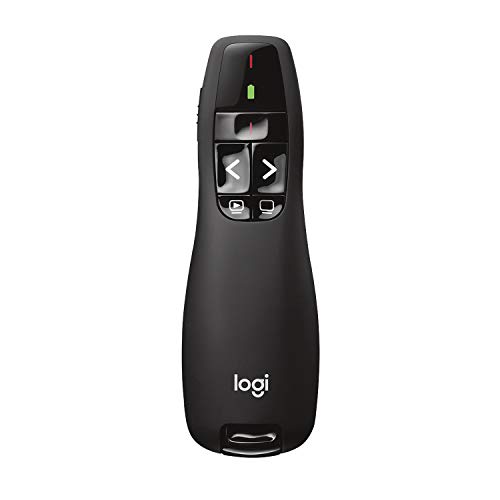
The R400 is the long running simple option in this category. It connects through a USB receiver on the 2.4 GHz band with plug and play setup, so there is no pairing routine on a borrowed room computer. The listing gives a maximum range of 50 feet, a maker figure that fits boardrooms and classrooms. Slide controls cover forward and back movement, a black screen key and a slideshow key, and the receiver tucks into the remote body when you pack up.
The pointer is a red laser, the common choice for projected slides. Power comes from two AAA batteries, with a battery indicator listed so you can check the level before a session. The main limit is platform reach: the listing names Windows system software, so Mac based rooms should look at the R500s or the Spotlight instead.
Specs
- Brand: Logitech
- Model number: 910-001354
- Connection: 2.4 GHz via USB receiver, plug and play
- Stated range: up to 50 feet (15 meters), maker figure
- Pointer: red laser
- Power: 2 AAA batteries, battery indicator listed
- Listed system software: Windows Vista, 7, 8, 10 or later
Logitech R500s Laser Presentation Remote
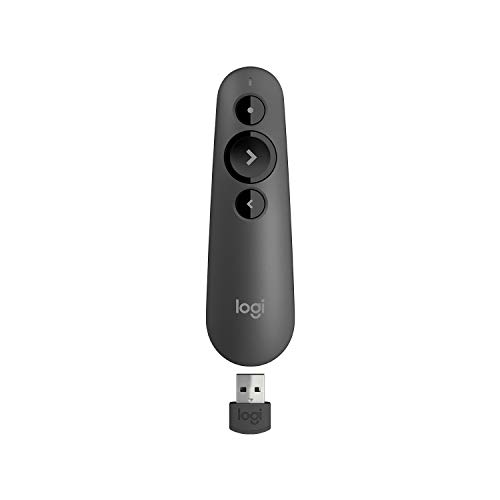
The R500s is built for rooms where the presentation computer changes often. It offers two connection paths: Bluetooth Low Energy or the included USB receiver, so it can pair with a laptop that has no free port, and fall back to the receiver on a shared desktop. The listing states a range of up to 20 meters (65 feet), a maker figure aimed at medium and large meeting rooms. A three button layout keeps slide movement simple to find by touch.
The pointer is a Class 1 red laser, and one AAA battery powers the remote for up to 12 months of use, as listed. The listing names a wide spread of system software: Windows, macOS, iOS, Android, Chrome OS and Linux, along with presentation apps including PowerPoint, Keynote, PDF readers, Google Slides and Prezi. If you present from more than one kind of computer, this is the most flexible remote in the group.
Specs
- Brand: Logitech
- Model number: 910-006518
- Connection: Bluetooth Low Energy or USB receiver
- Stated range: up to 20 meters (65 feet), maker figure
- Pointer: Class 1 red laser
- Power: 1 AAA battery, up to 12 months as listed
- Listed system software: Windows, macOS, iOS, Android, Chrome OS and Linux
- Listed apps: PowerPoint, Keynote, PDF, Google Slides and Prezi
Logitech Professional Presenter R800

The R800 is the pick for longer rooms and timed talks. Its listing gives a maximum range of 100 feet, the longest figure among the laser models here, and the pointer is a green laser. The listing describes the green light as easy to see even on plasma and LCD screens and in bright rooms. Connection is through a USB receiver on the 2.4 GHz band, and the receiver docks inside the remote for travel.
What sets the R800 apart is the LCD display: it shows the timer and battery level, and the remote gives silent vibration alerts as time runs down, so you can pace a talk without glancing at a clock. The trade off is platform reach: Windows system software only, as listed.
Specs
- Brand: Logitech
- Model number: 910-001350
- Connection: 2.4 GHz via USB receiver
- Stated range: up to 100 feet (30 meters), maker figure
- Pointer: green laser, Class 2
- Display: LCD with timer and battery level, vibration alerts listed
- Listed system software: Windows 10, 11 or later
Logitech Spotlight Presentation Remote

The Spotlight takes a different approach to pointing. Instead of a laser dot, it highlights and magnifies areas of the screen itself, keeping the pointer visible on large displays and in streamed sessions where a laser dot would not appear. The listing gives a range of 30 meters and names Bluetooth among its connection options, along with a USB receiver.
Power is rechargeable with quick charging, as listed, so there are no cells to swap before a big meeting, though you do need a charging cable handy. Because the highlight is drawn by the computer, the Spotlight leans on the presentation computer more than a plain laser clicker does. For screen based decks, it is the natural fit in this group.
Specs
- Brand: Logitech
- Model number: 910-005749
- Connection: Bluetooth or USB receiver
- Stated range: 30 meters, as listed
- Pointer: digital highlighting and magnification on screen
- Power: rechargeable, quick charging as listed
DinoFire Wireless Presenter with Hyperlink and Volume Control
The DinoFire remote adds media and navigation keys that the simpler clickers leave out. Along with slide advance, the listing names hyperlink control and volume control, which help when a deck jumps between slides, web pages and embedded video. It connects over RF 2.4 GHz through a USB receiver with plug and play setup, and the description states a range of up to 100 feet, a maker figure.
The listing names the compatible device as a laptop, so check that wording against your own setup before choosing it for a desktop or tablet based room. With no Bluetooth option, it suits presenters who want extra physical keys and a long stated range in one receiver based package.
Specs
- Brand: DinoFire
- Model number: rcrf-011 (D05)
- Connection: RF 2.4 GHz via USB receiver, plug and play
- Stated range: up to 100 feet, as listed
- Functions: slide advance, hyperlink and volume control
- Listed compatible device: laptop
Who should skip
Skip this whole category if your meetings run from a single laptop at a desk, where the keyboard already covers slide movement. Skip the Windows only models, the R400 and the R800, if your room is Mac based; the R500s and the Spotlight list wider system software support. Skip laser models if you present mainly over video calls, where a laser dot never reaches the audience. And skip any remote whose listed range barely covers your room, since maker figures assume clear conditions.
FAQ
How far from the computer can I present?
Each listing states its own figure: 50 feet for the R400, 20 meters for the R500s, 100 feet for the R800, 30 meters for the Spotlight and 100 feet for the DinoFire. These are maker figures, measured under the maker’s conditions. Furniture, walls and other wireless equipment can shorten the working distance, so treat the stated figure as a ceiling and present well inside it.
Do these remotes work with both Windows and Mac computers?
It depends on the model. The R500s listing names Windows, macOS, iOS, Android, Chrome OS and Linux system software. The R400 and R800 listings name Windows only. Check the system software line in the Specs of the model you are considering against your room’s computer before you buy.
Is a laser pointer safe to use in a meeting?
Used with care, yes, but the rule is firm: never aim a laser pointer at anyone’s eyes or face. Keep the beam on the screen, switch the laser off when you are not pointing, and store the remote where children cannot reach it. If your venue bans laser pointers, choose the Spotlight, which highlights on screen with no laser.
Which remote is best for presenting over video calls?
The Spotlight suits video calls best in this group, because its highlight and magnification appear on the shared screen itself. A laser dot from the other remotes shows only in the physical room and does not appear for remote viewers. The R500s is the next most flexible option for mixed setups, thanks to its Bluetooth connection and wide system software list.
Final verdict
Match the remote to the room. The R500s is the safest all round choice here, with dual connection, a 20 meter stated range and the widest system software list. The R400 keeps things simple for Windows rooms, the R800 serves timed talks in larger spaces, the Spotlight fits screen based and streamed sessions, and the DinoFire adds hyperlink and volume keys. Check the listed range and system software for your room before you choose.