
Key takeaways
- Five USB hubs compared for desk and laptop setups, covering USB-C hubs with power delivery and HDMI plus powered USB-A hubs for busy workspaces.
A slim laptop rarely ships with enough ports for a full desk. Once a monitor, keyboard, mouse, external drive, webcam, and card reader all need a home, the two or three sockets on the machine run out fast. A USB hub solves that by turning one port into many, and the right pick depends on how the desk is used each day.
This guide compares five hubs sold on Amazon, from compact USB-C models that travel between home and office to a powered desktop hub built to stay plugged in. Each pick is described only with what its listing states, so port counts, speeds, and charging figures can be matched against the gear already on the desk.
As an Amazon Associate, we earn from qualifying purchases.
Quick answer
For most USB-C laptops, the Anker 555 USB-C Hub (8-in-1) covers the widest ground with 10Gbps data ports, 4K HDMI, Ethernet, card readers, and up to 85W pass-through charging. Anyone with a fixed desk full of USB-A gear should look at the powered TP-Link UH720 instead, while the SABRENT HB-UM43 suits simple port expansion.
How to choose
Begin with the port on the laptop. USB-C hubs need a USB-C socket on the host machine, and two features depend on what that socket supports. Video output over HDMI needs the port to carry a display signal, and pass-through charging needs the port to accept Power Delivery. As Anker notes for its hubs, a laptop port without Power Delivery still passes data and video but will not charge through the hub. Check the laptop maker’s page before ordering.
Next, count the gear that stays connected all week. A keyboard, mouse, and one drive fit easily on a four or five port hub. A desk with two drives, a webcam, a headset dongle, and a card reader fills seven or more ports quickly.
Data speed matters most for drives. Ports listed at 10Gbps move files between SSDs in less time than 5Gbps ports, while keyboards, mice, and webcams work fine on either. Match the hub’s listed speed to the quickest drive in the setup rather than paying for headroom nothing can use.
Power comes in two forms. Pass-through USB-C hubs take power from a laptop charger and hand most of it to the laptop, keeping one wall outlet free. Powered USB-A hubs use their own wall adapter, which suits bus-powered drives that can misbehave when several share one laptop port. Finally, decide whether Ethernet and card readers earn their place: daily tools for some desks, dead weight for others.
Anker 555 USB-C Hub (8-in-1)

The Anker 555 is the fullest featured hub in this group, built for a laptop that becomes a workstation at one desk. Its listing counts eight ports: a USB-C data port and two USB-A data ports, each listed at up to 10Gbps, an HDMI port, an Ethernet port, and SD plus microSD card readers. That mix covers a monitor, wired networking, camera cards, and fast drives through one cable to the laptop.
The Power Delivery input accepts up to 100W, the hub keeps 15W for its own operation, and up to 85W passes through to the laptop. A 100W charger is needed for the full figure, and none is included. HDMI output reaches 4K at 60Hz with a DP 1.4 laptop, or 4K at 30Hz with a DP 1.2 laptop, per the listing.
Specs:
– Model: A8383
– Total ports: 8
– USB-C data port: 1, up to 10Gbps
– USB-A data ports: 2, up to 10Gbps
– HDMI: up to 4K at 60Hz (DP 1.4 hosts)
– Ethernet: yes
– Card readers: SD and microSD
– Power Delivery input: up to 100W in, up to 85W pass-through to the laptop
– Charger: not included
UGREEN Revodok 107 7-in-1 USB-C Hub
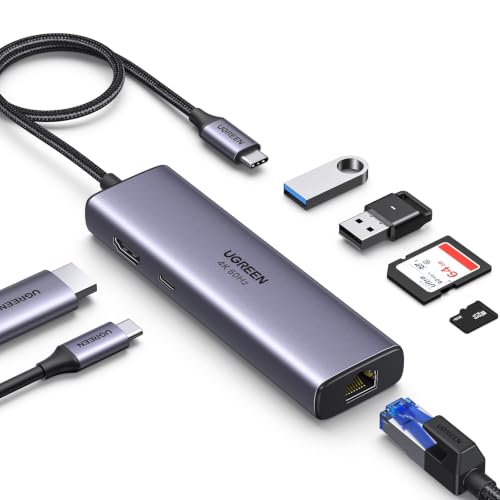
The UGREEN Revodok 107 packs seven ports into a compact body with a short built-in cable, which suits a laptop that moves between rooms or buildings. The listing names a 4K at 60Hz HDMI port, a Gigabit Ethernet port, two USB-A 3.0 ports, SD and TF card readers, and a USB-C Power Delivery port. The Ethernet socket is the draw here, since many thin laptops no longer include one.
UGREEN lists Ethernet speeds up to 1000Mbps and USB-A data at up to 5Gbps. The Power Delivery port accepts up to 100W from a charger and passes up to 85W through to the laptop, with 15W held back for the hub itself. That USB-C port is for charging input only and carries no data or video, a limit the listing states plainly.
Specs:
– Model: CM512 (60515)
– Total ports: 7
– HDMI: 4K at 60Hz
– Ethernet: Gigabit, up to 1000Mbps
– USB-A ports: 2, USB 3.0, up to 5Gbps
– Card readers: SD and TF (microSD)
– Power Delivery input: up to 100W in, up to 85W pass-through to the laptop
– Built-in cable: 20cm
Anker 332 USB-C Hub (5-in-1)

The Anker 332 keeps things lean for a laptop bag or a tidy desk with modest needs. Five ports are listed: an HDMI port, a USB-C data port, two USB-A data ports, and a USB-C Power Delivery input. Data ports run at up to 5Gbps, which handles drives, keyboards, mice, and webcams without fuss, and the HDMI port drives an external display at up to 4K at 30Hz.
Pass-through charging works the same way as on the larger Anker above. The PD-IN port accepts up to 100W and up to 85W reaches the laptop, so one charger can feed both the hub and the machine. Anker states that the PD-IN port supports charging only and does not move data, so headphones, speakers, and drives belong on the other ports. With no Ethernet or card reader on board, this pick suits a desk that needs a monitor and a few peripherals.
Specs:
– Model: A8355
– Total ports: 5
– HDMI: up to 4K at 30Hz
– USB-C data port: 1, up to 5Gbps
– USB-A data ports: 2, up to 5Gbps
– Power Delivery input: up to 100W in, up to 85W pass-through to the laptop
– Ethernet: no
– Card readers: none
TP-Link UH720 Powered USB Hub

The UH720 is a powered USB-A hub that lives on the desk full time, fed by its own 12V/4A power adapter, which is included. TP-Link lists seven USB 3.0 data ports at up to 5Gbps and two further smart charging ports that output 5V/2.4A for phones and tablets. Those charging ports move no data, which keeps charging gear apart from drives and dongles.
A power on and off button sits on the hub, handy for a shared desk that gets shut down at night. The listing names compatibility with Windows, Mac, Chrome, and Linux systems, so the same hub can serve a mixed household or office. Because it connects over USB-A, it suits desktops and older laptops directly, while USB-C-only laptops would need an adapter that is not part of this listing.
Specs:
– Model: UH720
– USB 3.0 data ports: 7, up to 5Gbps
– Smart charging ports: 2, 5V/2.4A, charging only
– Power adapter: 12V/4A, included
– Power button: yes
– Host connection: USB-A
– Listed system support: Windows, Mac, Chrome, Linux
SABRENT 4-Port USB 3.0 Hub (HB-UM43)

The SABRENT HB-UM43 is the simplest hub here: four USB 3.0 ports on a slim body with a 2 ft cable, made for a desk that needs a few more sockets. Each port carries its own LED power switch, so a printer, drive, or dongle can be switched off without unplugging anything. That helps on a crowded desk where cables are hard to trace.
The listing gives data speeds up to 5Gbps and notes backward compatibility with USB 2.0 and 1.1 gear, so older peripherals still work. The hub draws power from the host port with no wall adapter, and SABRENT’s documentation for the model states it is built for data transfer rather than charging phones or tablets. Pick it for keyboards, mice, flash drives, and one external drive, and look at the powered TP-Link above when several drives must run at once.
Specs:
– Model: HB-UM43
– USB 3.0 ports: 4, up to 5Gbps
– Per-port power switches: yes, with LED indicators
– Cable length: 2 ft
– Power source: bus powered, no adapter included
– Charging: data hub, not made for device charging
– Compatibility: USB 3.0 with backward support for USB 2.0 and 1.1
Who should skip
Anyone whose laptop lacks a USB-C port with display and charging support will not get video or pass-through charging from the three USB-C hubs, so check the machine first. Desks that need two external monitors should skip every hub here, since each lists a single HDMI output. Gamers chasing drive speeds beyond 10Gbps, and users who must charge a laptop above 85W through the hub, also need a full docking station rather than a compact hub.
FAQ
Will these hubs work with any laptop?
No hub works with every laptop. The USB-C models need a USB-C port on the host, and their HDMI and charging features depend on that port carrying a display signal and accepting Power Delivery, as the listings describe. The TP-Link and SABRENT hubs connect over USB-A. Match the hub to the ports and abilities the laptop maker lists.
What does pass-through charging mean on the Anker and UGREEN hubs?
A charger plugs into the hub’s Power Delivery input, the hub keeps a small share for its own operation, and the rest flows to the laptop. On the Anker 555 and the UGREEN Revodok 107, up to 100W can go in and up to 85W reaches the laptop. A 100W charger is needed for the full figure, and chargers are not included with these hubs.
Can a hub charge phones and tablets from its data ports?
It depends on the hub. The TP-Link UH720 adds two smart charging ports at 5V/2.4A made for that job, apart from its seven data ports. The SABRENT HB-UM43 is a data hub and its documentation says it is not made for charging phones or tablets. On the Anker hubs, the USB-C PD-IN port is for charging the laptop only.
Is a powered hub better than a bus-powered one for external drives?
A powered hub such as the TP-Link UH720 feeds its ports from a wall adapter, which helps when several bus-powered drives run at once. A bus-powered hub such as the SABRENT HB-UM43 draws everything from the laptop port, fine for a keyboard, mouse, and one drive. Match the power source each listing states to the drives on the desk.
Final verdict
The Anker 555 USB-C Hub (8-in-1) is the strongest all-round pick for a USB-C laptop that anchors a desk, thanks to 10Gbps ports, Ethernet, card readers, and up to 85W of pass-through charging. The UGREEN Revodok 107 covers similar ground in a smaller body. For a light setup, the Anker 332 keeps a monitor and a few peripherals running. Fixed desks full of USB-A gear are better served by the powered TP-Link UH720, and the SABRENT HB-UM43 answers neatly when four switched ports are all that is missing.






