Key takeaways
- Five wireless keyboards that clear the cables from a desk: a backlit full-size board, two multi-device picks, a mechanical TKL and a split model.
A desk keyboard cable dictates where the board sits and snags on mugs and notebooks. A wireless keyboard removes that fixed tether, so the board can slide aside for paperwork or travel to the sofa for typing on a tablet.
The five boards below cover the main shapes a cable free desk can take: a full-size backlit board, one with a cradle for a phone or tablet, a compact board, a mechanical tenkeyless board, and a wide split board. Every battery and range figure quoted is the maker’s own figure, stated as listed, and compatibility is described exactly as each listing states it.
As an Amazon Associate, we earn from qualifying purchases.
Quick answer
For a cable free desk, the Logitech MX Keys S leads with a full-size backlit layout, three-device pairing and USB-C charging. The K780 adds a number pad and a phone cradle, the K380 shrinks the footprint, the Keychron K8 brings mechanical switches, and the Ergo K860 splits the layout around a pillowed rest.
How to choose
Begin with size. A full-size board keeps a number pad, but pushes the mouse farther to the side. A tenkeyless board drops the number pad and keeps the arrow keys and function row, while a compact board squeezes the layout down so a mouse can sit close. Measure your desk and tray first, because the widest board here needs real room.
Next, look at how the board connects. Bluetooth pairing needs no port at all, which suits laptops with few sockets. A USB receiver gives a dedicated link, but claims one USB port full time. Several boards here offer both routes, and several pair with up to three devices and switch with a marked key. Pick the route your machines support.
Power comes in two forms. Rechargeable boards charge over USB-C and need a cable only while they charge. Boards on AAA cells avoid charging, and makers quote long spans between swaps. Those spans, and the range figures, are maker figures based on the makers’ own usage assumptions, so treat them as listed claims rather than promises.
Finally, match the board to your system software. Each listing names the systems it supports, and those lists differ: a board listed for Windows and Mac may not list Chrome OS or Linux, and phone or tablet support is named only on some listings.
Logitech MX Keys S Wireless Keyboard

The MX Keys S is the full-size option for a main desk. Its listing describes a low profile board with spherically dished keys, backlighting and programmable keys, in a Pale Grey finish for this listing. It connects over Bluetooth Low Energy or through the included Logi Bolt USB receiver, pairs with up to three devices, and lists compatibility with Windows PC, Linux, Chrome and Mac. Power comes from a rechargeable 1500 mAh lithium polymer battery, charged over USB-C. Logitech’s figures, as listed, are up to 10 days on a full charge, or up to 5 months with the backlighting turned off; both are maker figures, and your span depends on how much the backlight runs. It also supports Smart Actions through Logi Options+ system software, as listed.
Specs:
– Model: 920-011559, Pale Grey
– Layout: Full-size, low profile, backlit keys
– Connection: Bluetooth Low Energy or Logi Bolt USB receiver, included
– Devices: Pairs with up to 3 devices
– Battery: Rechargeable Li-Po 1500 mAh, USB-C; up to 10 days, or 5 months with backlighting off, as listed
– Dimensions: 430.2 x 131.63 x 20.5 mm; Weight: 810 g
– Compatibility as listed: Windows PC, Linux, Chrome, Mac
Logitech K780 Multi-Device Wireless Keyboard
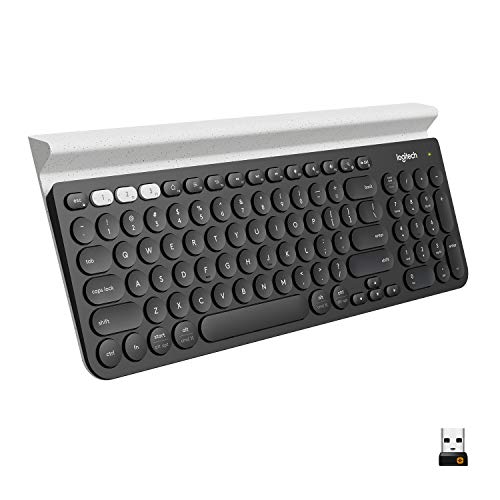
The K780 is a full-size board for a desk where a computer, a phone and a tablet all need typing. Its listing describes a full-size layout with a number pad and an integrated cradle that holds a phone or tablet upright while you type on it. It connects by Bluetooth Smart or through a Logitech Unifying USB receiver, and Easy-Switch buttons move between up to three paired devices. The listing names Windows, macOS, Chrome OS, iOS and Android among the systems it works with, with version notes for the receiver and Bluetooth routes. It runs on two AAA batteries, pre-installed, with a maker figure of up to 24 months, stated as listed. At 14.9 inches wide it is a stay-on-the-desk board, and the cradle needs depth, so check that your desk fits 6.2 inches front to back.
Specs:
– Model: 920-008025, Speckles (White)
– Layout: Full-size with number pad and integrated device cradle
– Connection: Bluetooth Smart or Logitech Unifying USB receiver
– Devices: Up to 3 paired, Easy-Switch buttons
– Battery: 2 AAA, pre-installed; up to 24 months, as listed
– Dimensions: 14.9 x 6.2 x 0.9 inches; Weight: 1.9 lb
– Compatibility as listed: Windows, macOS, Chrome OS, iOS, Android
Logitech K380 Multi-Device Bluetooth Keyboard
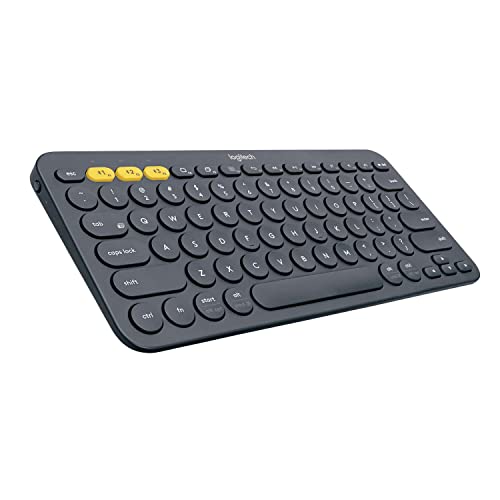
The K380 is the compact pick, with round keys unlike any other board here. The listing describes a small keyboard without a number pad that connects over Bluetooth only, with no receiver in the box, and pairs with up to three devices via Easy-Switch keys. It names compatibility with Windows, Mac, Chrome OS, Android, iPad, iPhone and Apple TV, making it a handy second board for a tablet or TV box as well as a laptop. Logitech’s listed details give a range of up to 10 m, a maker figure, and power from two AAA batteries, pre-installed, with a maker figure of up to 24 months. At 279 x 124 x 16 mm and 423 g, it fits a small desk, a lap tray or a bag with ease. The trade-offs follow from the size: no number pad, smaller keys, and no use at all on a computer without Bluetooth.
Specs:
– Model: 920-007558, Dark Grey
– Layout: Compact, round keys, no number pad
– Connection: Bluetooth Classic 3.0, no receiver
– Devices: Up to 3 paired, Easy-Switch keys
– Battery: 2 AAA, pre-installed; up to 24 months, as listed; Range: up to 10 m, as listed
– Dimensions: 279 x 124 x 16 mm; Weight: 423 g including batteries
– Compatibility as listed: Windows, Mac, Chrome OS, Android, iPad, iPhone, Apple TV
Keychron K8 Wireless Mechanical Keyboard

The K8 is the mechanical entry here, for a desk where switch feel is the point. This listing is the tenkeyless version with 87 keys in an 80 percent layout, an aluminum frame, RGB backlighting and Gateron G Pro Brown switches. It connects over Bluetooth 5.1 and also works wired over USB-C, so the cable can come back when you want it, or while the battery charges as you type. The listing names macOS and Windows as the systems it supports, so buyers on other systems should look elsewhere here. The tenkeyless shape keeps the function row and arrow keys while dropping the number pad, leaving more room for a mouse. Switch choice is fixed by the listing variant: this ASIN is the Gateron G Pro Brown version, and other K8 variants sit under other listings, so check the switch name before ordering.
Specs:
– Model: K8C3
– Layout: Tenkeyless, 87 keys, 80 percent layout
– Switches: Gateron G Pro Brown mechanical, as listed for this variant
– Frame: Aluminum, with RGB backlighting
– Connection: Bluetooth 5.1 or USB-C wired
– Compatibility as listed: macOS and Windows
Logitech Ergo K860 Wireless Ergonomic Keyboard

The K860 is the wide split board. Its listing describes a curved, split keyframe with an integrated number pad and a pillowed wrist rest built from three layers: stain-resistant fabric, high-density foam and memory foam. Adjustable palm lift tilt legs give three positions, listed as 0, -4 and -7 degrees, so the front can sit flat or slope away. It connects over Bluetooth or through a Logitech Unifying USB receiver and pairs with up to three devices with Easy-Switch keys. The listing names compatibility with Windows, macOS, Linux and Chrome OS. Power comes from two AAA batteries, with a maker figure of up to 24 months, stated as listed, and the listed range is 10 m, again a maker figure. Size is the main caution: at 17.95 x 9.17 x 1.89 inches and 2.56 lb, it needs a broad, deep desk.
Specs:
– Model: 920-009166, Black
– Layout: Full-size split curved keyframe, integrated number pad, 105 keys as listed
– Palm lift: Tilt legs at 0, -4 and -7 degrees, as listed
– Connection: Bluetooth or Logitech Unifying USB receiver; up to 3 devices paired
– Battery: 2 AAA; up to 24 months, as listed; Range: 10 m, as listed
– Dimensions: 17.95 x 9.17 x 1.89 inches; Weight: 2.56 lb
– Compatibility as listed: Windows, macOS, Linux, Chrome OS
Who should skip
Skip this whole category if your work depends on a wired-only setup, such as a machine where wireless radios are off by policy; every board here uses Bluetooth or a USB radio receiver. Skip the MX Keys S if you want to avoid charging cables entirely. Skip the K780 if your desk is shallow, since the cradle needs depth, and skip the K380 if you type figures all day or your computer has no Bluetooth. Skip the K8 if your system software is not macOS or Windows. Skip the K860 if your tray is narrow, or if a split layout does not suit your typing.
FAQ
Do these keyboards work with both Windows and Mac computers?
Some do and some do not, and the answer sits in each listing. The K780, K380 and K860 listings name both Windows and Mac, the MX Keys S listing names Windows PC and Mac along with Linux and Chrome, and the Keychron K8 listing names macOS and Windows only.
How long do the batteries really last?
Each listing quotes a maker figure: up to 24 months for the three AAA powered boards, and up to 10 days per charge, or up to 5 months with the backlighting off, for the rechargeable MX Keys S. Those figures rest on the makers’ own usage assumptions, so heavy use will shorten them. Treat them as listed claims, not a guaranteed span.
Is a USB receiver better than Bluetooth?
Neither route is better in general; they suit different desks. A receiver gives a dedicated link and frees you from pairing menus, but holds one USB port the whole time. Bluetooth needs no port and suits laptops with few sockets, but the computer must have Bluetooth, which rules the K380 in or out on that point alone.
Which board leaves the most room for a mouse?
The K380, by a wide margin. At 279 mm wide it is far narrower than the full-size boards, and the tenkeyless K8 is the next step up. The K860 is the widest board here at 17.95 inches, so measure your desk against the listed dimensions first.
Final verdict
For most cable free desks, the MX Keys S is the balanced pick: a full-size backlit layout, two connection routes, three-device pairing and USB-C charging, with compatibility listed across Windows PC, Linux, Chrome and Mac. Choose the K780 if a number pad and a phone cradle match how you work, the K380 if space is tight, the K8 if mechanical switches and a wired fallback matter more than a number pad, and the K860 if you want the split shape and pillowed rest and your desk can fit it. Whichever you pick, confirm your system software against the listing first.