
Key takeaways
- Thermal paste or thermal pads? Compare five real Amazon picks, from ARCTIC MX-4 and Noctua NT-H1 to Gelid and Thermalright pads, each matched to its job.
Every build reaches the same quiet moment: the cooler is ready to go on, and something has to fill the microscopic gaps between the chip and the metal above it. That something is either a thermal paste or a thermal pad, and picking the wrong form is one of the easiest mistakes in PC building. Paste flows into tiny surface flaws on a flat die, while a pad bridges a wider, uneven gap at a fixed thickness. They solve related problems, but they are not interchangeable.
This guide compares five products sold on Amazon, three pastes and two pads, sorted by the work each one actually does. A CPU or GPU die under a cold plate wants a thin, even layer of paste. Memory chips, voltage regulators and other parts at uneven heights under a shared heatsink want a pad cut to the right thickness. Read on with your own parts list in mind, because the best choice depends on the surface and the gap.
As an Amazon Associate, we earn from qualifying purchases.
Quick answer
Choose paste for flat CPU and GPU dies, where a thin layer under a clamped cooler does the work; the ARCTIC MX-4, Noctua NT-H1 and Thermal Grizzly Kryonaut cover that job at three sizes. Choose a pad for memory chips and uneven gaps, where the Gelid GP-Ultimate and Thermalright Extreme Odyssey II sheets fill space at a set thickness.
How to choose
Begin with the shape of the job. A processor die and its cooler base are both machined flat, and mounting pressure squeezes paste into a thin film that fills the flaws neither surface can close on its own. That is why paste belongs on CPUs and on GPU dies during a repaste: the layer is thin, the contact is direct, and there is no fixed gap to bridge. A pad in that spot would hold the cooler too far away and add thickness the joint never needed.
Pads earn their place where the gap is real and uneven. Memory chips on a graphics card, power stages on a motherboard, and chips inside a laptop or console often sit at slightly different heights under one shared plate. A soft pad compresses over each chip, touches every surface at once, and stays put over time. The catch is thickness: a pad that is too thin never touches, and one that is too thick can bend a board or lift the plate off a neighboring chip. Measure the old pad or the gap, then match the sheet to it.
Application habits matter too. Paste rewards patience: clean both surfaces, use a small amount, and let mounting pressure spread it. Pads reward careful measuring and clean cuts, and they can be lifted and refitted during a first attempt in a way paste cannot. Conductivity figures give a rough sense of a product family, but makers measure them in their own ways, so treat the number as one clue among several. Form, size and fit decide far more builds than a headline figure does.
ARCTIC MX-4 Thermal Paste, 4 g with Spatula

The MX-4 is the general-purpose paste of this group: a carbon-based compound for all processors, in a 4 g syringe with a spatula included in the box. That tube size suits builders who service more than one machine, or who want spare compound for a cooler swap later in the year.
In the paste-versus-pad question, the MX-4 sits firmly on the die side of the line. Reach for it when a CPU gets a new cooler, or when a graphics card is opened for a careful repaste of the die itself. The listing describes the compound as built for long durability, which fits a pick you apply once and leave alone for years. It has no answer for memory chips or uneven gaps; those jobs belong to the two pads further down.
Specs:
– Form: Thermal paste in a syringe
– Size: 4 g
– Included: Spatula
– Compound: Carbon-based, per the listing
– Stated use: All processors, CPU and GPU
Noctua NT-H1 Thermal Compound Paste, 3.5 g
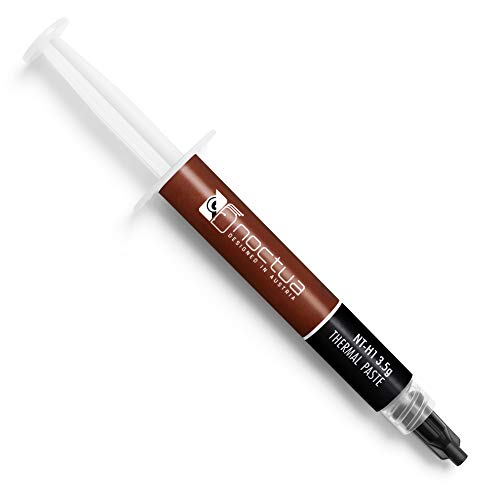
Noctua built its name on coolers and fans, and the NT-H1 is the compound the company ships for the same audience. The listing describes it as a pro-grade thermal compound paste in a 3.5 g package, and gives a practical detail many listings skip: one package covers roughly 3 to 20 applications, depending on die size. For a single desktop, that is a tidy one-tube answer with plenty left for a future cooler change.
The NT-H1 plays the same position as the MX-4: a die paste for the flat meeting point between a processor and its heatsink. Noctua publishes no conductivity figure on the listing, so judge it by form and fit rather than by a number. Its standing in the build community rests on easy spreading and long service life. Like every paste here, it should stay off memory modules and power stages, where a fixed-thickness pad does a job a flowing compound cannot hold.
Specs:
– Form: Thermal paste in a syringe
– Size: 3.5 g
– Coverage: 3 to 20 applications per package, per the listing
– Model: NT-H1
– Stated use: CPU and GPU heatsinks
Thermal Grizzly Kryonaut Thermal Paste, 1 g

Kryonaut is the specialist of the three pastes. The listing presents it as an extremely high performance thermal paste for demanding applications and overclocking, aimed at CPU, GPU and console processors, and states a thermal conductivity figure of 12.5 W/mK. The tube holds a single gram, the smallest amount in this guide: one careful application on one prized chip.
If a build centers on a high-end processor that will be pushed hard, this is its moment. The small syringe also suits a single graphics card die repaste. For a fleet of office machines, the gram runs out quickly, and a larger tube above makes more sense. Kryonaut belongs on dies only; its thin film cannot bridge the wider, uneven spaces that pads exist to fill.
Specs:
– Form: Thermal paste in a syringe
– Size: 1 g
– Thermal conductivity: 12.5 W/mK, as stated on the listing
– Model: TG-K-001-RS
– Stated use: Demanding applications and overclocking, CPU and GPU
Gelid Solutions GP-Ultimate Thermal Pad, 120 x 20 x 1.0 mm

The GP-Ultimate moves the guide to the pad side of the comparison. It arrives as a sheet measuring 120 by 20 millimeters at 1.0 millimeter thick, and the listing names it a 15W thermal pad, pointing to the conductivity figure Gelid prints for the line. The long, narrow shape suits rows of memory chips on a graphics card, where a strip can be cut into matching pieces under one cold plate.
Picture a graphics card opened to find the factory pads on its memory dried or torn. Fresh pad material at the correct thickness restores contact across every chip at once, something no paste can do across parts at uneven heights. The 1.0 mm thickness is one specific answer, not a universal one: check the pads your card already uses before ordering, since Gelid sells this family in several sizes and thicknesses. Keep it off processor dies, where its fixed thickness would hold a cooler away from the surface.
Specs:
– Form: Thermal pad sheet, cut to fit
– Size: 120 x 20 mm
– Thickness: 1.0 mm
– Thermal conductivity: 15 W, as stated in the listing name
– Model: TP-GP04-R-B
Thermalright Extreme Odyssey II Thermal Pad, 85 x 45 x 1.0 mm

Thermalright’s Extreme Odyssey II closes the list with a wider, shorter sheet: 85 by 45 millimeters, again at 1.0 millimeter thick. The listing gives a thermal conductivity of 12.8 W/m-k in its title, and describes the Odyssey II line as the successor to the original Extreme Odyssey series. The broader shape gives more cutting room for scattered chips, such as power stages around a CPU socket.
Between the two pads, the choice comes down to sheet shape and the figure each maker prints, since the thickness matches the Gelid sheet at 1.0 mm. A wide plate with chips spread across it uses this sheet well, while a neat row of memory modules may suit the Gelid strip better. Both pads share the same limits: they fill gaps of a known depth and never belong between a bare die and its cooler. If your card uses another thickness, order that one instead of stacking sheets, since a doubled layer adds resistance and can shift.
Specs:
– Form: Thermal pad sheet, cut to fit
– Size: 85 x 45 mm (3.3 x 1.8 inches)
– Thickness: 1.0 mm
– Thermal conductivity: 12.8 W/m-k, as stated in the listing title
– Model: EXT-ODYSSEY II 85×45 1.0mm
Who should skip
Skip this whole category if your machine runs cool and quiet and you have no plan to open it: fresh interface material helps during a cooler change or a repaste, and does little on a sealed, healthy system. Skip paste if your only job is graphics card memory, and skip pads if your only job is a processor die. Also skip every product here if you have not yet measured the gap or checked which thickness your card already uses, because a pad bought on a guess often ends up loose or far too thick.
FAQ
Can I use a thermal pad on a CPU instead of paste?
It is not the right tool for that joint. A CPU cooler clamps down with strong, even pressure and expects a very thin film between two flat surfaces. A pad adds fixed thickness the mount was never designed around, so contact and heat flow suffer. Use paste on dies, and save pads for gapped parts.
How do I know which pad thickness my graphics card needs?
Check the pads already fitted when you open the card, and measure one with care before removing it. Order the same thickness, since a thinner pad may never touch the plate and a thicker one can strain the board.
How much paste should I apply to a processor?
A small amount goes a long way, because mounting pressure spreads the film thin. Many builders use a pea-sized dot for a desktop processor, or spread a thin layer with a spatula when one is included, as with the MX-4. What matters is even coverage without excess squeezing out onto the socket.
Do the conductivity figures decide which product cools better?
Not on their own. Each maker arrives at its figure in its own way: Kryonaut states 12.5 W/mK, the Gelid pad names 15 W, the Thermalright pad states 12.8 W/m-k, and Noctua prints no figure at all. Fit, thickness and correct application move temperatures more than a headline number, so choose by job first.
Final verdict
Paste and pads divide the work cleanly once the jobs are named. For flat dies under clamped coolers, the ARCTIC MX-4 is the roomy tube for repeat work, the Noctua NT-H1 is the steady single-machine choice with generous coverage, and Thermal Grizzly Kryonaut is the small, focused tube for one demanding chip. For memory chips and uneven gaps, the Gelid GP-Ultimate strip and the Thermalright Extreme Odyssey II sheet both work at 1.0 mm, split by sheet shape and the figure each maker prints. Match the form to the surface, and measure before you order.






