Key takeaways
- Learn how to choose a mechanical keyboard for work and gaming: compare layout size, switch feel, keycaps and connection types with five worked examples.
A mechanical keyboard uses an individual switch under every key, and that single design choice shapes how typing and gaming feel day after day. Compared with the flat membrane board that ships with many computers, a mechanical model gives clearer feedback with each press, holds up well over years of use, and often lets you change switches or keycaps later. The catch is that the range is wide: sizes run from full boards with number pads down to compact 60 percent layouts, and switch feel ranges from smooth and quiet to firm and clicky.
This guide walks through the four decisions that matter most, in the order you should make them: layout size, switch feel, keycaps, and connection type. Five keyboards sold on Amazon serve as worked examples along the way, one for each common path buyers take. Read the choices first, then see how each example maps onto them, and you will know exactly which style of board fits your desk, your work, and your games.
As an Amazon Associate, we earn from qualifying purchases.
Quick answer
Choose the layout first: full-size if you enter numbers often, tenkeyless or 75 percent for a balance of keys and desk room, and 60 percent only if you accept function layers. Next pick switch feel: linear for smooth presses, tactile for a gentle bump, clicky for sound and feedback. Then confirm keycap material and whether you want wired, Bluetooth, or 2.4 GHz wireless.
How to choose
Layout size. A full-size board keeps the number pad, which suits spreadsheet work and data entry. Tenkeyless drops the number pad but keeps arrow keys and the function row, freeing mouse room for gaming. A 75 percent layout packs nearly the same keys into a tighter frame, while 60 percent removes the function row and arrows as separate keys, so those inputs live on a function layer. Smaller is not better or worse; it is a trade between desk space and direct access to keys.
Switch feel. Linear switches travel straight down with no bump, which many gamers like for rapid repeated presses. Tactile switches add a small bump you can feel as the press registers, a helpful cue for typists who want confirmation without sound. Clicky switches add both a bump and an audible click, which feels precise but can bother people nearby. Low-profile switches shorten the travel for a flatter, laptop-like stroke in a slimmer case.
Keycaps. PBT keycaps resist shine and keep their texture longer than basic ABS caps, and double-shot legends are molded in two layers so the letters do not fade. If you type all day, keycap material quietly shapes comfort more than lighting does.
Connection. A wired USB link is simple and never needs charging, which suits a fixed desk. Bluetooth pairs with several devices and keeps a desk clean, handy for work across a laptop and tablet. A 2.4 GHz receiver gives a wireless link that behaves like a wired one for gaming. Hot-swappable sockets are a bonus on any board: they let you pull a switch and press in another feel later, no soldering involved.
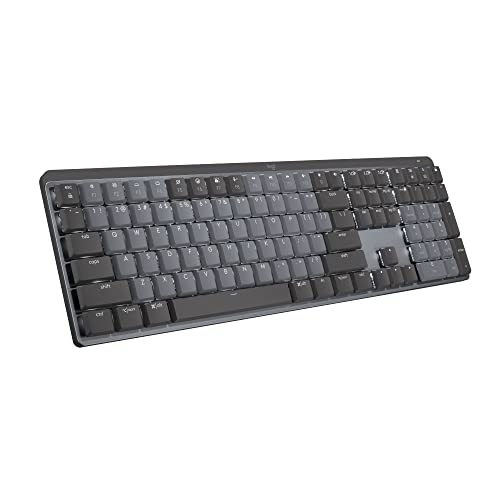
Logitech MX Mechanical: the full-size, quiet tactile path
If your day mixes long documents, spreadsheets, and calls, the Logitech MX Mechanical shows the work-first route. It keeps the full-size layout, so the number pad stays where your hand expects it, and its Tactile Quiet switches give the tactile bump for accurate typing while keeping the sound low enough for shared rooms and late sessions. Backlit keys help in dim light, and the metal body gives the board a planted feel on the desk.
For gaming, the full-size frame takes more desk room than compact boards, so mouse space shrinks on a small desk. In exchange, every key is present with no layers to learn, and Bluetooth pairing makes it easy to move between a work laptop and a personal machine. Choose this example when number entry and quiet tactility rank above compact size.
Specs:
– Layout: Full-size
– Switches: Tactile Quiet mechanical switches
– Connection: Bluetooth wireless
– Backlight: Illuminated keys
– Charging: USB-C
– Body: Metal
– Compatibility: macOS, Windows, Linux, iOS, Android
– Model number: 920-010547
Keychron V1: the 75 percent wired board you can tune
The Keychron V1 is the example for buyers who want a compact board they can adjust over time. Its 75 percent layout keeps arrow keys and a function row in a frame far smaller than a full-size board, so it suits mixed work and gaming on an average desk. The Keychron K Pro Brown switches are tactile, with a middle-ground bump that works for both typing and play.
Two details set this example apart. The switches are hot-swappable, so you can change feel later by pulling and pressing in new switches. The board is also programmable through QMK/VIA, which lets you remap keys and set macros in software. It connects by wire only, which keeps the setup simple and removes charging from your routine. Pick this path when you want one compact board that can evolve with your preferences.
Specs:
– Layout: 75 percent
– Switches: Keychron K Pro Brown, hot-swappable
– Connection: Wired
– Programmability: QMK/VIA support
– Compatibility: Mac, Windows, Linux
– Color: Carbon Black
Redragon K552P: the tenkeyless route with PBT keycaps
The Redragon K552P, listed under model K552-RGB, is the tenkeyless example. Its 87 keys keep arrows and the function row while dropping the number pad, a layout many gamers prefer because the mouse hand gains room. It connects over wired USB, so there is no battery to manage during long sessions.
This example earns its place through build details from the listing: a metal frame, double-shot PBT keycaps that resist fading, and hot-swappable sockets that accept 3-pin switches, so the feel can change later. RGB backlighting with 18 modes covers the gaming side of the brief, and N-key rollover means many simultaneous presses register. Choose this path when you want the classic TKL shape, durable keycaps, and a wired link in one board.
Specs:
– Layout: Tenkeyless, 87 keys
– Switches: Hot-swappable mechanical switches, 3-pin
– Keycaps: Double-shot PBT
– Connection: USB wired
– Backlight: RGB, 18 modes
– Frame: Metal
– Model number: K552-RGB
RK Royal Kludge RK61: the 60 percent triple-mode option
The RK61 from RK Royal Kludge shows how far compact can go. At 60 percent with 61 keys, it drops the function row, arrows, and number pad as separate keys, leaving maximum room for mouse movement. That suits gaming desks and small workspaces, as long as you are comfortable reaching less-used keys through a function layer.
The Red switches in this version are linear, so presses feel smooth from top to bottom, a common pick for gaming. Connection is the headline here: the board offers 2.4 GHz wireless, Bluetooth, and wired modes in one unit, so it can serve a gaming PC, a laptop, and a tablet across a day. The switches are hot-swappable and the board carries RGB backlighting. Pick this example when portability and flexible connection matter more than having every key on the top layer.
Specs:
– Layout: 60 percent, 61 keys
– Switches: Hot-swappable Red linear switches
– Connection: 2.4 GHz wireless, Bluetooth, and wired
– Backlight: RGB
– Color: White
– Model number: RK61
Logitech MX Mechanical Mini: the low-profile clicky route
The Logitech MX Mechanical Mini is the low-profile example. Its compact mini layout trims the board down for smaller desks while keeping a work-friendly key set, and the low-profile mechanical switches shorten each press for a flatter typing feel than tall boards give. This version uses Clicky switches, so each press pairs the tactile bump with a clear click.
Backlit keys, a metal body, and USB-C charging round out the work side of the design, and Bluetooth lets it pair across computers and tablets running macOS, Windows, Linux, iOS, or Android. For gaming it suits players who prefer a slim board that travels between rooms. Choose this path when you want mechanical feedback in a slim, quiet-desk footprint, and you enjoy a click you can hear.
Specs:
– Layout: Compact mini layout
– Switches: Low-profile mechanical, Clicky
– Connection: Bluetooth wireless
– Backlight: Illuminated keys
– Charging: USB-C
– Body: Metal
– Compatibility: macOS, Windows, Linux, iOS, Android
– Model number: 920-010552
Who should skip
Skip mechanical keyboards entirely if you are happy with a slim laptop keyboard and rarely type for long stretches; the change in height and feel takes adjustment. Skip 60 percent layouts if your work needs a number pad or you dislike function layers for arrows and F keys. Skip clicky switches if you share a room or join calls all day, since the sound carries. Finally, skip wireless models if you never move the board and prefer a desk tool that never needs charging.
FAQ
Which layout size suits both office work and gaming?
Tenkeyless and 75 percent layouts suit most mixed desks. They keep arrow keys and a function row for work while freeing mouse room for gaming. Move to full-size only if a number pad is part of your daily work, and pick 60 percent only when desk space is tight and function layers feel natural to you.
What is the difference between linear, tactile, and clicky switches?
Linear switches press straight down with a smooth stroke, which suits rapid gaming inputs. Tactile switches add a small bump as the press registers, giving your fingers confirmation without much sound. Clicky switches add a bump plus an audible click. The three feels use the same basic switch design; only the stem shape and sound change.
Are hot-swappable switches worth choosing?
For many buyers, yes. Hot-swappable sockets let you change one switch or the whole set without soldering, so a board can move from linear to tactile feel later, and a single worn switch can be swapped in minutes. If you already know the exact feel you love and never plan to change it, fixed switches serve just as well.
Should I choose wired or wireless for gaming?
A wired board is the simplest reliable link and never needs charging, which suits a fixed gaming desk. A 2.4 GHz wireless connection gives similar in-game behavior with a cleaner desk, while Bluetooth favors multi-device work over gaming. Many boards now offer two or three modes, so you can game wired and work wireless with the same keyboard.
Final verdict
There is no single right mechanical keyboard, only a right order of decisions. Set the layout by your desk and your need for a number pad, set the feel by how you type and play, then let keycaps and connection confirm the pick. The five examples map cleanly onto those choices: the Logitech MX Mechanical for full-size quiet work, the Keychron V1 for a tunable 75 percent board, the Redragon K552P for a durable tenkeyless setup, the RK61 for a compact triple-mode desk, and the MX Mechanical Mini for a slim low-profile feel. Match the example to your answers and the choice makes itself.