
Key takeaways
- Compare five office printers for desks and studies, from supertank inkjets and all-in-one models to monochrome and color laser picks with duplex printing.
A home office printer earns its place on the desk when it handles the weekly mix of forms, letters, school papers, and shipping labels without fuss. The five models below cover the main routes a buyer can take: refillable ink tanks, cartridge inkjets with document feeders, and laser machines.
Each pick comes from a long-running line by Epson, HP, Canon, or Brother. Most also scan and copy, and several add fax and two-sided printing. Match the feature list to the work on your desk, then use the closing table to confirm the exact model before you order.
As an Amazon Associate, we earn from qualifying purchases.
Quick answer
For most home offices, the Epson EcoTank ET-2800 covers color printing, scanning, and copying with refillable tanks instead of cartridges. Desks that move more paper should look at the HP OfficeJet Pro 9125e and its document feeder, while text-heavy work suits the Brother HL-L2390DW laser. The Canon models round out the list for photo-friendly inkjet and color laser needs.
How to choose
The first fork in the road is inkjet versus laser. Inkjet models print color pages, photos, and charts, and they suit mixed work where a school project matters as much as a letter. Laser models shine on plain text: contracts, invoices, and long reports come out sharp, and toner does not dry out between busy weeks.
The second choice is how the ink or toner arrives. Refillable tank printers, like the EcoTank below, hold ink in built-in reservoirs that you top up from bottles. Cartridge inkjets swap in fresh cartridges when a color runs low. Laser machines use toner cartridges that cover many pages before they need changing.
Next, count the jobs the machine must do. A flatbed scanner handles books, photos, and single sheets, while an automatic document feeder pulls a stack of pages through for scanning or copying with far less attention from you. Fax still matters for some medical, legal, and school forms. Duplex printing turns the page over for two-sided output, which trims paper use on long documents.
Finally, check the fit with your room and your devices. Wireless printing lets a laptop, phone, or tablet send jobs without a cable across the desk. Measure the shelf or desk corner before you commit, since all-in-one models with feeders stand taller than print-only machines.
Epson EcoTank ET-2800

The EcoTank ET-2800 is the refillable tank option in this group, and it suits a home office that prints in color most weeks. Rather than cartridges, it stores ink in front-facing tanks that you refill from bottles, which keeps the routine simple. Epson lists this model as a wireless color all-in-one with scan and copy, so it covers the daily trio of jobs on a study desk.
Because it prints, scans, and copies in color, the ET-2800 handles a broad mix: invoices with a color logo, school worksheets, photo pages, and signed forms scanned back to a computer. The flatbed scanner takes single sheets and book pages one at a time, so it fits households that scan now and then rather than clearing stacks of paperwork. There is no document feeder and no fax on this model.
For a desk that prints steadily but not in bulk, this is the calm, low-fuss pick of the five. Choose it when color output and simple refills matter more than feeder speed.
Specs:
– Print technology: Inkjet, cartridge-free supertank
– Output: Color
– Functions: Print, scan, copy
– Connectivity: Wireless
– Model number: C11CJ66202
HP OfficeJet Pro 9125e
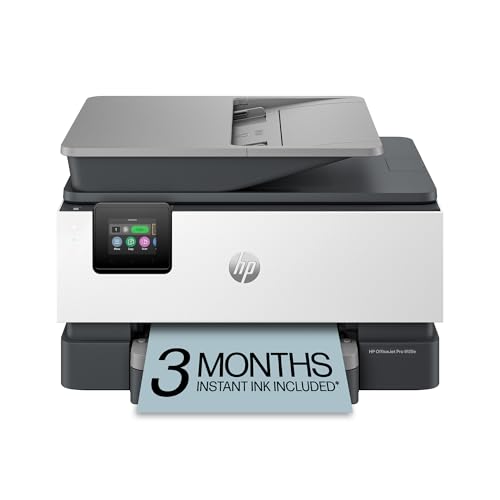
The OfficeJet Pro 9125e is the paperwork mover of the group. HP lists it as a wireless all-in-one color inkjet with print, scan, copy, and fax, plus an automatic document feeder and duplex printing. The listing also notes a 250-sheet paper capacity and duplex scanning and copying, which means two-sided originals pass through the feeder on their own.
That mix suits a home office that handles client files, school packets, or club records in batches. Color output covers charts, flyers, and presentation pages, while the fax line still serves offices and agencies that ask for one. As a cartridge inkjet, it asks for fresh cartridges as colors run down, so steady, frequent printing is the pattern it rewards.
On the desk, it is a larger presence than the EcoTank, with the feeder adding height. Pick the 9125e when scanning stacks, two-sided work, and fax sit near the top of your list, and when the printer will serve more than one person in the house.
Specs:
– Print technology: Inkjet
– Output: Color
– Functions: Print, scan, copy, fax
– Feeder: Automatic document feeder
– Duplex: Duplex printing, with duplex scanning and copying
– Paper capacity: 250 sheets
– Model number: 403X0A#B1H
Canon PIXMA TR8620a

The PIXMA TR8620a is Canon’s home office all-in-one in this roundup, and it balances document work with photo printing better than most. The listing describes a wireless inkjet with copier, scanner, and fax, an auto document feeder, and support for AirPrint, Android printing, and Alexa voice control.
Day to day, the feeder handles multi-page copies and scans, while the flatbed takes care of photos and delicate originals. Canon’s PIXMA line leans toward strong photo output, so prints for a school display or a family album sit comfortably within its brief. It uses ink cartridges, so color-heavy photo sessions draw on supplies faster than plain text work does.
Choose the TR8620a when the printer lives in a shared space and serves mixed duties: homework, home office pages, and photos in between. It is also a sensible pick for households with both Apple and Android devices, since the listing calls out support for each.
Specs:
– Print technology: Inkjet
– Output: Color
– Functions: Print, copy, scan, fax
– Feeder: Auto document feeder
– Mobile support: AirPrint, Android, works with Alexa
– Model number: 4451C032
Brother HL-L2390DW

The HL-L2390DW takes the opposite path from the inkjets above: it is a monochrome laser built for black-and-white documents. Brother’s listing describes a compact laser printer with a flatbed for convenient copy and scan work, wireless printing, and duplex two-sided printing. The listing gives a black-and-white speed of up to 32 pages per minute, which keeps long reports and form packets moving.
Laser output is the draw here. Text comes out crisp and resists smudging, and toner keeps well during quiet weeks when the printer sits idle. The flatbed handles copying an ID card, scanning a signed page, or duplicating a form, though there is no feeder for stacks and no color for charts or photos.
Pick the HL-L2390DW when nearly everything on your desk is a letter, invoice, label, or contract and color is a rare guest. It also works well as a second printer beside a color inkjet, taking over the heavy text work.
Specs:
– Print technology: Laser
– Output: Monochrome (black and white)
– Functions: Print, copy, scan via flatbed
– Connectivity: Wireless networking
– Duplex: Two-sided printing
– Listed speed: Up to 32 pages per minute in black and white
– Model number: HLL2390DW
Canon Color imageCLASS MF656Cdw

The imageCLASS MF656Cdw is the color laser flagship of this list, aimed at a home office that wants laser text and color in one machine. Canon’s listing describes a wireless duplex color laser all-in-one with copier, scanner, and fax, an auto document feeder, and mobile-ready printing, with a listed speed of 22 pages per minute. It suits desks where color pages are business documents rather than photos.
The feeder plus duplex printing keeps multi-page, two-sided work flowing, and the flatbed beneath handles books and single sheets. As a laser, it produces sharp text with color that stays tidy on plain office paper, and toner suits bursty work patterns where a busy week follows a quiet one. It is the largest machine here, so give it a proper desk or a sturdy stand in the study.
Choose the MF656Cdw when a small practice, studio, or busy home office needs one machine to print, scan, copy, and fax in color with a professional finish.
Specs:
– Print technology: Laser
– Output: Color
– Functions: Print, copy, scan, fax
– Feeder: Auto document feeder
– Connectivity: Wireless, mobile ready
– Duplex: Duplex printing
– Listed speed: 22 pages per minute
– Model number: 5158C002
Who should skip
Skip this whole category if your printing amounts to a boarding pass twice a year; a print shop visit covers that with no machine on the desk. Skip the inkjet models if the printer will sit unused for months and nearly all your pages are plain text, since the laser picks handle idle weeks with less fuss. Skip the monochrome Brother if color charts, photos, or school projects form a real share of your printing. Skip the feeder-free EcoTank if you scan stacks of pages every week, and skip the larger Canon color laser if your study corner is small. And skip fax as a buying reason if no one still sends or receives faxes.
FAQ
Is a laser or inkjet printer better for a home office?
It depends on the mix of work. Laser models excel at sharp black text and long document runs, and the color laser here adds tidy color for reports. Inkjet models handle photos and mixed color pages with ease. Match the engine to the pages you print most often.
What does duplex printing do for everyday work?
Duplex printing places content on both sides of the sheet, which halves paper use on long documents. Several picks here also scan or copy two-sided pages through the feeder. For contracts and class packets that live in binders, the thinner stack alone makes duplex worth having.
Do all five of these printers scan and copy?
Yes, each model in this list scans and copies as listed by its maker. The EcoTank and the Brother use a flatbed only, so pages go one at a time. The HP, the PIXMA, and the Canon color laser add an automatic document feeder, which pulls a stack of pages through with far less attention from you.
Can these printers work with phones and tablets?
Each of the five connects over a wireless network, so laptops, phones, and tablets on the same network can send print jobs. The Canon PIXMA listing calls out AirPrint and Android support by name, and the Canon color laser is listed as mobile ready.
Final verdict
For a balanced home office, the Epson EcoTank ET-2800 is the easy first look: color printing, scanning, and copying with simple tank refills. Desks buried in paperwork should move to the HP OfficeJet Pro 9125e for its feeder and duplex scanning, while photo-sharing households will like the Canon PIXMA TR8620a. Text-only studies belong with the Brother HL-L2390DW, and the Canon Color imageCLASS MF656Cdw stands as the color laser option when one machine must do everything.






