Key takeaways
- Compare five HDMI switches for a PC and home office desk, from compact three-input boxes to five-input 4K models with remotes and auto-switching.
- Top Pick: Kinivo 501BN 5-in-1 HDMI Switch
- Runner-up: UGREEN 3-in-1 HDMI Switch
- Also consider: Zettaguard ZW410 4×1 HDMI Switch
A home office desk can fill up with HDMI sources in a hurry. A desktop PC, a work laptop, a game console and a streaming stick each want a port, and most monitors offer only one or two. Reaching behind a monitor to swap cables every time you change devices is awkward, and it wears out ports and cable ends. An HDMI switch sits between your sources and your display, so several devices share one input.
The five switches in this guide cover the range a desk setup usually needs, from a compact three-input box to a five-input unit. Each pick below lists only figures and features shown on its own Amazon listing, so you can match the numbers to your monitor and your sources.
As an Amazon Associate, we earn from qualifying purchases.
Quick answer
For three or fewer sources, a three-input switch such as the UGREEN 3-in-1 covers a PC, a laptop and a console. For four or five sources, the Kinivo 550BN and the Kinivo 501BN both offer five inputs, while the Zettaguard ZW410 and the OREI HDS-401MV offer four inputs with extra viewing features. Match the listed resolution to your display first, then count your inputs.
How to choose
Count your sources first. A three-input switch suits a PC, a laptop and one console, while a four-input or five-input switch leaves room for a streaming stick or a second console. Add one spare input if your desk tends to gain new hardware.
Match the listed resolution and refresh figures to your display. A 4K@30Hz switch passes 4K video at 30Hz, which suits office work, streaming and film, while a 4K@60Hz switch suits a monitor that runs at 60Hz. Backward compatibility with 1080p is listed on most of these models.
Look at HDCP support when you plan to watch protected content from streaming services. HDCP 2.2 is listed on the newer switches here, while older models list HDCP 1.4 or HDCP 1.2, and a mismatch can leave a streaming app with a blank screen.
Think about how you want to change inputs. Auto-switching moves to the input that just woke up, which suits a desk where one device is active at a time, yet some devices keep their HDMI port live while asleep and can confuse it. An IR remote lets you pick an input from your chair.
Kinivo 501BN 5-in-1 HDMI Switch

The Kinivo 501BN leans toward film and streaming rather than high-refresh gaming. Its listing shows five HDMI inputs feeding one HDMI output, so a PC, a laptop, a console, a streaming stick and a Blu-ray player can all stay connected. Switching happens automatically when a single source wakes up, or by IR remote and a button on the unit.
The listing gives 4K@30Hz as the headline resolution, with HDR10 and Dolby Vision pass-through, HDCP 2.2 and 18Gbps bandwidth. It also lists 1080p, 1080i, 720p, 480p, 3D and deep color up to 36-bit. A note warns that Apple TV keeps its HDMI port live while asleep, which can confuse auto-switching. The box holds the switch, an IR remote with battery, an AC power adapter and a manual, and Kinivo backs the unit with a 2-year warranty.
| Spec | Detail |
|---|---|
| Inputs | 5 HDMI in |
| Output | 1 HDMI out |
| Max resolution | 4K@30Hz |
| HDR | HDR10, Dolby Vision |
| HDCP | HDCP 2.2 |
| Bandwidth | 18Gbps |
| Switching | Auto-switching, IR remote, on-unit button |
| Warranty | 2 years |
UGREEN 3-in-1 HDMI Switch

The UGREEN 3-in-1 is the compact pick in this guide, and it suits a desk with three sources and no more. Its listing shows three HDMI inputs feeding one HDMI output, which covers a PC, a laptop and a console, or a PC, a console and a streaming stick. Two switching methods are listed, a manual button and a remote, so you can change inputs without touching a cable.
The listing gives 4K@30Hz as the headline resolution, with 2K@60Hz and 1080P@120Hz also listed, plus 3D and HDCP 1.4. UGREEN notes that the HDMI 1.4 cable used with this switch should stay under 8 meters, or 26 feet, to hold the 4K@30Hz signal.
| Spec | Detail |
|---|---|
| Inputs | 3 HDMI in |
| Output | 1 HDMI out |
| Max resolution | 4K@30Hz |
| Other resolutions | 2K@60Hz, 1080P@120Hz, 3D |
| HDCP | HDCP 1.4 |
| HDMI version | HDMI 1.4, does not support HDMI 2.0 |
| Cable guidance | HDMI 1.4 cable under 8 meters (26 feet) |
| Switching | Manual button, remote control |
Zettaguard ZW410 4×1 HDMI Switch

The Zettaguard ZW410 brings four inputs and a picture-in-picture feature that none of the other picks in this guide offer. Its listing shows four HDMI inputs feeding one HDMI output, and the picture-in-picture mode lets you watch more than one input source at once on a single display. That suits a desk where a camera feed deserves a corner of the screen while you work on the main input.
The listing gives 4K Ultra HD support through the HDMI 1.4 protocol, with 4K x 2K at 30Hz, 1080P at 120Hz and 1080P 3D at 60Hz listed as supported resolutions. Four inputs cover a PC, a laptop, a console and a streaming stick, which is the shape of many home office desks.
| Spec | Detail |
|---|---|
| Inputs | 4 HDMI in |
| Output | 1 HDMI out |
| Max resolution | 4K x 2K at 30Hz |
| Other resolutions | 1080P at 120Hz, 1080P 3D at 60Hz |
| HDMI version | HDMI 1.4 |
| Feature | Picture-in-picture |
Kinivo 550BN 5-in-1 HDMI Switch
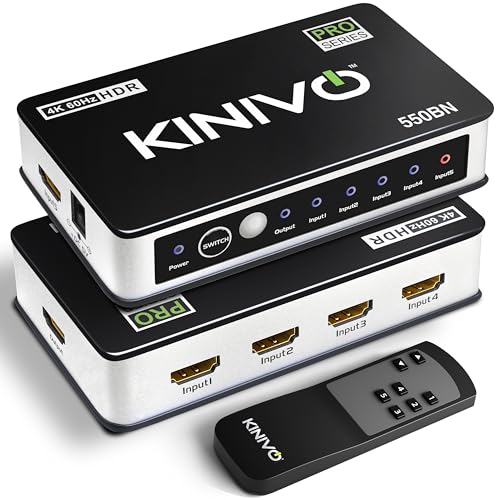
The Kinivo 550BN is the five-input pick for a desk where 4K@60Hz matters. Its listing shows five HDMI inputs feeding one HDMI output, with support for resolutions up to 4K@60Hz, plus 4K@30Hz and 1080p, through HDMI 2.0 at 18Gbps. HDCP 2.2 is listed, along with HDR and Dolby Vision, so protected 4K content from streaming services has a clear path through the switch.
Switching works automatically when a single source wakes up, or by IR remote when you want to choose by hand. The listing notes that Apple TV, Xbox, PS4 and Chromecast keep their HDMI port live while asleep, so auto-switching may not work with those devices. Kinivo covers the unit with a 2-year limited hardware warranty plus US-based lifetime customer service support.
| Spec | Detail |
|---|---|
| Inputs | 5 HDMI in |
| Output | 1 HDMI out |
| Max resolution | 4K@60Hz |
| Other resolutions | 4K@30Hz, 1080p |
| HDMI version | HDMI 2.0 |
| Bandwidth | 18Gbps |
| HDCP | HDCP 2.2 |
| HDR | HDR, Dolby Vision |
| Switching | Auto-switching, IR remote |
| Warranty | 2-year limited hardware warranty |
OREI HDS-401MV Quad Multi Viewer HDMI Switch

The OREI HDS-401MV is the four-input pick with the most unusual output options in this guide. Its listing shows four HDMI inputs feeding one HDMI output, plus a VGA output, so the switch can show material on one HDMI screen and one VGA screen at the same time. A quad multi-viewer mode shows four sources at once, and an IR remote handles switching between them.
The listing gives 4K@30Hz as the headline resolution with 1080P also listed, and it names PS4, PC, DVD and security camera use among its applications. That mix fits a desk where an older VGA monitor still earns its keep beside a newer HDMI display.
| Spec | Detail |
|---|---|
| Inputs | 4 HDMI in |
| Outputs | 1 HDMI out, 1 VGA out |
| Max resolution | 4K@30Hz |
| Other resolutions | 1080P |
| Feature | Quad multi-viewer, seamless switching |
| Switching | IR remote |
| Listed uses | PS4, PC, DVD, security camera |
Who should skip
Skip an HDMI switch entirely if your display already has enough HDMI inputs for every device on your desk and you rarely add new hardware. A switch adds a box, a remote and another cable to manage, and a direct connection is simpler when ports are plentiful.
Skip the 4K@30Hz models here if your monitor runs at 60Hz for 4K and your sources send 60Hz video. A 30Hz switch will hold the signal to 30Hz, so the Kinivo 550BN is the pick in this guide for a 60Hz 4K setup. Skip any switch whose listed HDCP version sits below what your streaming apps need. Skip the three-input UGREEN if you already own four devices or expect to add one soon, since an outgrown switch means buying twice.
FAQ
Does an HDMI switch lower picture quality?
A switch that lists the same resolution and refresh figures as your display and sources should pass the signal through without changing it. Match the listed figures to your monitor, and keep cable runs within the length the maker lists.
How many inputs do I need for a home office desk?
Count every HDMI device on the desk today, then add one spare input if you can. A PC, a laptop and a console need three inputs, while a streaming stick or a Blu-ray player takes you to four or five.
What is the difference between auto-switching and a remote?
Auto-switching moves to the input that just woke up, which works well when only one device is active at a time. A remote lets you pick any input by hand, which helps when a device keeps its HDMI port live while asleep and confuses auto-switching.
Can I use an HDMI switch with a laptop and a desktop PC?
Yes, when both machines have an HDMI output and the switch lists the resolution your monitor uses. Connect each machine to an input, connect the switch output to the monitor, and change inputs with the remote or the button on the unit.
Final verdict
For most home office desks, the choice comes down to how many inputs you need and whether your display runs 4K at 60Hz. The Kinivo 550BN is the pick for a full desk that wants five inputs at 4K@60Hz with HDR and Dolby Vision in the listing. The Kinivo 501BN covers the same five inputs at 4K@30Hz.
The UGREEN 3-in-1 is the tidy pick for a three-device desk, the Zettaguard ZW410 adds picture-in-picture to a four-input box, and the OREI HDS-401MV suits a desk with a VGA display or a need to watch four sources at once. Count your devices, match the listed resolution and HDCP version to your display, and pick the switch with one input to spare.