Key takeaways
- Compare five portable SSDs for laptop backup and travel, with listed capacities, speeds and rugged builds to help you pick a drive that fits your bag.
- Top Pick: Samsung T7 Portable SSD 1TB
- Runner-up: SanDisk Extreme Portable SSD 1TB
- Also consider: Crucial X9 Portable SSD 1TB
A laptop fills up sooner than most people expect. Photo libraries grow, video projects pile up, and a single work folder can swell to hundreds of gigabytes before anyone notices. A portable SSD gives that overflow a home outside the laptop, and it moves files far more quickly than an older spinning drive. For travel days, the appeal is simple: a pocket-sized drive, a short cable, and a backup copy that rides along in a bag.
This guide compares five portable SSDs that suit laptop owners and travellers. Each one holds 1TB, connects over USB-C, and lists read speeds of 1,050 MB/s or higher. The sections below lay out what each listing states about capacity, interface, speed, and rugged build. Keep one habit in mind throughout: a single drive is one copy, not a safety net. Back up in more than one place, and keep a second copy somewhere separate from the drive you carry.
As an Amazon Associate, we earn from qualifying purchases.
Quick answer
For most laptop owners, the Samsung T7 1TB covers the common ground: 1TB of room, read speeds up to 1,050 MB/s, a USB 3.2 Gen 2 link, and a 58-gram aluminium body. Travellers who want a tougher shell can look at the SanDisk Extreme 1TB, while the Samsung T9 1TB suits a laptop with a USB 3.2 Gen 2×2 port.
How to choose
Begin with capacity. Every drive in this guide holds 1TB, which suits a photo library, a set of work files, and a modest video collection. If your library already nears that size, a 1TB drive leaves little room to grow, and a larger capacity in the same family may fit better.
Next, match the interface to your laptop. A USB 3.2 Gen 2 port moves data at up to 10 Gbps, which lines up with the listed 1,050 MB/s read speeds on four of the drives here. The Samsung T9 lists read speeds up to 2,000 MB/s, but that figure needs a USB 3.2 Gen 2×2 port rated at 20 Gbps. On a plain Gen 2 port, the T9 still works, yet it runs at the lower ceiling of that port
Listed speeds are maker figures measured under favourable conditions, and real transfers vary with file size, the host machine, and the cable in use. A folder of small files moves more slowly than one large video file. Rugged build matters on travel days, too: drop resistance, water and dust resistance, and a metal or rubberised shell help a drive survive a bag or a desk edge, yet no figure promises survival after every fall, and a rugged shell never replaces a second backup copy. Several drives here also list 256-bit AES hardware encryption with password protection, so check compatibility exactly as the listing states it.
Samsung T7 Portable SSD 1TB

The Samsung T7 1TB is the plain, well-rounded pick here, with listed read speeds up to 1,050 MB/s and write speeds up to 1,000 MB/s over USB 3.2 Gen 2 inside a solid aluminium body. At 58 grams and roughly the size of a credit card, it slips into a laptop sleeve or a jacket pocket. Samsung also lists password protection and AES 256-bit hardware encryption. The listed speeds need a USB 3.2 Gen 2 port, and the T7 has no carabiner loop, so travellers who clip a drive to a bag may prefer another model.
| Spec | Detail |
|---|---|
| Capacity | 1TB |
| Interface | USB 3.2 Gen 2 |
| Read speed | Up to 1,050 MB/s |
| Write speed | Up to 1,000 MB/s |
| Model | MU-PC1T0T/AM |
| Colour | Gray |
| Weight | 58 grams |
| Drop resistance | Up to 2 metres |
| Warranty | 3-year limited |
SanDisk Extreme Portable SSD 1TB
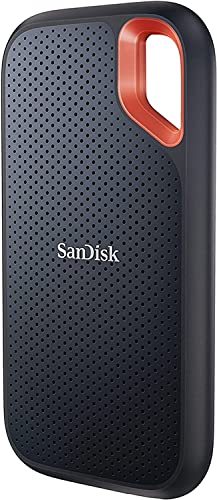
The SanDisk Extreme 1TB is built for days outside the office. Its listing states read speeds up to 1,050 MB/s and write speeds up to 1,000 MB/s over USB-C with USB 3.2 Gen 2, and it adds a carabiner loop that clips to a bag strap. The ribbed shell gives a secure grip, and the listing describes water and dust resistance plus drop protection up to two metres. One point needs care: the listing title names one water and dust resistance figure while the listing body names another, so treat the exact figure as unsettled.
| Spec | Detail |
|---|---|
| Capacity | 1TB |
| Interface | USB-C, USB 3.2 Gen 2 |
| Read speed | Up to 1,050 MB/s |
| Write speed | Up to 1,000 MB/s |
| Model | SDSSDE61-1T00-G25 |
| Drop protection | Up to two metres |
| Carabiner loop | Yes |
| Warranty | 5-year limited |
Crucial X9 Portable SSD 1TB

The Crucial X9 1TB is the compact pick of the group. Its listing states read speeds up to 1,050 MB/s over USB 3.2 with a USB-C connection, and it lists compatibility with Windows, Mac, Android, PlayStation, and Xbox. Crucial lists drop resistance up to 7.5 feet, a 3-year warranty covers the drive, and the box includes a USB-C to USB-C cable. Note that the listing publishes no write speed figure, and it names no encryption feature, so a user who needs password protection should look at the Samsung T7 or the WD My Passport SSD instead.
| Spec | Detail |
|---|---|
| Capacity | 1TB |
| Interface | USB-C, USB 3.2 |
| Read speed | Up to 1,050 MB/s |
| Model | CT1000X9SSD902 |
| Colour | Black |
| Drop resistance | Up to 7.5 feet |
| Warranty | 3 years |
WD My Passport SSD 1TB

The WD My Passport SSD 1TB pairs brisk listed speeds with hardware encryption. Its listing states read speeds up to 1,050 MB/s and write speeds up to 1,000 MB/s over USB-C, with NVMe technology inside. Password-enabled 256-bit AES hardware encryption helps keep files private, and the listing notes drop resistance up to 2 metres plus shock and vibration resistance. The listing names PC, Xbox, and PlayStation among the compatible devices. The password feature works through WD software, so confirm that it runs on your system software and set a password you can recall.
| Spec | Detail |
|---|---|
| Capacity | 1TB |
| Interface | USB-C, NVMe |
| Read speed | Up to 1,050 MB/s |
| Write speed | Up to 1,000 MB/s |
| Colour | Midnight Blue |
| Drop resistance | Up to 2 metres |
| Encryption | 256-bit AES hardware encryption |
Samsung T9 Portable SSD 1TB

The Samsung T9 1TB carries the highest listed read speed in this guide. Its listing states sequential read speeds up to 2,000 MB/s over USB 3.2 Gen 2×2, with a black finish and a rubberised shell. Samsung lists drop resistance up to 3 metres, AES 256-bit hardware encryption, and a Dynamic Thermal Guard that manages heat during longer transfers. The drive weighs 122 grams. It fits creators whose laptop has a USB 3.2 Gen 2×2 port rated at 20 Gbps; on a plain Gen 2 port, the T9 runs at that port’s lower ceiling, and the extra speed stays out of reach.
| Spec | Detail |
|---|---|
| Capacity | 1TB |
| Interface | USB 3.2 Gen 2×2 |
| Read speed | Up to 2,000 MB/s |
| Write speed | Up to 1,950 MB/s |
| Model | MU-PG1T0B/AM |
| Colour | Black |
| Weight | 122 grams |
| Drop resistance | Up to 3 metres |
| Warranty | 3 years |
Who should skip
A portable SSD is not the right buy for everyone. If your files already live in a cloud account with room to spare and you rarely work offline, an extra drive may sit unused in a drawer. If your laptop has only older USB ports, the listed speeds in this guide stay out of reach, and a simpler storage option may serve just as well.
Skip a 1TB drive if your photo or video library already passes that size. A drive that fills up in the first month forces a second purchase soon after, and a larger capacity in the same family avoids that squeeze. Finally, skip any drive whose listed compatibility leaves out your device. Keep a second copy of anything vital.
FAQ
Do I need a USB 3.2 Gen 2×2 port to use these drives?
No. Every drive in this guide works on a standard USB-C port, and four of them list their full read speed on a USB 3.2 Gen 2 link. Only the Samsung T9 needs a Gen 2×2 port rated at 20 Gbps to reach its listed read speed of up to 2,000 MB/s.
How much can a 1TB portable SSD hold?
A 1TB drive holds a large photo library, many hours of video, and a full set of work documents, with room left over for new files. The exact amount depends on file size: a folder of phone photos takes far less room than a folder of 4K video clips.
Is one portable SSD enough for backup?
No, one drive is one copy. A backup plan works best with at least two copies in separate places, such as the drive in your bag and a second drive or a cloud account kept elsewhere. A drive can be lost, dropped, or damaged, and a second copy is what covers that day.
Can I edit video files directly from a portable SSD?
Yes, many editors work from a portable SSD, and the drives in this guide list read speeds of 1,050 MB/s or higher. For smooth editing, use a short, sound cable and a USB port that matches the drive’s listed interface.
Final verdict
The Samsung T7 1TB is the pick for most laptop owners: 1TB of room, listed read speeds up to 1,050 MB/s, a 58-gram aluminium body, and a simple USB-C link that suits the current generation of laptops. It asks for no special port and no extra setup, and it covers documents, photos, and video backup without fuss.
Travellers who want a tougher shell and a clip should look at the SanDisk Extreme 1TB, while creators with a Gen 2×2 port can use the Samsung T9 1TB. The Crucial X9 1TB suits anyone who wants the most compact shape, and the WD My Passport SSD 1TB suits anyone who wants hardware encryption built in. Whichever drive you pick, keep a second copy of your files somewhere separate.