
Key takeaways
- Compare five USB hubs for desk charging and peripherals, from a slim 4-port hub to a powered model with switches, card readers, and a long cable.
A modern laptop often ships with two or three ports, while a working desk needs many more. A keyboard, a mouse, an external drive, a printer, and a camera card all compete for a socket. A USB hub solves the shortage by turning one port on the computer into a row of connections. The five models below cover the most common desk setups.
Choosing well means matching the hub to the gear on the desk. Bus-powered hubs draw all their energy from the computer and suit light loads such as input devices and flash drives. Powered hubs add a wall adapter for hungrier hardware such as spinning external drives. USB-C hubs can also carry video to a monitor and pass charging power back to the laptop.
As an Amazon Associate, we earn from qualifying purchases.
Quick answer
Match the hub to the job. The Anker 4-Port USB 3.0 Hub suits simple port expansion, the Anker 5-in-1 USB-C Hub adds 4K HDMI and pass-through charging, the atolla 7-Port brings powered ports with switches, the VIENON 8-in-1 adds card readers, and the ORICO 7-Port reaches across a desk on a 3.28 ft cable.
How to choose
Begin with the host connector. A USB-A hub plugs into the rectangular port found on older laptops and most desktops, while a USB-C hub needs the smaller oval port on newer machines. A hub that matches the computer directly avoids one more adapter in the chain.
Next, count ports and check the mix. Four ports handle a keyboard, mouse, receiver, and flash drive with ease. Seven ports suit a fuller desk with a printer, a webcam, and a drive or two. Speed matters as much as count: USB 3.0 ports move data at up to 5Gbps as listed, while USB 2.0 ports run at 480Mbps and belong under a keyboard rather than a drive.
Power decides what the hub can run: a bus-powered hub shares one computer port’s energy among everything plugged in, which is fine for light gear. A powered hub with its own adapter, or a USB-C hub with pass-through charging, keeps drives stable and can refill the laptop battery at the same time. Read the listing closely: some hubs include the adapter, and some leave it out of the box.
Finally, note the extras: an HDMI port for video (the computer port must support DP Alt Mode), built-in card readers for camera files, a longer cable for reach, and individual switches for control.
Anker 4-Port USB 3.0 Hub (Ultra-Slim)

This slim Anker hub is the straightforward answer for a desk that simply needs more USB-A sockets. It turns one USB 3.0 port into four, each moving data at up to 5Gbps as listed, which covers flash drives, external drives, a keyboard, and a mouse. The 2 ft extended cable lets the hub sit on the desk surface.
The main limit sits in the listing itself: charging is not supported. This is a data hub, so phones and tablets plugged into it should not be expected to fill their batteries. It also draws all its power from the host port, so several bus-powered drives at once can strain the supply.
Specs:
– Ports: 4 x USB 3.0 (USB-A)
– Data transfer: up to 5Gbps
– Cable: 2 ft extended cable
– Charging: not supported, data only
– Model: A7516011
– Listed for: MacBook, Mac Pro, Mac mini, iMac, XPS, Surface Pro, notebook PC, mobile HDD
Anker USB-C Hub 5-in-1 with 4K HDMI (A8357)

Anker’s 5-in-1 hub suits a USB-C laptop that needs a monitor and a charger through a single port. The HDMI output delivers 4K resolution at 30Hz in mirror and extend modes, and the USB-C power input passes up to 90W through to the laptop from a 100W total input, with the hub keeping 10W for its own operation. One USB-A 3.0 port moves data at 5Gbps, while two USB-A 2.0 ports at 480Mbps cover a keyboard and mouse.
Compatibility follows the listing exactly: MacBook with macOS 12 and newer, Windows 10 and 11, and ChromeOS, on laptops with DP Alt Mode and Power Delivery. The listing states that the hub is not compatible with Linux, and the wall charger is not included.
Specs:
– Ports: 1 x HDMI, 1 x USB-A 3.0, 2 x USB-A 2.0, 1 x USB-C power input
– Video: HDMI up to 4K at 30Hz, mirror and extend modes
– Data transfer: up to 5Gbps (USB 3.0 port), 480Mbps (USB 2.0 ports)
– Charging: up to 90W pass-through, charger not included
– Compatibility as listed: MacBook (macOS 12+), Windows 10 and 11, ChromeOS; needs DP Alt Mode and Power Delivery; not for Linux
– Size and weight: 5.1 x 1.2 x 0.5 inches, 2.1 oz
– Model: A8357
atolla 7-Port USB 3.0 Powered Hub (CH-207U3)
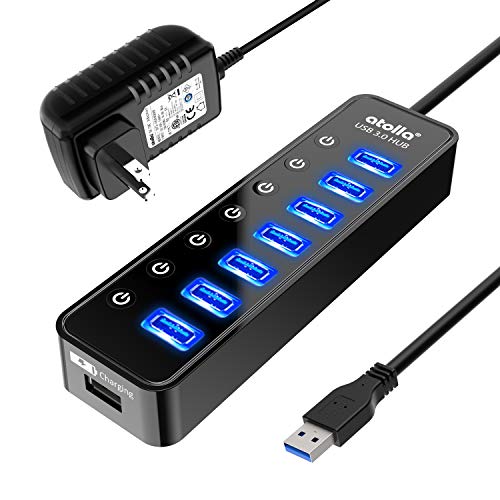
The atolla hub is built for a desk where devices come and go all day. Seven USB 3.0 data ports each carry an individual on/off switch with an LED indicator, so a printer or drive can be switched off without pulling its plug. An eighth port is a smart charging port for a phone or tablet. The included 5V/4A power adapter feeds the hub from the wall, keeping power-hungry gear running steadily with every port occupied.
That steady supply is the reason to pick this model: one computer port shared seven ways can leave a spinning drive short of energy, and the adapter removes that worry. The trade-off is one more cable and wall socket in use. For a home office with a permanent row of peripherals, the switches and included adapter make daily use more orderly.
Specs:
– Ports: 7 x USB 3.0 data ports, 1 x smart charging port
– Switches: individual on/off switch with LED indicator for each port
– Power: 5V/4A power adapter included
– Model: CH-207U3
– Listed for: MacBook, Mac Pro, Mac mini, and more
VIENON 8-in-1 USB Hub with SD/TF Card Reader

The VIENON hub folds several desk tools into one aluminum bar. It expands a single connection into four USB ports, one USB 3.0 and three USB 2.0, and adds an SD card slot, a microSD (TF) slot, and a 3.5mm aux audio jack. Camera users can pull files from a card without a separate reader, and the aux jack gives wired headphones a home on the desk.
The dual host connection is a helpful touch: USB-A and USB-C plugs let it move between an older desktop and a newer laptop. The single USB 3.0 port should carry the external drive, since the USB 2.0 ports run at lower speed and suit input devices better.
Specs:
– Ports: 4 x USB (1 x USB 3.0, 3 x USB 2.0)
– Card readers: SD slot and microSD (TF) slot
– Audio: 3.5mm aux headphone jack
– Host connection: USB-A and USB-C dual connectors
– Body: aluminum
– Listed for: MacBook Pro, MacBook Air, and more PC, laptop, and tablet devices
ORICO 7-Port USB 3.0 Hub with 3.28 ft Cable

The ORICO hub answers a placement problem. Its attached cable runs 3.28 ft (100 cm), long enough for the hub to sit on top of the desk while the computer tower rests on the floor or at the far end of a wide worktop. Seven USB-A 3.0 ports move data at up to 5Gbps, and the aluminum alloy casing shrugs off daily knocks.
A USB-C power input accepts 5V/3A from a wall adapter when extra supply is needed, though no adapter is included and the port cannot charge the computer. The listing also states that the USB-A ports support data only, with no charging. As listed, it works with Windows, Mac OS, and Linux, and stays backward compatible with USB 2.0 and USB 1.0 devices.
Specs:
– Ports: 7 x USB-A 3.0
– Data transfer: up to 5Gbps (USB 3.2 Gen1)
– Cable: 3.28 ft (100 cm) attached cable
– Power input: USB-C port, 5V/3A, adapter not included
– Charging: USB-A ports are data only, no charging
– Compatibility as listed: Windows, Mac OS, Linux; backward compatible with USB 2.0 and USB 1.0
– Body: aluminum alloy
Who should skip
Skip this roundup if the desk needs a full docking station. None of these hubs adds Ethernet, and only the Anker 5-in-1 carries video, to a single monitor at 4K and 30Hz. Anyone driving two external displays or a 10Gbps workflow should look at a dedicated dock. Linux users should also pass on the Anker 5-in-1, since its listing rules that system out.
Charging needs can rule models out as well: the Anker 4-Port and the ORICO move data only, so a desk that must refill phones and tablets from the hub belongs with the atolla.
FAQ
Can a USB hub charge my laptop?
Only a hub with pass-through charging can. Among these five, the Anker 5-in-1 accepts a wall charger at its USB-C power input and passes up to 90W on to the laptop, with the charger supplied by the owner. The other hubs either move data only or, in the atolla’s case, charge smaller devices through a smart charging port.
Will a hub slow down my external drive?
A USB 3.0 port on these hubs is listed at up to 5Gbps, and that bandwidth is shared across ports in use at the same time. One drive on a USB 3.0 port runs at full listed speed. Drives plugged into USB 2.0 ports, such as the extra ports on the Anker 5-in-1 and the VIENON, are limited to 480Mbps, so keep drives on the USB 3.0 sockets.
Do I need a powered hub?
A powered hub helps when several drives or other hungry devices share one computer port. The atolla includes a 5V/4A adapter in the box, and the ORICO accepts an optional 5V/3A supply through its USB-C power input. A keyboard, mouse, and flash drive run happily on a bus-powered hub such as the Anker 4-Port.
Can these hubs connect a monitor?
Only one of the five carries video. The Anker 5-in-1 has an HDMI port listed at 4K resolution and 30Hz, in mirror and extend modes. The listing requires a laptop port with DP Alt Mode and Power Delivery, and it names MacBook on macOS 12 and newer, Windows 10 and 11, and ChromeOS. The remaining hubs have no display output.
Final verdict
For simple expansion, the Anker 4-Port covers most desks with four quick ports and a 2 ft cable. A USB-C laptop gains the most from the Anker 5-in-1, which adds 4K HDMI and up to 90W of pass-through charging. The atolla 7-Port earns its place where power matters, thanks to the included adapter and a switch for every port. The VIENON 8-in-1 folds card readers and an audio jack into one bar, and the ORICO 7-Port solves reach across a 3.28 ft cable.






