
Key takeaways
- ARGB versus RGB: Addressable fans use a 5 volt, 3-pin header. Older non-addressable RGB uses a 12 volt, 4-pin header. Plugging one into the other can damage lighting, so match the connector to your motherboard’s header or to the fan’s controller.
- Motherboard software: Many boards sync lighting through their own software. Boards without an ARGB header need a separate controller.
- Fan size: Most cases accept 120 mm and many accept 140 mm. Count mounting positions before buying.
- Header count: A chain or splitter reduces headers used, but a splitter drawing too many fans from one header can exceed the header’s rated current. Check the motherboard manual.
- Ecosystem lock-in: Corsair iCUE Link fans need their own hub or compatible hardware to work as designed.
For most builders, a multi-pack of 120 mm addressable RGB fans, such as the Arctic P12 PWM PST A-RGB or the Thermalright TL-C12C-S, covers an entire case under $100, while Corsair iCUE Link and Lian Li UNI Fan SL-Infinity fans suit buyers who want a premium look and tidy cabling and are willing to buy fewer fans.
Our top picks
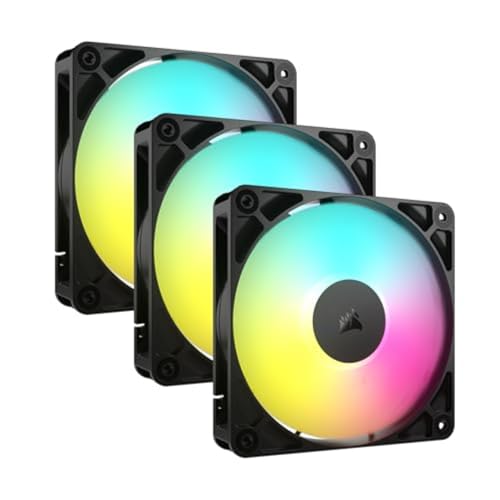


As an Amazon Associate we earn from qualifying purchases at no extra cost to you.
Quick answer by buyer
RGB fans split into three groups at this budget. Value multi-packs give you three to five fans for the price of one premium unit. Mid-range single fans such as the Corsair RS120 ARGB add polish and software support. Premium chain-linked fans from Corsair and Lian Li cost the most per fan, so under $100 they buy a small set, often two or three. Pick by how many fans your case needs, whether your motherboard has the right RGB header, and how loud you can tolerate the fans being at full speed.
At a glance
| Fan | Tier | Key stated specs | Best for | Limits |
|---|---|---|---|---|
| Arctic P12 PWM PST A-RGB | Value | The maker lists 200 to 2000 rpm PWM, 0 rpm below 5 percent PWM, 48.8 cfm, 1.85 mmH2O static pressure, 0.3 sone, 12 A-RGB LEDs on a 5V 3-pin connector; sold single or as a 3-pack | Good balance of price, noise and airflow; a widely cited value pick | Lower rated airflow than the non-RGB P12 |
| Thermalright TL-C12C-S | Budget | Retail listings give up to 1550 rpm, 66.17 cfm, 1.53 mmH2O and 25.6 dBA at maximum, with a 4-pin PWM connector and a 3-pin 5V ARGB connector, sold as a 3-pack | Filling a whole case cheaply | Figures are maximums from listings; check the controller or header compatibility in the box |
| Corsair RS120 ARGB | Mid-range | Roundups name it a mainstream pick for most builders; it uses a standard ARGB header rather than iCUE Link | Buyers who want a polished, widely supported fan | Fewer fans per budget than value multi-packs |
| Corsair iCUE Link LX120 | Premium | Corsair lists 400 to 2400 rpm, up to 69.9 cfm, 18 RGB LEDs per fan and a 5-year warranty; the starter kit has three fans and a System Hub in a single-cable chain | Corsair iCUE owners | Needs the iCUE Link hub; the three-fan starter kit may exceed the cap |
| Lian Li UNI Fan SL-Infinity | Premium | Retail listings give up to 2100 rpm, about 61 cfm and 2.66 mmH2O, with an infinity-mirror look and interlocking daisy-chain cabling | Show builds that care about appearance | Usually the costliest per fan |
Arctic P12 PWM PST A-RGB: the value reference
The Arctic P12 line is a long-running favorite for case airflow, and the A-RGB version adds addressable lighting. The maker lists a speed range of 200 to 2000 rpm under PWM control with a fan-stop below 5 percent duty, along with 48.8 cfm and 1.85 mmH2O static pressure. These numbers are lower than the plain P12 PWM PST, which is listed at 56.3 cfm and 2.2 mmH2O, because the lighting hardware occupies part of the blade area and hub. That is a normal trade-off for RGB fans, and one reason performance-first builders buy a non-RGB fan for the heat-producing positions and RGB for the front or side.
The PST feature, short for PWM sharing technology, lets the fans share one PWM header so they ramp together. It is a popular value choice, and it is offered as a single fan or a 3-pack.
Thermalright TL-C12C-S: the lowest cost per fan
Roundups name the TL-C12C-S as a budget choice because a pack of several fans typically costs less than a single fan from the premium brands. Retail listings give a maximum of about 66 cfm and 1550 rpm at up to 25.6 dBA for each fan, which are best-case figures. Buyers should note which lighting connector comes with each pack, since a pack may include a controller or rely on the motherboard header. The trade-off is less documentation and software support than Corsair or Arctic, which matters mainly if you want precise control.
Corsair and Lian Li: premium chained fans
Corsair’s iCUE Link fans, including the LX120, connect in a chain with a single cable from fan to fan, through a Link System Hub that comes in the starter kit. Corsair lists the LX120 at 400 to 2400 rpm and up to 69.9 cfm with a magnetic dome bearing. The catch is that the system works best when the rest of the ecosystem is Corsair, and a starter kit can use much of the budget by itself.
The Corsair RS120 ARGB is a simpler, mid-range option that shows up in roundups as a pick for many builders. The Lian Li UNI Fan SL-Infinity is the other frequent premium name, with an infinity-mirror ring look and interlocking daisy-chain cabling that reduces cable clutter. Both premium families are mainly a visual and cable-management upgrade rather than a large airflow gain.
Compatibility: the part that causes returns
- ARGB versus RGB: Addressable fans use a 5 volt, 3-pin header. Older non-addressable RGB uses a 12 volt, 4-pin header. Plugging one into the other can damage lighting, so match the connector to your motherboard’s header or to the fan’s controller.
- Motherboard software: Many boards sync lighting through their own software. Boards without an ARGB header need a separate controller.
- Fan size: Most cases accept 120 mm and many accept 140 mm. Count mounting positions before buying.
- Header count: A chain or splitter reduces headers used, but a splitter drawing too many fans from one header can exceed the header’s rated current. Check the motherboard manual.
- Ecosystem lock-in: Corsair iCUE Link fans need their own hub or compatible hardware to work as designed.
How many fans do you need?
A typical mid-tower airflow layout uses two or three intake fans in front and one exhaust at the rear, and sometimes two on top. Many builders get a better result from fewer, quieter fans on a sensible curve than from filling every slot. Positive pressure, with more intake than exhaust, tends to keep dust down when filters are fitted. Static-pressure-focused blades suit radiators and dense filters, while airflow-focused blades suit open mesh fronts. RGB lighting is an add-on, so judge each fan by the stated airflow and noise first.
Noise and lighting trade-offs
Higher rpm means more noise, so a fan rated to 2000 rpm will rarely need to run flat out. Fan curves set in the BIOS or software let the fan idle near zero. Lighting is another factor: bright all-around RGB looks best with a glass side panel, while a mesh or solid panel hides most of the effect. If you plan to mix brands, expect the lighting to be controlled separately.
Pick this if
| If you want | Pick | Why |
|---|---|---|
| Best all-around value | Arctic P12 PWM PST A-RGB | Stated 200 to 2000 rpm, fan-stop, sold in a 3-pack |
| Cheapest way to light a whole case | Thermalright TL-C12C-S | Multi-pack pricing, up to about 66 cfm listed |
| A polished mainstream fan | Corsair RS120 ARGB | Mainstream, widely supported |
| A Corsair-based build | Corsair iCUE Link LX120 | Single-cable chain, software sync; needs the Link hub |
| Maximum looks and neat cables | Lian Li UNI Fan SL-Infinity | Infinity-mirror design, daisy chain |
Alternatives
- Non-RGB P12 or similar: For rear exhaust or hidden positions, plain fans save money and add a little airflow.
- Higher-speed Arctic variants: Arctic sells faster P12 variants; confirm the rpm and noise on the maker’s page before buying for a quiet build.
- RGB strip or lit case front: If you want color without filling every slot, a strip or a lit front panel may do the job.
- A better case with included fans: Many current cases ship with ARGB fans, which can beat buying them separately.
Planning a fan set under the cap
The cap changes what is sensible. A premium chained fan costs several times more per unit than a value multi-pack fan, so a premium purchase under $100 will usually be a pair or a triple. If your case needs four fans, a value 3-pack plus a single extra fan, or a larger pack, if one is sold in your region, gets the lighting uniform without exceeding the budget. Keep in mind that the fans in a single pack are designed to look alike, so mixing packs from different product generations can leave visible differences in color temperature and ring design.
Think about where the lighting will be seen. Front intake fans and a side-mounted set show the most light through a tempered-glass panel, while top and rear fans are usually hidden. Putting the lit fans where they are visible and using plain fans elsewhere is a sound way to stretch the budget. Many builders also set the lighting to a single static color at moderate brightness, which looks cleaner and avoids the distraction of rapidly changing effects.
Finally, consider cable length. Chained designs, which route power and lighting through the fan frames, reduce clutter but need the first fan placed within reach of the hub or header. Fans with separate power and lighting cables need extra routing and tie points, which is easier in a roomy case. Check the cable lengths the maker lists against your case layout before ordering.
Frequently Asked Questions
Do RGB fans cool better than regular fans?
No. Lighting does not improve cooling, and some RGB fans give up a little airflow to the hub electronics. Judge a fan on airflow, static pressure and noise, then choose the lighting you like.
What is the difference between ARGB and RGB fans?
ARGB, or addressable RGB, lets each LED show its own color, which makes effects like waves and rainbows possible. It uses a 5 volt, 3-pin header. Standard RGB uses a 12 volt, 4-pin header and shows one color at a time.
Can I mix fan brands?
Yes for airflow, but lighting is the problem. Each brand’s controller and software may handle only its own fans, so mixed lighting often ends up controlled in two places.
How many RGB fans should I buy?
Count the mounting positions you will actually fill. Three front intakes and one rear exhaust cover most mid-tower builds. Buying a larger pack and leaving fans in the drawer wastes budget.
Are premium chained fans worth it?
They deliver cleaner cabling and a distinctive look, which matters in a glass case. They do not cool better, and under this cap you get fewer of them than with a value multi-pack.
Should I use a fan splitter?
A splitter or hub is fine within the header’s rated current. Read the motherboard manual, and avoid chaining more fans than the header supports.




