Key takeaways
- Slot: The Audigy Fx V2 uses PCIe x1. Any free PCIe slot, including x16, will physically accept it, but check that the slot is not blocked by a large graphics card.
- Bracket: Use the half-height bracket for low-profile cases and the full-height bracket for standard ATX cases.
- Operating system: Windows 10 or later is listed. Linux and macOS support was not found in the listings, so do not assume it.
- Front panel: Some cards do not connect to the case’s front-panel audio header. Plan to use the card’s own jacks.
- Disable onboard audio: Turn off the motherboard codec in firmware or Windows settings to avoid output confusion.
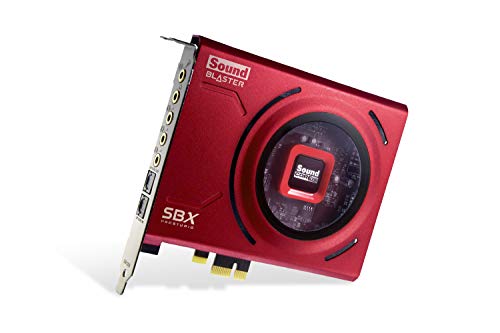
Under $100, the Creative Sound Blaster Audigy Fx V2 is the entry-level internal PCIe sound card guides often point to for buyers who want a headphone amplifier that can drive higher-impedance headsets and a bit more control than motherboard audio, while the AE-series cards with discrete DACs and amps generally sit in a higher tier. For many people with modern motherboards, the honest answer is that a sound card is optional.
Our top picks


As an Amazon Associate we earn from qualifying purchases at no extra cost to you.
Do you need a sound card at all?
Most current motherboards include an audio codec that is good enough for speakers and everyday headphones. A separate card makes sense in a few cases: you use headphones with a high impedance that onboard audio drives poorly, you hear electrical noise or hiss from the case, your motherboard lacks the jacks you need, or you want a dedicated mic input and software features. If you only need cleaner sound for ordinary headphones, a USB DAC and amp is an alternative that avoids electrical noise inside the PC and works with laptops too.
At a glance
| Card | Tier | Key stated specs | Best for | Limits |
|---|---|---|---|---|
| Creative Sound Blaster Audigy Fx V2 | Budget entry level | Listings describe 32 to 600 ohm headphone support, 5.1 channel output, 24-bit/192 kHz playback, PCIe x1 and a half-height bracket with a full-height bracket included; SNR figures differ between sources | Entry upgrade over onboard audio, small-form-factor cases | 5.1 only on the base card; no discrete bi-amp or SABRE DAC |
| Sound BlasterX AE-5 Plus | Premium | Listings cite a SABRE32 DAC, a DNR figure of about 122 dB and RGB lighting; confirm on the maker’s page | Music listening and gaming with a better DAC | Above this cap in most listings |
| Sound BlasterX AE-7 | Higher premium | Listings cite a DNR figure of about 127 dB and a Xamp bi-amp headphone amplifier; confirm on the maker’s page | Hard-to-drive headphones of 300 ohms or more | Costs well above the cap; needs a full-size slot |
| Sound Blaster AE-X | Premium | Positioned by listings as a high-end internal card; specs not confirmed for this guide | Buyers wanting a single high-end internal card | Above this cap |
Audigy Fx V2: what the maker says
The Audigy Fx V2 is the current entry-level Sound Blaster. Creative’s listings describe support for headphones from 32 to 600 ohms and playback up to 24-bit and 192 kHz. Some retail listings quote a signal-to-noise ratio of 120 dB, but sources differ and the figure could not be confirmed from the maker’s page, so do not treat it as a guaranteed measurement.
It connects through a PCIe x1 slot and is listed as half-height, which helps in small cases, with both half-height and full-height brackets in the box according to listings. The ports are 3.5 mm mic-in, line-in, headphone or headset out, rear out and center or subwoofer out, which is enough for a stereo desk setup or a 5.1 speaker system. Listings say the card works with Windows 10 or later and is set up through Creative’s app, with voice features such as the SmartComms kit.
It is often described as an inexpensive entry point for an internal sound card. The limitations are plain: it is 5.1 channel rather than native 7.1, and it lacks the SABRE DAC and discrete Xamp amplifier of the AE series. Listings mention an optional daughterboard for extra outputs, but it is an extra purchase and may push the total over the cap.
One caution: an older original Audigy Fx card is still listed in places, with different specs. Confirm the V2 in the product name before buying.
Above the cap: AE-5 Plus, AE-7 and AE-X
The Sound BlasterX AE-5 Plus is the most commonly cited premium internal card. Guides list it with a SABRE32 DAC and RGB lighting. The AE-7 steps up to a Xamp bi-amp headphone stage, and reviewers suggest it for demanding headphones of 300 ohms or higher. These cards generally sit above this budget, so they appear here only as the next tier. If you are stretching, the jump is only worthwhile when you own headphones that need the extra amplification or care about the DAC specs.
Compatibility and fit
- Slot: The Audigy Fx V2 uses PCIe x1. Any free PCIe slot, including x16, will physically accept it, but check that the slot is not blocked by a large graphics card.
- Bracket: Use the half-height bracket for low-profile cases and the full-height bracket for standard ATX cases.
- Operating system: Windows 10 or later is listed. Linux and macOS support was not found in the listings, so do not assume it.
- Front panel: Some cards do not connect to the case’s front-panel audio header. Plan to use the card’s own jacks.
- Disable onboard audio: Turn off the motherboard codec in firmware or Windows settings to avoid output confusion.
What to look for
- Headphone support: Match the card’s stated impedance range to your headphones; high-impedance models need more amplification.
- Noise figures: SNR and DNR numbers are manufacturer measurements and are not directly comparable between brands.
- Channels: 5.1 is plenty for most speaker sets. Native 7.1 needs an upgrade or a higher-tier card.
- Software: Creative’s app controls effects such as Scout Mode and equalization. Some users prefer to leave effects off for neutral sound.
- Microphone input: A card with a clean mic input matters for streamers who use analog microphones.
Pick this if
| If you want | Pick | Why |
|---|---|---|
| A cheap upgrade over onboard audio | Audigy Fx V2 | Entry-level; listed 32 to 600 ohm support |
| A small-form-factor build | Audigy Fx V2 | Half-height bracket listed in the box |
| Better DAC for music | AE-5 Plus | SABRE32 DAC, but above the cap |
| Hard-to-drive headphones | AE-7 or an external amp | Dedicated amplification, higher tier |
| Use with a laptop as well | A USB DAC and amp | Portable, no internal slot needed |
Alternatives
- USB DAC and headphone amp: Avoids electrical noise inside the case and works across several devices.
- Motherboard with better audio: If you are building a new PC, a board with an upgraded codec can remove the need for a card.
- Headset with USB audio: A USB headset bypasses the PC’s analog audio entirely.
- Optical or HDMI audio: For a receiver or soundbar, digital outputs avoid analog quality concerns.
Setting up and getting the most from a card
Installing an internal sound card is straightforward. Power the PC down and unplug it, ground yourself, place the card in a free PCIe slot and secure the bracket with a screw. After boot, install the maker’s driver and app, then pick the card as the default playback and recording device in Windows. If you hear noise that follows graphics activity, try a slot farther from the graphics card, since electrical interference is the usual reason people buy a card in the first place and positioning matters.
In the app, start with effects off and a flat equalizer, then change one setting at a time. Surround and bass enhancement features are matters of taste, and leaving them off gives the most neutral sound. Set the output to match your equipment: headphones for headphones, speakers for speakers, and choose the speaker configuration that matches how many speakers you actually have. Setting 5.1 with a stereo pair sends channels to speakers that do not exist.
Set a sensible volume. High-impedance headphones may need the card’s higher gain setting, but high gain with sensitive in-ear monitors can be loud and risks hearing damage. Start with the volume low and increase gradually. If headphones sound distorted at moderate volume, check that the gain is not set too high before assuming a fault.
Frequently Asked Questions
Will a sound card improve my sound quality?
It can if your onboard audio is noisy or underpowered for your headphones. On a clean modern motherboard with ordinary headphones, the difference may be small, and many listeners will not hear one.
Is the Audigy Fx V2 good for gaming?
It offers 5.1 output and Creative’s virtual surround and Scout Mode features. It is an entry-level card rather than a performance one, so judge it by headphone drive and noise, not by frame rates.
Can it drive high-impedance headphones?
Creative’s listings state support up to 600 ohms. Very demanding headphones may still sound better with a dedicated amplifier, so check the headphone maker’s recommendations.
Does it work with a small case?
Yes, it is listed as half-height with both bracket sizes in the box. Make sure a free PCIe slot is accessible and not covered by the graphics card.
Should I buy the card or a USB DAC?
A USB DAC suits laptops and avoids interference inside the case, while an internal card saves desk space. Choose based on whether you want to use the device with more than one computer.
Do I need to uninstall my onboard audio drivers?
Not necessarily. Install the card’s driver and app, then choose the new device as the default output in Windows, and disable the onboard device if conflicts appear.