
Key takeaways
- Find the best PC keyboard trays for under-desk comfort. Compare clamp-on, slide-out and adjustable trays for typing, gaming and home office desks.
The best PC keyboard tray for most desks is a clamp-on slide-out tray when drilling is not an option, and an articulating arm tray when height and tilt adjustment matter most. A good tray lowers the keyboard below the desktop, frees the main work surface, and keeps the mouse within easy reach. The right choice depends on desk thickness, edge shape, under-desk clearance, and how much adjustment the typing position needs.
This guide compares five under-desk keyboard trays: a no-drill clamp-on tray, two articulating trays, an extra-wide slide-out drawer, and a simple budget drawer. Each one holds a keyboard and mouse below the desktop and slides away when not in use. Measure the desk before ordering, because a tray made for the wrong edge shape or clearance will not fit.
As an Amazon Associate, we earn from qualifying purchases.
Table of Contents
- At a Glance
- How to Choose a PC Keyboard Tray
- Vivo Clamp-On Keyboard Tray
- Huanuo Adjustable Keyboard Tray
- Kensington SmartFit Keyboard Drawer
- 3M Adjustable Keyboard Tray
- Fellowes Office Suites Keyboard Drawer
- Frequently Asked Questions
- Conclusion
- Product and ASIN Reference
At a Glance
| Tray | Mount type | Best for |
|---|---|---|
| Vivo Clamp-On Keyboard Tray | Clamp-on, no drilling | Renters and desks that cannot be drilled |
| Huanuo Adjustable Keyboard Tray | Screw-mount articulating arm | Height, tilt, and swivel adjustment |
| Kensington SmartFit Keyboard Drawer | Screw-mount slide-out drawer | Wide and split keyboards |
| 3M Adjustable Keyboard Tray | Screw-mount articulating arm | Premium lift-to-adjust ergonomics |
| Fellowes Office Suites Keyboard Drawer | Screw-mount slide-out drawer | A simple low-cost drawer |
How to Choose a PC Keyboard Tray
Start with the mount. Clamp-on trays grip the front edge with two clamps, so they suit rented desks and desktops that cannot be drilled. Screw-mount trays bolt to the underside of the desktop. They are generally more stable and support articulating arms, but they need a solid desktop of the thickness stated in the listing.
Next, check the platform size. A full-size keyboard with a number pad needs a wider tray than a compact keyboard, and a mouse needs room beside the keyboard unless a separate mouse platform is included.
Adjustment is the third decision. A fixed slide-out tray lowers the keyboard by a set amount and does not tilt. That is enough when the desk height is already close to comfortable and the main goal is to free desk space. An articulating tray adds height adjustment, negative tilt, and swivel. Negative tilt, where the front edge sits lower than the back edge, helps keep wrists in a more neutral position during long typing sessions.
Clearance under the desk matters just as much. Look for crossbars, cable trays, drawer units, and desk legs. Articulating trays often state a minimum distance to a crossbar and a minimum width for full swivel. Clamp-on trays need a square desk edge of the thickness stated in the listing. Budget trays are usually fixed drawers or simple clamp-on platforms, mid-range trays add width or a wrist rest, and premium trays add an articulating arm.
Vivo Clamp-On Keyboard Tray

The Vivo clamp-on tray is the simplest pick in this guide. It grips the front edge of the desk with two clamps, so there is nothing to drill and nothing permanent to install. The platform slides out for typing and slides back under the desk when work is finished. For a rented home, a shared desk, or a desktop that cannot be drilled, this no-drill design removes the biggest barrier to adding a keyboard tray.
The platform measures 26.8 by 11 inches, which is wide enough for a full-size keyboard and a mouse side by side. Including the clamps, the overall width is 32.5 inches. The sliding tracks extend up to 8.5 inches past the desk edge. The stated weight capacity is 11 pounds, which covers most standard and mechanical keyboards with a mouse.
Fit is the detail to check first. The clamps fit square desk edges up to 1.25 inches thick, and the listing does not suit beveled edges. The tray sits 1.5 to 2.75 inches below the desktop. A steel frame supports the sliding mechanism, and the maker lists a three-year warranty. This budget-group tray has no height or tilt adjustment, but it suits a standard desk and a full-size keyboard.
Specs
| Specification | Detail |
|---|---|
| Platform size | 26.8 by 11 inches |
| Overall width including clamps | 32.5 inches |
| Extension past desk edge | Up to 8.5 inches |
| Weight capacity | 11 pounds |
| Desk edge thickness | Up to 1.25 inches, square edge |
| Drop below desktop | 1.5 to 2.75 inches |
| Mount type | Clamp-on, no drilling |
| Frame material | Steel |
| Warranty | Three years |
Huanuo Adjustable Keyboard Tray
The Huanuo adjustable tray is the most flexible mid-range pick in this guide. It mounts under the desk on a track with an articulating arm, so the platform can be raised, lowered, tilted, and swiveled. That range suits a shared desk, a corner desk, or a setup where the keyboard needs to face different monitors during the day. A wrist rest is included.
Height adjustment covers 6.3 inches, and tilt ranges from 6 degrees up to 22 degrees down. The downward tilt lets the front of the keyboard sit lower than the back. Swivel covers 180 degrees to the left and right, which helps on corner desks and wide multi-monitor setups. The platform measures 25 by 9.84 inches and fits keyboards up to 17.3 by 5.5 inches, with room for a mouse beside the keyboard.
Installation needs more planning than a clamp-on tray. This is a screw-mount tray, and the desktop needs to be more than 0.6 inches thick. The listing states a need for 14.17 inches from the desk edge to any crossbar, or 16.22 inches for a full slide. Side clearance needs to be at least 25 inches, or 35.4 inches for full rotation.
Specs
| Specification | Detail |
|---|---|
| Platform size | 25 by 9.84 inches |
| Keyboard fit | Up to 17.3 by 5.5 inches, plus mouse |
| Height adjustment | 6.3 inches |
| Tilt range | 6 degrees up to 22 degrees down |
| Swivel | 180 degrees left and right |
| Mount type | Screw-mount track with articulating arm |
| Minimum desk thickness | More than 0.6 inches |
| Clearance to crossbar | 14.17 inches, or 16.22 inches for full slide |
| Included extras | Wrist rest |
Kensington SmartFit Keyboard Drawer
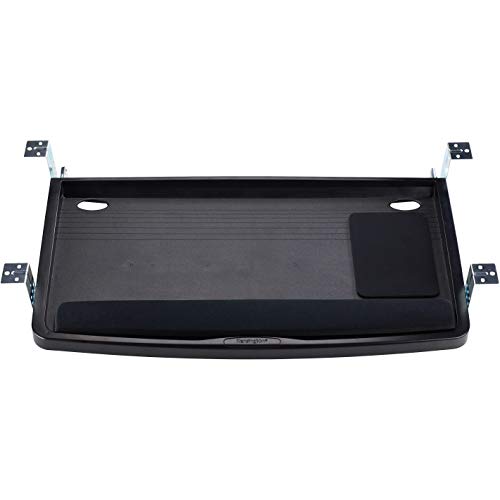
The Kensington SmartFit drawer is the pick for wide keyboards. Its platform measures 24.5 by 11.75 inches, wide enough for many full-size, split, and curved keyboards, plus a wrist rest and a mouse pad. The outer dimensions are 26 by 13.2 by 2.75 inches.
Height is handled through the SmartFit system. A color-coded chart helps match hand size to a mounting height, and the drawer mounts at a chosen height during installation. That suits a desk used by one person, where the height is set once and then left alone.
The drawer includes a full-length gel wrist rest, a mouse pad, and built-in cable management. The slide-out design stores the keyboard under the desktop when not in use. The maker lists a three-year warranty. This mid-range pick does not tilt, so it does not offer negative tilt adjustment, and it needs screws for mounting.
Specs
| Specification | Detail |
|---|---|
| Platform size | 24.5 by 11.75 inches |
| Outer dimensions | 26 by 13.2 by 2.75 inches |
| Mount type | Screw-mount slide-out drawer |
| Height system | Color-coded SmartFit chart |
| Included extras | Gel wrist rest, mouse pad, cable management |
| Fits | Full-size, split, and curved keyboards |
| Desk layout | Straight or corner workstations |
| Warranty | Three years |
3M Adjustable Keyboard Tray

The 3M adjustable tray is the premium pick in this guide. It uses an articulating arm on a 23-inch track, and height and tilt are changed by lifting the platform. That lift-to-adjust design suits an office where the keyboard position needs to change quickly.
Height adjustment runs from about 4 inches above the mounting surface to 6 inches below it. Tilt ranges from 10 degrees up to 15 degrees down, so negative tilt is available for a more neutral wrist position. The platform swivels from side to side and stores under the desk when not in use. A gel wrist rest and a precise mouse pad are included.
The track needs a solid mounting surface and enough depth under the desk, so measure the underside before ordering. The 23-inch track needs more clear depth than a compact drawer. That depth is the trade-off for the smooth arm movement and the wide height range. It suits a fixed desk, a sit-stand setup, or a shared workstation where height and tilt change often.
Specs
| Specification | Detail |
|---|---|
| Track length | 23 inches |
| Height adjustment | About 4 inches above to 6 inches below mounting surface |
| Tilt range | 10 degrees up to 15 degrees down |
| Adjustment method | Lift to adjust height and tilt |
| Swivel | Side to side |
| Mount type | Screw-mount articulating arm |
| Included extras | Gel wrist rest and mouse pad |
| Storage | Stores under desk |
Fellowes Office Suites Keyboard Drawer

The Fellowes Office Suites drawer is the simple budget pick in this guide. It is a slide-out drawer that moves the keyboard and mouse off the desktop to save workspace. There is no articulating arm and no tilt adjustment: pull the drawer out to type, push it back to clear the desk.
The keyboard platform measures about 20.1 by 7.75 inches, with an overall footprint of 22 by 11.6 inches. A separate mouse platform mounts on either the left or the right side, and it stows underneath when not in use. Three height settings place the keyboard about 1.75, 2.13, or 2.5 inches below the mounting track.
Installation needs about 23.5 inches of clear width under the desk, so measure the space between desk legs and support rails. The drawer runs on ball-bearing glides. The shallow platform depth is the main limit: a keyboard with a built-in wrist rest may overhang the front edge, so check the keyboard depth against the 7.75-inch platform depth before ordering.
Specs
| Specification | Detail |
|---|---|
| Keyboard platform | About 20.1 by 7.75 inches |
| Overall footprint | 22 by 11.6 inches |
| Mouse platform | Separate, mounts left or right, stows underneath |
| Height settings | About 1.75, 2.13, or 2.5 inches below track |
| Mount type | Screw-mount slide-out drawer |
| Glide type | Ball-bearing glides |
| Clear width needed | About 23.5 inches |
Frequently Asked Questions
What size keyboard tray do I need for a full-size keyboard?
A full-size keyboard with a number pad usually needs a platform at least 24 inches wide, plus room for a mouse beside it. The Kensington drawer at 24.5 inches wide and the Vivo clamp-on tray at 26.8 inches wide both suit a full-size keyboard and mouse.
Do clamp-on keyboard trays damage the desk?
A clamp-on tray grips the front edge with pads that protect the surface, and it leaves no screw holes. Check the stated desk thickness and edge shape first, because a clamp made for a square edge may not grip a beveled edge securely.
Can a keyboard tray help with wrist pain?
A tray can help by lowering the keyboard below the desktop and, on articulating models, by adding negative tilt. That can support a more neutral wrist position during long typing sessions. A tray is not a medical device, and persistent wrist pain should be discussed with a clinician.
Will a keyboard tray fit a standing desk?
Some trays fit a standing desk, and some do not. Check for a crossbeam under the desktop, the distance to that crossbeam, and the depth available for the track or arm. Measure the underside at both sitting and standing heights before ordering.
Conclusion
The best PC keyboard tray is the one that fits the desk and matches how the keyboard is used. For a desk that cannot be drilled, the Vivo clamp-on tray is the straightforward pick. For height, tilt, and swivel adjustment, the Huanuo tray covers the main ergonomic controls at a mid-range level, while the 3M tray adds a wider height range and lift-to-adjust movement in the premium group. For a wide or split keyboard, the Kensington drawer offers extra width, and the Fellowes model is the simple low-cost drawer.
Measure desk thickness, edge shape, under-desk width, and clearance to any crossbar before ordering. Choose a budget drawer when the goal is mainly to free desk space, a mid-range tray when width or adjustment matters, and a premium articulating tray when height and tilt need to change often.






