
Key takeaways
- Compare five webcams for streaming, meetings and video calls, from 1080p picks to 4K models with privacy covers, adjustable views and helpful desk extras.
A built-in laptop camera often sits too low, looks soft in indoor light, and gives you little control over what shows behind you. A separate webcam fixes the angle, sharpens the picture, and adds extras such as a privacy cover, a wider or narrower view, and clearer built-in audio. For anyone who joins daily meetings, records lessons, or streams from a home desk, that upgrade changes how professional each call feels.
This guide compares five webcams sold on Amazon, from a proven Full HD model for everyday calls to 2K and 4K models for recording and streaming. Each pick uses only facts from its own listing, so you can match resolution, field of view, focus, microphone, and connection type to your desk and the apps you use most.
As an Amazon Associate, we earn from qualifying purchases.
Quick answer
For most home desks, a good 1080p or 2K webcam with autofocus, light correction and a privacy cover covers daily meetings well. Choose 4K if you record or crop your video, choose 1080p at 60 frames per second if you stream movement, and check field of view, microphone and connection before you order any model.
How to choose
Begin with resolution and how your apps handle it. Full HD 1080p suits most meeting apps and keeps streams manageable. A 2K camera adds sharpness for close framing and recording. A 4K camera gives room to crop or zoom in software while keeping detail, which helps creators who record lessons or facecam footage for edited video. A meeting app may send a lower resolution than the camera can capture, so check the video settings inside your app as well.
Frame rate matters when movement is part of the picture. Thirty frames per second is common for seated calls. Sixty frames per second looks smoother for streaming or teaching with gestures.
Field of view controls how much of the room appears. A narrow view keeps the frame on your face and shoulders. A wider view suits a shared desk or a whiteboard. Adjustable field of view helps in a small office because you can change the frame in software.
Focus and light handling shape the daily result. Autofocus helps if you lean in or hold up notes. Fixed focus suits a set seating position at a steady distance. Light correction and HDR help when a window sits behind you or room light is uneven. Audio, privacy, and connection matter too: built-in microphones are convenient, a privacy cover blocks the lens between calls, and you should confirm the port type and app names in the listing match your computer.
Logitech MX Brio Ultra HD 4K Webcam

The MX Brio is the high resolution pick in this group, built for collaboration and streaming from a personal workspace. The listing states 4K Ultra HD video, with 2160p at 30 frames per second and 1080p at 60 frames per second, so you can pick detail for recording or smoother motion for live sessions. Its diagonal field of view can be set to 65, 78, or 90 degrees, making it easy to tighten the frame for a solo call or widen it for a desk view.
Fine controls set this model apart. The listing describes adjustments for lighting and white balance, with ISO, shutter speed, temperature, tint, and vibrance available through Logi software. Show Mode lets you tilt the camera down to share physical work and notes on a call. Two beamforming microphones with noise reducing technology aim to keep your voice clear, and the integrated privacy shutter closes the lens when you are done.
Specs:
– Brand: Logitech
– Model: MX Brio (960-001545)
– Video: 4K Ultra HD, 2160p at 30 fps; 1080p at 60 fps
– Field of view: 65, 78, and 90 degrees
– Focus: Auto focus
– Microphones: 2 beamforming mics, noise reducing
– Privacy: Integrated shutter
– Connection: USB-C
– Works with: Microsoft Teams, Zoom, Google Meet
– Included: Mount clip, USB-C to USB-C 3.0 cable
Anker PowerConf C200 2K Webcam
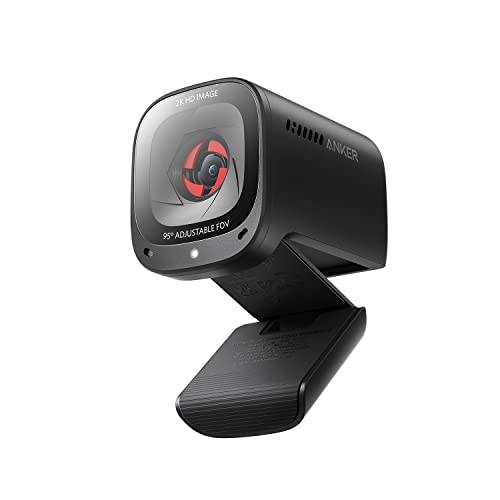
The PowerConf C200 sits in the middle of this group, with 2K video that is a clear step above basic 1080p for close, face-focused calls. The listing highlights low-light correction, which helps in rooms where the main light comes from a window or a single lamp. Its adjustable field of view lets you choose a tighter or wider frame, with 65, 78, and 95 degree options set in the AnkerWork software, according to summaries of the listing.
The listing names AI noise canceling microphones and stereo mics, aimed at picking up your voice while reducing background sound in a shared home. A built-in privacy cover slides over the lens between calls. The model number is A3369, and the listing covers PC, laptop, and Mac use. For team calls, client meetings, and family video chats from one desk, this 2K mix of sharpness, framing choice, and privacy is easy to live with.
Specs:
– Brand: Anker
– Model: PowerConf C200 (A3369)
– Video: 2K
– Field of view: Adjustable, 65, 78, and 95 degrees
– Microphones: Stereo mics, AI noise canceling
– Light feature: Low-light correction
– Privacy: Built-in cover
– For: PC, laptop, Mac
– Systems listed: Windows 7 or later, macOS 10.11 or later
Logitech C920S HD Pro Webcam

The C920S HD Pro is the proven Full HD choice for buyers who want simple, familiar video calling. The listing states Full HD 1080p video at 30 frames per second, with clear stereo audio, HD light correction, and a privacy shutter. That mix covers the core needs of remote work: a sharp seated picture, built-in sound, help with uneven room light, and a physical cover for the lens at the end of the day.
Compatibility is a strong point in the listing, which names Skype, Zoom, FaceTime, and Hangouts, and lists PC, Mac, laptop, tablet, and Xbox among the devices. This is a sensible pick if your meetings happen inside common apps and you prefer a long-running model line with a straightforward setup. It does not offer 2K or 4K capture or a 60 frames per second mode, so creators who record and crop footage should look at the higher resolution models instead.
Specs:
– Brand: Logitech
– Model: C920S HD PRO Webcam (960-001257)
– Video: Full HD 1080p at 30 fps
– Audio: Clear stereo audio
– Light feature: HD light correction
– Privacy: Privacy shutter
– Works with: Skype, Zoom, FaceTime, Hangouts
– Devices listed: PC, Mac, laptop, tablet, Xbox
Razer Kiyo Pro Webcam
The Kiyo Pro focuses on smooth motion and changing light. The listing states Full HD 1080p at 60 frames per second, an adaptive light sensor, and HDR enabled capture. That combination suits streamers, teachers, and presenters who move while they talk or show items to the camera, in rooms where brightness shifts between day and evening sessions.
A wide angle lens with adjustable field of view lets you frame a solo stream or a wider desk view without moving the mount. The listing names OBS, XSplit, Twitch, Zoom, and Teams, covering streaming software and meeting apps. Product details list PC as the platform and note that Windows 10 and USB 3.0 are recommended for streaming and recording performance. Choose this model when smooth 1080p motion and light handling matter more than 2K or 4K resolution.
Specs:
– Brand: Razer
– Model: Kiyo Pro (RZ19-03640100-R3U1)
– Video: Full HD 1080p at 60 fps
– Light features: Adaptive light sensor, HDR enabled
– Lens: Wide angle, adjustable field of view
– Works with: OBS, XSplit, Twitch, Zoom, Teams
– Platform: PC; Windows 10 and USB 3.0 recommended in listing
– Weight: 6.9 ounces
Elgato Facecam 4K Webcam

The Facecam 4K is the creator-focused model here, described in its listing as a 4K60 studio webcam with DSLR-like control. The listing states 4K video capture, with 2160p at 60 frames per second among the USB 3.0 resolutions, plus HDR support and support for 49mm lens filters. A Sony CMOS sensor of 1/1.8 inch and an Elgato Prime Lens handle image capture, with a 90 degree field of view and fixed focus, according to the manufacturer tech specs on the listing.
This camera suits a set desk where you sit at a steady distance and want control over the picture for recorded lessons, streams, and edited video. The listing includes a monitor mount and a detachable USB-C cable, names laptop and personal computer as compatible devices, and lists Windows 11 and macOS 13 or later under system requirements. Because the focus is fixed, set the camera at your usual seating distance and check the framing in your app before an important session.
Specs:
– Brand: Elgato
– Manufacturer: Corsair
– Model: Facecam 4K (20WAF9901)
– Video: 4K, with 2160p at 60 fps listed for USB 3.0
– Sensor: Sony CMOS, 1/1.8 inch
– Lens: Elgato Prime Lens
– Focus: Fixed focus
– Field of view: 90 degrees
– Features: HDR support, DSLR-like control, 49mm lens filters
– Connection: USB-C
– Included: Monitor mount, USB-C to USB-C 3.0 cable
– Requirements listed: Windows 11, macOS 13 or later
Who should skip
Skip a new webcam if your built-in camera already looks clear in your usual light and you join only occasional calls. Skip the 4K models if your apps or work laptop limit outgoing video and you never record or crop footage, since you would rarely use the extra detail. Skip fixed focus models if you move around a lot while presenting. Skip any model whose port, computer system, or app support does not match the listing for your setup.
FAQ
Will a 4K webcam make every meeting app show my video in 4K?
Not always. The camera may capture 4K while the app sends a lower resolution based on its settings, your connection, or workplace rules. Check the video settings in your app, and treat 4K capture as most useful for recording, cropping, and streaming software that supports it.
Do I still need a separate microphone with one of these webcams?
For everyday calls, a built-in microphone is often enough in a quiet room close to the camera. If you record lessons or streams, a separate microphone placed near your mouth usually gives a fuller voice. Check each listing to see what audio it includes.
Which field of view suits a small home office?
A narrower view, around 65 to 78 degrees where offered, keeps the frame on your face and shoulders. A wider view near 90 degrees suits shared framing or showing your desk. Adjustable models let you change this in software as your setup changes.
How can I keep my lens private between calls?
Choose a model with a built-in privacy cover or shutter and close it when you finish, as listed for the MX Brio, the PowerConf C200, and the C920S HD Pro. A physical cover is the simplest habit because you can see at a glance that the lens is blocked.
Final verdict
For most readers, the Anker PowerConf C200 offers a balanced mix of 2K sharpness, adjustable framing, built-in microphones, and a privacy cover for daily meetings. The Logitech C920S HD Pro remains a sound Full HD choice for common apps. Choose the Logitech MX Brio for 4K detail with fine image controls, the Razer Kiyo Pro for smooth 1080p at 60 frames per second in changing light, and the Elgato Facecam 4K for a fixed, creator-focused desk with 4K60 capture and lens filter support.






