Key takeaways
- Five desktop speakers for PC gaming, music and movies compared, from a compact USB pair to 2.1 systems with subwoofers, RGB lighting and THX sound.
The speakers built into a monitor or laptop do one job well: they make sound small enough to fit a thin screen. Voices come through, but game effects feel flat, music loses its low end, and movie scenes that should fill a room sound distant. A dedicated set of desktop speakers fixes that at the place you actually sit, a short distance from the screen, where even a modest system can sound full and clear.
This guide compares five desktop speaker systems on sale on Amazon now, each built for a different kind of desk: a compact USB pair for tight spaces, a wooden bookshelf pair for music, two 2.1 systems with subwoofers for games and films, and one gaming system with reactive lighting.
As an Amazon Associate, we earn from qualifying purchases.
Quick answer
For most desks, the Logitech Z407 is the safest all-round choice, with a subwoofer, Bluetooth, USB and a wireless control dial. The Creative Pebble V3 suits small desks and simple USB setups, the Edifier R1280T favors music, the Logitech G560 adds RGB lighting and DTS:X Ultra for gaming, and the Klipsch ProMedia 2.1 brings THX-certified analog power.
How to choose
Begin with the shape of the system. A 2.0 setup is a pair of speakers with no separate bass box, which keeps a desk tidy and works well for music, calls and casual video. A 2.1 system adds a subwoofer that sits on the floor or under the desk, and that extra box gives games and movies their rumble and weight. If you watch films or play action games at your desk, the subwoofer matters more than any other single feature.
Next, look at connections. USB audio is the simplest route for a computer, since one cable can carry both sound and power on compact models. Bluetooth lets a phone or tablet play through the same speakers without moving cables. A 3.5 mm input works with computers, monitors, handheld consoles and older gear, while dual RCA inputs suit a bookshelf pair that may also serve a record player.
Desk space is the third check. Measure the room on either side of your monitor before choosing, because bookshelf speakers are far larger than compact desktop pairs. Think about controls as well: a wireless dial or side panel knobs you can reach easily makes daily use much simpler. Finally, treat headline power figures as a rough guide to headroom rather than a promise of quality.
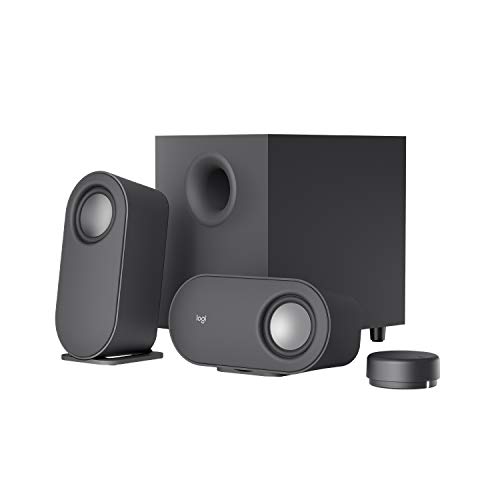
Logitech Z407 Bluetooth Computer Speakers
The Z407 is the flexible middle ground of this group: a 2.1 system with two satellite speakers and a down-firing subwoofer, rated by Logitech at 80 watts peak and 40 watts RMS. That subwoofer gives game effects and film soundtracks a low-end weight that compact pairs cannot reach. The satellites can stand upright or lie flat, which helps when a monitor shelf leaves little vertical room.
Connections are a strong point. The listing covers Bluetooth, micro USB and a 3.5 mm input, so a computer, a phone and a third device can stay connected and swap over without re-plugging cables. The wireless control dial handles volume, play and pause, track skipping and bass level from anywhere on the desk. For a home office desk that moves between work calls, music and evening gaming, the Z407 covers all three jobs in one tidy system.
Specs:
– Brand: Logitech
– Configuration: 2.1, two satellite speakers and a subwoofer
– Output: 80 W peak, 40 W RMS
– Connections: Bluetooth, micro USB, 3.5 mm input
– Controls: wireless control dial
– Model number: 980-001347
Creative Pebble V3 Minimalistic 2.0 USB-C Desktop Speakers
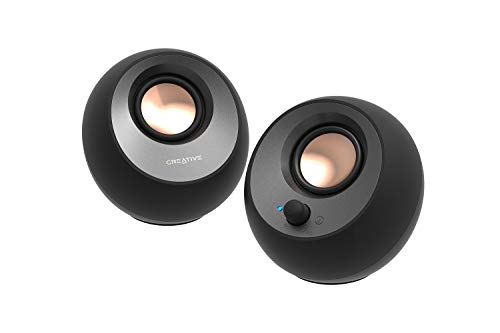
The Pebble V3 is built for desks where space runs out before the monitor does. Each rounded speaker is small enough to tuck beside a laptop, and a single USB-C cable carries both audio and power, so there is no separate power brick and no cable clutter. Creative includes a USB-C to USB-A converter in the box for computers with only the older port. The listing gives output as 8 watts RMS with 16 watts peak, from 2.25 inch drivers angled toward the listener.
Beyond the wired link, the Pebble V3 adds Bluetooth 5.0 for wireless playback from a phone, plus a 3.5 mm AUX input for other sources. A Clear Dialog feature aims to keep voices forward in podcasts, calls and film dialogue. There is no subwoofer, so deep bass is limited by the small cabinets, but for near-desk listening the trade is a clean, minimal setup that takes minutes to install.
Specs:
– Brand: Creative
– Configuration: 2.0 desktop speaker pair
– Output: 8 W RMS, 16 W peak
– Connections: USB-C audio, Bluetooth 5.0, 3.5 mm AUX input
– Drivers: 2.25 inch, angled toward the listener
– Extras: Clear Dialog enhancement, USB-A converter included
– Model number: MF1700
Edifier R1280T Powered Bookshelf Speakers
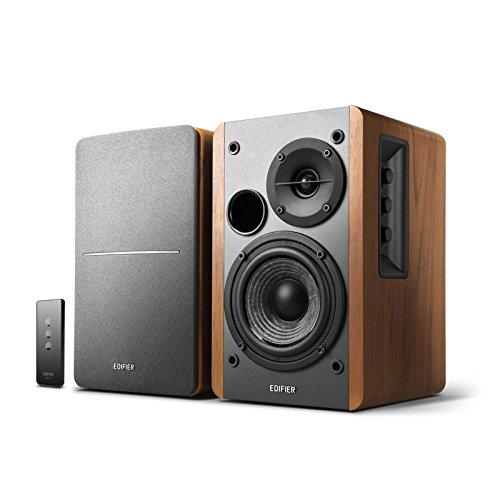
The R1280T takes the bookshelf route: two powered speakers in wooden enclosures, with 42 watts RMS on the listing and no separate bass box. Edifier describes the model as a near field design, tuned for listening up close, which is exactly how a desk setup works. The wooden cabinets give the pair a furniture-like look that suits a home office better than plastic gaming styling.
Two RCA inputs let you keep two sources wired at once, for example a computer and a record player, and switch between them without swapping plugs. Bass, treble and volume controls sit on the side panel of the active speaker, so you can shape the sound for music or lift the treble for speech. There is no Bluetooth and no USB input on this model. What you get instead is a simple, analog, music-first pair with more cabinet volume than compact desktop speakers.
Specs:
– Brand: Edifier
– Configuration: 2.0 powered bookshelf pair
– Output: 42 W RMS
– Inputs: dual RCA
– Enclosure: wooden
– Controls: bass, treble and volume on the side panel
– Model number: R1280T
Logitech G560 PC Gaming Speaker System
The G560 is the gaming specialist here, a 2.1 system with two satellite speakers and a down-firing subwoofer, rated at 240 watts peak and 120 watts RMS. Its signature feature is LIGHTSYNC RGB lighting: four lighting zones react to in-game action and audio in supported titles, and can also sample colors from areas of your screen to extend the picture onto the wall behind the desk. Logitech lists around 16.8 million colors, set through its gaming software.
On the audio side, integrated DTS:X Ultra renders 3D positional sound over USB, which helps with picking out direction in games where hearing a footstep early matters. Connections cover USB, a 3.5 mm input and Bluetooth 4.1, and Easy-Switch lets you move between connected devices with a button press. Two notes from the listing are worth knowing: DTS:X is not supported on Mac OS X, and full lighting control needs USB and Logitech software on a Windows PC. If your desk doubles as a gaming station, this is the pick built for that job.
Specs:
– Brand: Logitech G
– Configuration: 2.1, two satellite speakers and a down-firing subwoofer
– Output: 240 W peak, 120 W RMS
– Connections: USB, 3.5 mm input, Bluetooth 4.1
– Features: LIGHTSYNC RGB lighting, DTS:X Ultra, Easy-Switch
– Model number: 980-001300
Klipsch ProMedia 2.1 THX Certified Computer Speaker System

The ProMedia 2.1 is the veteran of this group, a THX-certified 2.1 system that Klipsch has sold for years as a computer and gaming speaker set. Two satellite speakers use Klipsch horn-loaded design, built around the company MicroTractrix horn, the same approach Klipsch applies in its home speakers to keep dialogue and effects clear at high volume. A separate subwoofer handles the low end.
This is an analog system: the listing is built around a 3.5 mm input, with no Bluetooth and no USB audio. That focus is both the appeal and the limit. There is nothing to pair and no software to install; you plug in the cable and the system works with any device that has a headphone jack or line output. Buyers who want wireless playback should look at the Z407 or G560 instead. Buyers who want a proven, powerful desk system for movies and games, and who are happy with a cable, will find the ProMedia 2.1 hard to argue with.
Specs:
– Brand: Klipsch
– Configuration: 2.1, two satellite speakers and a subwoofer
– Certification: THX Certified
– Input: 3.5 mm analog
– Satellites: horn-loaded design with MicroTractrix horn
– Color: Black
Who should skip
Skip desktop speakers entirely if you do most of your listening on headphones, or if your desk sits in a shared room where open speakers would disturb other people. Skip these five if you want true surround sound for a TV lounge setup, since every system here is stereo or 2.1 and built for near-desk listening. Skip the 2.1 systems if you have no room for a subwoofer box, and skip the compact 2.0 pairs if heavy bass for films and action games is your main goal. Finally, skip the wired-only models if wireless playback from a phone is a daily habit.
FAQ
Do I need a subwoofer for games and movies at a desk?
It depends on the content. A subwoofer handles the low notes that small desktop speakers cannot reproduce, so explosions, engines and film scores gain weight and impact. For music, calls and casual video, a good 2.0 pair is enough. If games and movies are the main use, a 2.1 system such as the Z407, G560 or ProMedia 2.1 is the better match.
Can one set of speakers serve my computer and my phone?
Yes, if the model has more than one input. The Z407 and G560 accept Bluetooth alongside wired inputs, and the Pebble V3 adds Bluetooth 5.0 to its USB and AUX connections, so a phone can play wirelessly while the computer stays plugged in. The R1280T and ProMedia 2.1 are wired only.
Is USB audio a better choice than a 3.5 mm cable?
USB carries a digital signal and, on compact models like the Pebble V3, can carry power on the same cable, which keeps a desk tidy. A 3.5 mm cable works with far more devices, including monitors, controllers and older hardware. Neither is universally better; match the connection to your devices and the features you want, such as the G560 lighting and DTS:X Ultra, which need USB.
Will these speakers work with a game console?
Models with a 3.5 mm input can usually connect through a controller headphone jack or a TV or monitor audio output, which covers the Z407, G560, Pebble V3 and ProMedia 2.1. Check the outputs on your setup first, since options vary by console and display, and features tied to a Windows PC, such as DTS:X Ultra on the G560, will not carry over.
Final verdict
All five systems improve on built-in monitor sound by a wide margin, so the right choice comes down to your desk and your habits. Pick the Logitech Z407 for the most flexible all-round setup, the Creative Pebble V3 for a small desk and a one-cable install, and the Edifier R1280T if music through a wooden bookshelf pair matters most. Choose the Logitech G560 for gaming with reactive lighting and positional audio, or the Klipsch ProMedia 2.1 for THX-certified analog power with zero fuss.