Our Short List of 3

- Best for: Threadripper PRO workstations running several graphics cards, large memory, and fast storage at once Watch out for: EEB sizing needs a large case with EEB mounting points, and a standard Threadripper processor will not unlock the full eight-channel memory or 128 lanes
- Specs: Socket sTR5; Chipset AMD WRX90; Form factor EEB; Memory 8 DDR5 ECC R-DIMM slots, up to 2TB with a PRO processor; Power delivery 32 power stages; Expansion 7 PCIe 5.0 x16 slots, 4 PCIe 5.0 M.2 slots; Networking Dual 10Gb LAN, 2.5Gb LAN; Wireless Wi-Fi 7
- Best for: Threadripper PRO workstations running several graphics cards, large memory, and fast storage at once
- Watch out for: EEB sizing needs a large case with EEB mounting points, and a standard Threadripper processor will not unlock the full eight-channel memory or 128 lanes

- Best for: Professionals who want one board that handles rendering, simulation, and multi-GPU work without moving to the larger EEB size Watch out for: CEB sizing still needs a case wider than a standard ATX tower, and the three M.2 slots are fewer than the four offered by some rivals
- Specs: Socket sTR5; Chipset AMD TRX50; Form factor CEB; Memory 4 DDR5 ECC R-DIMM slots, up to 1TB; Power delivery 36 power stages; Expansion 3 PCIe 5.0 x16 slots, 3 PCIe 5.0 M.2 slots, SlimSAS connector; Networking 10Gb LAN, 2.5Gb LAN; Wireless Wi-Fi 7, USB4 Type-C
- Best for: Professionals who want one board that handles rendering, simulation, and multi-GPU work without moving to the larger EEB size
- Watch out for: CEB sizing still needs a case wider than a standard ATX tower, and the three M.2 slots are fewer than the four offered by some rivals

- Best for: Builders who want overclocking support and four M.2 slots in a CEB board Watch out for: Fewer power stages than the non-A model, so it suits mid-range Threadripper processors better than the highest core-count chips under sustained full load
- Specs: Socket sTR5; Chipset AMD TRX50; Form factor CEB; Memory 4 DDR5 ECC R-DIMM slots, up to 1TB; Power delivery 20 power stages; Expansion 3 PCIe 5.0 x16 slots, 4 M.2 slots; Networking 10Gb LAN, 2.5Gb LAN; Wireless Wi-Fi 7, USB4 Type-C
- Best for: Builders who want overclocking support and four M.2 slots in a CEB board
- Watch out for: Fewer power stages than the non-A model, so it suits mid-range Threadripper processors better than the highest core-count chips under sustained full load
All 4 Picks at a Glance
| Product | Specs | Action |
|---|---|---|
| 1. ASUS Pro WS WRX90E-SAGE SE |
| Check price on Amazon |
| 2. ASUS Pro WS TRX50-SAGE WIFI |
| Check price on Amazon |
| 3. ASUS Pro WS TRX50-SAGE WiFi A |
| Check price on Amazon |
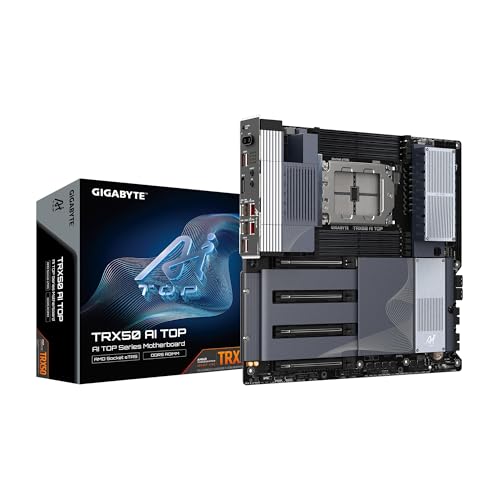 5. GIGABYTE TRX50 AI TOP |
| Check price on Amazon |
Key takeaways
- Five Threadripper motherboards for rendering, AI training, and simulation work, compared on socket, VRM, memory channels, PCIe lanes, and case fit.
A Threadripper build lives or dies on the motherboard. The processor brings the cores, but the board decides how many memory channels feed them, how many graphics cards and storage drives can run at full speed, and whether the power delivery holds steady through a render that runs all night. Pick the wrong socket and the processor will not fit at all, and too few PCIe lanes will leave a second graphics card or a fast storage array idle.
This guide covers motherboards for AMD Threadripper CPUs only. Every board below uses a Threadripper socket and chipset, with both stated in its specs. No Ryzen desktop boards and no Intel boards appear here, because neither accepts a Threadripper processor.
Disclosure: As an Amazon Associate, we earn from qualifying purchases.
Quick Picks
Here is the field at a glance. The ASUS Pro WS WRX90E-SAGE SE is the flagship for Threadripper PRO builds with the most expansion. The ASUS Pro WS TRX50-SAGE WIFI is the steady all-rounder for Threadripper 7000 and 9000 builds. The ASUS Pro WS TRX50-SAGE WiFi A is the overclocking-ready CEB option with four M.2 slots. The GIGABYTE TRX50 AERO D is the creator-focused board with strong connectivity. The GIGABYTE TRX50 AI TOP is the memory-heavy pick for local AI work with eight memory slots.
| Motherboard | Socket and Chipset | Form Factor | Memory Slots | PCIe 5.0 x16 Slots |
|---|---|---|---|---|
| ASUS Pro WS WRX90E-SAGE SE | sTR5, WRX90 | EEB | 8 DDR5 ECC R-DIMM | 7 |
| ASUS Pro WS TRX50-SAGE WIFI | sTR5, TRX50 | CEB | 4 DDR5 ECC R-DIMM | 3 |
| ASUS Pro WS TRX50-SAGE WiFi A | sTR5, TRX50 | CEB | 4 DDR5 ECC R-DIMM | 3 |
| GIGABYTE TRX50 AERO D | sTR5, TRX50 | E-ATX | 4 DDR5 R-DIMM | 2 |
| GIGABYTE TRX50 AI TOP | sTR5, TRX50 | E-ATX | 8 DDR5 ECC R-DIMM | 4 |
How to Choose
Socket and chipset generations
Threadripper processors come in distinct socket generations, and the sockets are not interchangeable. Current Threadripper 7000 and 9000 series processors, including Threadripper PRO WX-series chips, use the sTR5 socket. Boards for them use the TRX50 chipset for standard Threadripper or the WRX90 chipset for Threadripper PRO. Older third-generation Threadripper processors use the sTRX4 socket with the TRX40 chipset, and first- and second-generation chips use TR4 with X399. A TRX40 board will not accept a 7000-series processor, and a TRX50 board will not accept a third-generation chip. Confirm the exact processor series named in the listing before ordering, and check the maker’s CPU support list for the BIOS version your chip needs.
TRX50 and WRX90 share the sTR5 socket, but they are not the same platform. TRX50 supports quad-channel DDR5 memory and up to 80 PCIe 5.0 lanes, and it accepts both standard Threadripper and Threadripper PRO processors. WRX90 is built for Threadripper PRO only, and with a PRO processor it unlocks eight-channel DDR5 memory and up to 128 PCIe 5.0 lanes. A standard Threadripper chip will run on a WRX90 board, but it will only use quad-channel memory and 80 lanes, so the extra WRX90 hardware goes unused.
VRM and power delivery
Threadripper processors draw far more power than mainstream desktop chips, with flagship parts carrying a 350W thermal design power. The voltage regulator module, or VRM, converts power from the supply into the stable voltage the processor needs, and a weak VRM will throttle the processor under load. Look for a high phase count with large heatsinks and active cooling over the VRM area. The boards in this guide list 16 to 36 power stages, and the higher counts suit the highest core-count processors and long unattended renders. If you plan to run a 96-core processor at full load for hours, treat VRM design as a deciding factor, not a footnote.
Memory channels and type
Threadripper boards do not use ordinary desktop DDR5 memory. They require registered DDR5 memory, known as R-DIMM, with ECC error correction. Standard unbuffered desktop DDR5 will not boot on these boards. TRX50 boards offer four memory channels with four slots, while WRX90 boards and the GIGABYTE TRX50 AI TOP offer eight slots. With a PRO processor, eight slots deliver eight-channel memory and up to 2TB of capacity. With a standard Threadripper processor on the AI TOP, only four of the eight slots are usable, so read the slot rules for your processor before buying memory. Check the maker’s qualified vendor list for validated kits, because memory stability matters more on a workstation than on a gaming machine.
PCIe lanes and slot layout
PCIe lanes are the currency of a Threadripper build. The processor provides the lanes, and the board decides how they are split between graphics card slots, M.2 storage slots, and add-in cards. Count the full-length x16 slots and their generation. A board with seven PCIe 5.0 x16 slots, like the WRX90 model below, can hold several graphics cards plus capture or networking cards. A board with two or three x16 slots suits a single graphics card plus one accelerator. Also count M.2 slots: most boards here offer three or four PCIe 5.0 M.2 slots for fast NVMe storage, and some add SlimSAS or MCIO connectors for more drives. A large graphics card can block a neighboring slot, so check slot spacing if you plan to install more than one double-width card.
Form factor and case fit
Threadripper boards are large. The boards in this guide use CEB, E-ATX, or EEB form factors, and all of them need a roomy case with the right mounting points. Measure your case against the board dimensions before ordering: an EEB board will not fit in a mid-tower case built for ATX boards, and even some E-ATX boards overhang the mounting tray in compact cases. Large boards also need strong airflow, because the VRM, chipset, and memory all generate heat under load. Confirm that your cooler covers the large sTR5 socket, since mainstream coolers made for smaller sockets do not fit.
The 5 Best Options
1. ASUS Pro WS WRX90E-SAGE SE
- Best for: Threadripper PRO workstations running several graphics cards, large memory, and fast storage at once Watch out for: EEB sizing needs a large case with EEB mounting points, and a standard Threadripper processor will not unlock the full eight-channel memory or 128 lanes
- Specs: Socket sTR5; Chipset AMD WRX90; Form factor EEB; Memory 8 DDR5 ECC R-DIMM slots, up to 2TB with a PRO processor; Power delivery 32 power stages; Expansion 7 PCIe 5.0 x16 slots, 4 PCIe 5.0 M.2 slots; Networking Dual 10Gb LAN, 2.5Gb LAN; Wireless Wi-Fi 7
- Best for: Threadripper PRO workstations running several graphics cards, large memory, and fast storage at once
- Watch out for: EEB sizing needs a large case with EEB mounting points, and a standard Threadripper processor will not unlock the full eight-channel memory or 128 lanes
Threadripper PRO workstations running several graphics cards, large memory, and fast storage at once Watch out for: EEB sizing needs a large case with EEB mounting points, and a standard Threadripper processor will not unlock the full eight-channel memory or 128 lanes
EEB sizing needs a large case with EEB mounting points, and a standard Threadripper processor will not unlock the full eight-channel memory or 128 lanes
The flagship PRO board in this group. It is an EEB workstation motherboard for Threadripper PRO 7000 and 9000 WX-series processors, with seven PCIe 5.0 x16 slots, four PCIe 5.0 M.2 slots, dual 10Gb LAN, and a 32 power-stage design. Together those figures describe a board built for sustained, expansion-heavy work, and the large power-stage count addresses the high power draw of a high-core-count processor. With a PRO processor it supports eight-channel ECC R-DIMM DDR5 memory up to 2TB, plus remote management for systems that run unattended.
Watch out for: EEB sizing needs a large case with EEB mounting points, and a standard Threadripper processor will not unlock the full eight-channel memory or 128 lanes
2. ASUS Pro WS TRX50-SAGE WIFI
- Best for: Professionals who want one board that handles rendering, simulation, and multi-GPU work without moving to the larger EEB size Watch out for: CEB sizing still needs a case wider than a standard ATX tower, and the three M.2 slots are fewer than the four offered by some rivals
- Specs: Socket sTR5; Chipset AMD TRX50; Form factor CEB; Memory 4 DDR5 ECC R-DIMM slots, up to 1TB; Power delivery 36 power stages; Expansion 3 PCIe 5.0 x16 slots, 3 PCIe 5.0 M.2 slots, SlimSAS connector; Networking 10Gb LAN, 2.5Gb LAN; Wireless Wi-Fi 7, USB4 Type-C
- Best for: Professionals who want one board that handles rendering, simulation, and multi-GPU work without moving to the larger EEB size
- Watch out for: CEB sizing still needs a case wider than a standard ATX tower, and the three M.2 slots are fewer than the four offered by some rivals
Professionals who want one board that handles rendering, simulation, and multi-GPU work without moving to the larger EEB size Watch out for: CEB sizing still needs a case wider than a standard ATX tower, and the three M.2 slots are fewer than the four offered by some rivals
CEB sizing still needs a case wider than a standard ATX tower, and the three M.2 slots are fewer than the four offered by some rivals
This CEB board is the steady all-rounder for current Threadripper builds. It lists ECC R-DIMM DDR5 memory, a 36 power-stage design, Wi-Fi 7, three PCIe 5.0 x16 slots, three PCIe 5.0 M.2 slots, and 10Gb plus 2.5Gb LAN. The high power-stage count and ECC support make it the calmer choice for long renders, simulation jobs, and anything that runs overnight. It accepts both standard Threadripper 7000 and 9000 series processors and Threadripper PRO WX-series processors, and it supports CPU and memory overclocking, dual power supply input, and remote management.
Watch out for: CEB sizing still needs a case wider than a standard ATX tower, and the three M.2 slots are fewer than the four offered by some rivals
3. ASUS Pro WS TRX50-SAGE WiFi A
- Best for: Builders who want overclocking support and four M.2 slots in a CEB board Watch out for: Fewer power stages than the non-A model, so it suits mid-range Threadripper processors better than the highest core-count chips under sustained full load
- Specs: Socket sTR5; Chipset AMD TRX50; Form factor CEB; Memory 4 DDR5 ECC R-DIMM slots, up to 1TB; Power delivery 20 power stages; Expansion 3 PCIe 5.0 x16 slots, 4 M.2 slots; Networking 10Gb LAN, 2.5Gb LAN; Wireless Wi-Fi 7, USB4 Type-C
- Best for: Builders who want overclocking support and four M.2 slots in a CEB board
- Watch out for: Fewer power stages than the non-A model, so it suits mid-range Threadripper processors better than the highest core-count chips under sustained full load
Builders who want overclocking support and four M.2 slots in a CEB board Watch out for: Fewer power stages than the non-A model, so it suits mid-range Threadripper processors better than the highest core-count chips under sustained full load
Fewer power stages than the non-A model, so it suits mid-range Threadripper processors better than the highest core-count chips under sustained full load
The WiFi A is the sibling of the board above, with a different balance of features. It is a CEB TRX50 board with a 20 power-stage design, CPU and memory overclocking readiness, four M.2 slots, USB4, and 10Gb plus 2.5Gb LAN. The extra M.2 slot suits builders who want a large NVMe storage array alongside a graphics card, and the overclocking support suits enthusiasts who tune their processor and memory. Read the exact model name carefully when ordering, because the two ASUS TRX50 boards look alike and differ in power stages, M.2 count, and rear connectivity.
Watch out for: Fewer power stages than the non-A model, so it suits mid-range Threadripper processors better than the highest core-count chips under sustained full load
4. GIGABYTE TRX50 AERO D
The AERO D is the creator-focused board in the group, aimed at content creation and AI work. It is an E-ATX board with a 16+8+4 phase digital VRM, four DDR5 R-DIMM slots with support up to 1TB and speeds up to 7800 MT/s with overclocking, four PCIe 5.0 M.2 slots, dual USB4 Type-C ports, Wi-Fi 7, and 10GbE plus 2.5GbE LAN. Two PCIe 5.0 x16 slots and one PCIe 4.0 x16 slot cover a graphics card plus an accelerator or capture card. VRM Thermal Armor and M.2 Thermal Guard heatsinks keep the power delivery and storage cool during sustained work.
- Specs: Socket sTR5; Chipset AMD TRX50; Form factor E-ATX; Memory 4 DDR5 R-DIMM slots, up to 1TB, up to 7800 MT/s with overclocking; Power delivery 16+8+4 phase digital VRM; Expansion 2 PCIe 5.0 x16 slots, 1 PCIe 4.0 x16 slot, 4 PCIe 5.0 M.2 slots; Networking 10GbE LAN, 2.5GbE LAN; Wireless Wi-Fi 7, dual USB4 Type-C
- Best for: Content creators and video editors who want fast networking, USB4, and strong storage on a TRX50 board
-
Watch out for: Only two PCIe 5.0 x16 slots, so a second full-speed graphics card will run at PCIe 4.0 speed, and the E-ATX size needs a large case
- GIGABYTE TRX50 AERO D on Amazon
5. GIGABYTE TRX50 AI TOP
- Best for: Local AI training, large dataset work, and multi-GPU builds that need eight memory slots Watch out for: The eight-slot memory layout only pays off with a PRO processor, and the board is large, so confirm case fit and cooler clearance before ordering
- Specs: Socket sTR5; Chipset AMD TRX50; Form factor E-ATX; Memory 8 DDR5 ECC R-DIMM slots, up to 2TB with a PRO processor; Power delivery 16+8+4 phase digital VRM, 110A power stages; Expansion 4 PCIe 5.0 x16 slots, 4 PCIe 5.0 M.2 slots; Networking Dual 10GbE LAN; Wireless Wi-Fi 7, dual USB4 Type-C
- Best for: Local AI training, large dataset work, and multi-GPU builds that need eight memory slots
- Watch out for: The eight-slot memory layout only pays off with a PRO processor, and the board is large, so confirm case fit and cooler clearance before ordering
Local AI training, large dataset work, and multi-GPU builds that need eight memory slots Watch out for: The eight-slot memory layout only pays off with a PRO processor, and the board is large, so confirm case fit and cooler clearance before ordering
The eight-slot memory layout only pays off with a PRO processor, and the board is large, so confirm case fit and cooler clearance before ordering
The AI TOP is built for local AI training and memory-heavy computing. It is an E-ATX board with eight DDR5 ECC R-DIMM slots, four PCIe 5.0 x16 slots, four PCIe 5.0 M.2 slots, dual USB4 Type-C ports, dual 10GbE LAN, and Wi-Fi 7. With a Threadripper PRO processor it supports eight-channel memory up to 2TB, which suits large local language models and datasets that must stay in memory. The 16+8+4 phase digital VRM with 110A power stages feeds high-core-count processors through long training runs. Note the slot rules: with a standard Threadripper processor only four memory slots and three M.2 slots are usable, and the fourth x16 slot drops to PCIe 4.0 with a 7000-series chip.
Watch out for: The eight-slot memory layout only pays off with a PRO processor, and the board is large, so confirm case fit and cooler clearance before ordering
Which One Fits
For a Threadripper PRO workstation with the most expansion, the ASUS Pro WS WRX90E-SAGE SE is the clear match: seven PCIe 5.0 x16 slots, eight memory slots, and dual 10Gb LAN suit multi-GPU rendering, simulation, and server-style work. For a standard Threadripper 7000 or 9000 build that must stay steady through long renders, the ASUS Pro WS TRX50-SAGE WIFI is the balanced choice, with 36 power stages and ECC memory in a CEB board. For a builder who tunes the processor and wants four M.2 drives, the ASUS Pro WS TRX50-SAGE WiFi A fits better. For creators who value fast networking and USB4 alongside strong storage, the GIGABYTE TRX50 AERO D is the pick. For local AI work with large models in memory, the GIGABYTE TRX50 AI TOP is the match, provided a PRO processor is in the build so all eight memory slots work.
If you already own a third-generation Threadripper processor, none of these five boards will fit it. That chip needs an sTRX4 board with the TRX40 chipset, a separate and shrinking pool. If you own a Threadripper PRO 7000 or 9000 WX-series processor and want the full eight-channel memory and 128 lanes, choose the WRX90 board or the AI TOP.
Common Mistakes
The most common mistake is buying a board for the wrong socket. sTR5, sTRX4, and TR4 look similar in photos and share the Threadripper name, but the processors are physically different and will not fit each other’s sockets. Check the socket printed on the board listing and the processor series it supports before ordering.
The second mistake is buying the wrong memory. Threadripper boards need registered ECC DDR5 memory, and standard desktop DDR5 will not boot. Buy R-DIMM kits from the maker’s qualified vendor list, and populate the slots in the order the manual specifies, because the wrong slot population can halve the memory channels.
The third mistake is underestimating the case and cooler. These boards are CEB, E-ATX, or EEB size, and they need cases with matching mounting points plus a cooler made for the large sTR5 socket. A mainstream cooler will not cover the socket, and a mid-tower case may not fit the board at all.
The fourth mistake is ignoring the power supply. A high-core-count Threadripper processor plus one or two graphics cards draws far more power than a mainstream build, and several of these boards use dual power supply connectors. Confirm the wattage and connectors your supply provides, and leave headroom for sustained load.
The fifth mistake is assuming every slot runs at full speed at once. On some boards a slot shares lanes with an M.2 connector, or a slot drops a generation with a particular processor family. Read the lane-sharing notes in the manual before installing a second graphics card or a fourth NVMe drive.
FAQ
Can I use a Threadripper 7000 series processor on a TRX40 motherboard?
No. Threadripper 7000 series processors use the sTR5 socket, while TRX40 boards use the sTRX4 socket for third-generation Threadripper processors. The sockets are physically different and the processors will not fit. A 7000 series processor needs a TRX50 or WRX90 board, and a third-generation processor needs a TRX40 board.
Do I need ECC memory for a Threadripper motherboard?
Yes, in practice. TRX50 and WRX90 boards require registered DDR5 memory with ECC, known as R-DIMM, and standard unbuffered desktop DDR5 will not boot on them. ECC memory also guards against silent data errors during long renders and simulations. Buy kits from the maker’s qualified vendor list.
What is the difference between TRX50 and WRX90?
Both use the sTR5 socket, but TRX50 is the desktop chipset and WRX90 is the workstation chipset for Threadripper PRO processors. TRX50 supports quad-channel DDR5 memory and up to 80 PCIe 5.0 lanes, and it accepts both standard and PRO processors. WRX90 supports eight-channel DDR5 memory and up to 128 PCIe 5.0 lanes with a PRO processor. A standard Threadripper chip on a WRX90 board is limited to quad-channel memory and 80 lanes.
How many graphics cards can I install on a Threadripper motherboard?
It depends on the board. The WRX90 board in this guide offers seven PCIe 5.0 x16 slots, so it can hold several graphics cards plus other add-in cards. The TRX50 boards here offer two to four full-length slots, which suits one or two graphics cards. Check the slot spacing, because a large double-width card can block a neighboring slot.