Key takeaways
- Looking for the best chairs not just for gaming? These five ergonomic chairs handle long gaming sessions and full workdays with adjustable lumbar support.
The best chairs not just for gaming are the ones that do two jobs well. They hold you comfortably through a long evening of gaming, and then they hold you just as comfortably through a full workday the next morning. Most chairs are built for only one of those jobs. Racing-style gaming chairs look the part next to a PC and recline deeply, yet many have fixed lumbar support and a shape that feels out of place in a home office. Plain office chairs look right at a desk, yet many lack the recline range, the armrest freedom, and the long-session comfort that gaming demands.


Every chair below is an ergonomic chair with real adjustability, genuine lumbar support, and a stated weight capacity, sold on Amazon US. The short answer: the Herman Miller Aeron Remastered is the strongest all-round pick, the Steelcase Gesture is best for multi-device desks, and the Autonomous ErgoChair Pro is the most adjustable mid-range option. The HON Ignition 2.0 brings commercial-office ergonomics home, and the Secretlab Titan Evo is the pick for gamers who want a gaming chair that still works at a work desk.
Quick Picks
Our Short List of 3
All 5 Picks at a Glance
| Product | Specs | Action |
|---|---|---|
| Herman Miller Aeron Remastered, Size B, Fully Loaded | Check price on Amazon | |
| Steelcase Gesture, Graphite Gray Fabric | Check price on Amazon | |
 Autonomous ErgoChair Pro | Check price on Amazon | |
 HON Ignition 2.0 Mid Back Task Chair | Check price on Amazon | |
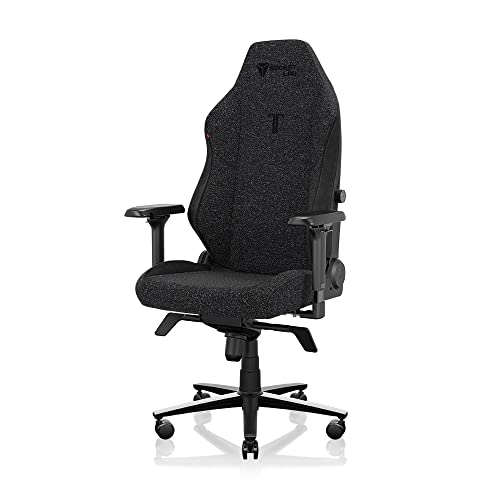 Secretlab Titan Evo, Regular, Black3 Fabric | Check price on Amazon |
How to Choose
Lumbar Support That Adjusts to Your Spine
Lumbar support decides whether a chair still feels good in hour six. Adjustable lumbar support is far more forgiving than a fixed curve: a pad that slides up and down, a dial that sets how firmly it pushes back, or a four-way system lets you tune the support to your own spine. Your posture changes between gaming and work, and the support has to change with it: upright and alert during a match, leaning back to read during a work call, with the support still meeting your lower back in both positions.
Armrests That Move With Your Hands
A keyboard and mouse want forearms level and close; a controller wants elbows tucked in; a tablet wants arms free to reach. Armrests that only move up and down cannot cover all three. Look for armrests that also adjust in width, depth, and pivot, so you can bring them in tight for controller play and swing them out for typing. The Steelcase Gesture goes furthest here, with arms that rotate through a full 360 degrees. Check that the armrests can drop low enough to slide under your desktop.
Seat Depth, Seat Height, and Fit
Seat height should let your feet rest flat on the floor with your thighs roughly level, and the seat-height range should match your desk height so your elbows sit level with your keyboard. Seat depth matters just as much and gets checked far less often. If the seat is too deep, the front edge presses into the back of your knees. If it is too shallow, your thighs get no support and your lower back takes the load. Measure your thigh length from the back of your knee to your lower back and compare it with the seat-depth figures on the listing before you order.
Recline Range and Tilt Control
Gaming chairs often recline very deeply; office chairs often recline modestly. A good dual-use chair gives you a useful middle range with a lock, so you can sit upright to work, lean back to relax, and lock the backrest at the angle you like. Look for synchro-tilt, which keeps the seat level as the backrest reclines, and tension control, which sets how much effort reclining takes.
Materials and Airflow
Mesh backs and seats keep air moving and suit people who run warm, which is why the Aeron and the HON Ignition 2.0 feel so comfortable during long sessions. Foam seats feel softer and more cushioned at first, and they suit people who prefer a plush sit, but they hold more heat. Fabric sits between the two: it breathes better than leather-style materials and feels warmer than bare mesh. Favour mesh if your room gets hot, and foam or fabric if you like a soft, sink-in seat.
Weight Capacity and Build Quality
Weight capacity is a useful proxy for build quality, because it reflects the strength of the gas lift, the base, and the frame. A chair rated for 300 lbs has a heavier-duty lift and a sturdier base than one rated for 250 lbs, and that sturdiness shows up as stability when you lean back hard or shift your weight during a tense match. Check the capacity against your body weight with margin to spare, and confirm the figure on the exact listing, since the rating can vary between configurations. A five-legged aluminium or steel base with smooth casters lasts for years.
A Look That Fits Both Rooms
A chair covered in racing stripes looks natural beside a gaming PC and out of place on a video call; a grey mesh task chair looks natural in a home office and anonymous beside a gaming setup. Neutral colours, clean lines, and fabric or mesh rather than glossy leather-style materials are the safest route to a chair that fits a home office as well as a gaming station. The Titan Evo is the deliberate exception for buyers who want the gaming look.
The Best Chairs Not Just for Gaming Reviewed
Herman Miller Aeron Remastered, Size B, Fully Loaded
The Aeron Remastered has been the benchmark ergonomic chair for years, and it earns that place with engineering rather than styling. The pellicle mesh seat and back suspend you instead of pressing foam against your body, which keeps air moving and reduces heat build-up during long sessions. The fully loaded Size B configuration includes PostureFit SL lumbar support, four-dimensional arms, a tilt limiter, and forward tilt.
For gaming, the Aeron shines when you sit for hours without a break: the mesh conforms to your shape, the lumbar support targets the natural curve of the lower spine, and the forward tilt helps when you lean in toward the screen. Weigh two things before you buy. First, this is a mesh task chair, not a padded gaming chair, so if you want a soft, sink-in seat or a deep recline for lounging between matches, the Aeron will feel firmer and more upright than a gaming-style chair. Second, confirm the exact configuration on the listing, including the PostureFit SL lumbar support and the four-dimensional arms. Size B suits most average to tall users; check the size guide, because fit changes with size.
Steelcase Gesture, Graphite Gray Fabric
The Gesture is built for people whose work jumps between devices, and that is exactly the pattern of a dual-use desk. Its defining feature is the arm system: the arms rotate through a full 360 degrees and adjust in height, width, depth, and pivot, so your forearms stay supported whether you are typing, holding a controller, reading a tablet, or leaning back with a notebook. Few task chairs offer that much arm range.
A lumbar pad moves up and down to meet your lower back. The recline range offers three settings plus an upright back lock, so you can lean back to think and lock the chair upright to type. All of the main adjustments sit on the right side within arm’s reach.
Published specifications list the chair at 32.5 by 27.5 by 21.25 inches and 70 pounds, with a standard seat height range of 16 to 21 inches. The graphite gray fabric version ships with carpet casters, which suit carpeted home offices and may need a chair mat on hard floors. One caution: this configuration is often sold by a third-party seller rather than directly by the manufacturer, so confirm the seller and whether the factory warranty applies to that listing before ordering. The Gesture is a heavy chair, so plan for a substantial delivery.
Autonomous ErgoChair Pro
The Autonomous ErgoChair Pro is built around adjustability, and it lists nine adjustment points, including a sliding lumbar support with a 6-inch height range, adjustable seat height from 18.5 to 22 inches, sliding seat depth, a five-position lockable recline with tension control, and multi-directional armrests. The mesh backrest is designed to follow the natural curve of the spine, and the adjustable headrest adds neck support when you lean back. It suits users from about 5 feet 4 inches to 6 feet 6 inches and supports up to 300 lbs.
The synchro-tilt mechanism means the seat stays fairly level as the backrest reclines, so you do not feel as if you are sliding forward when you lean back. That combination works well across both roles.
Note two fit caveats. First, the minimum seat depth of 19 inches may be too long for petite users, who should measure their thigh length against that figure before ordering. Second, check the warranty: the Amazon listing states a 2-year manufacturer’s warranty, while Autonomous’s own materials describe a lifetime warranty.
HON Ignition 2.0 Mid Back Task Chair
The HON Ignition 2.0 is a commercial office chair that is very good at the second half of the dual-use job, and strong enough at the first half to earn its place here. HON has built task chairs for corporate offices for decades, and the Ignition 2.0 is its all-day workhorse. This listing is the black mid-back mesh version with advanced synchro-tilt control, adjustable lumbar support, and height- and width-adjustable arms, and the Amazon listing gives a weight capacity of 300 lbs.
The mesh back breathes well during long sessions, and the seat-slide depth adjustment lets you set the seat to your thigh length rather than accepting a fixed depth. The advanced synchro-tilt keeps the seat level as you recline, and the 360-degree swivel keeps movement smooth when you turn between monitors. For work, it supports a full workday and fits a home office without any styling compromise.
The partial fit to flag is that this chair leans office rather than gaming. It has no headrest in this configuration, its recline range is moderate rather than deep, and its styling is plainly that of a task chair. If your gaming sessions are long and relaxed, and you like to lean well back between matches, you will miss the deeper recline and the headrest other chairs in this guide provide. Confirm the listing is the mid-back advanced-tilt version with adjustable lumbar support, since HON sells many near-identical variants.
Secretlab Titan Evo, Regular, Black3 Fabric
The Secretlab Titan Evo is the gaming chair in this guide, and it earns its place because its ergonomic credentials are real rather than decorative. The SoftWeave fabric version in Black3 uses memory foam over a cold-cure foam construction, with a four-way built-in adjustable lumbar system that moves in more directions than the fixed lumbar arch on many gaming chairs. That adjustable lumbar support is what separates the Titan Evo from gaming-only chairs.
The listing describes the Regular size as recommended for people between 5 feet 7 inches and 6 feet 2 inches, so check your height against the size guide before ordering, because the wrong size changes the whole sitting experience. The fabric finish breathes better than leather-style upholstery.
The partial fit to flag is the styling. The Titan Evo looks like a gaming chair, with the proportions and detailing that come from gaming rather than from the traditional task-chair world. If your desk setup is a conventional home office, or if you spend much of your day on video calls, weigh that look against the recline and lumbar adjustment on offer. For a buyer whose gaming sessions are the main event, the Titan Evo is the most gaming-flavoured chair here that still works properly as a work chair.
What to Check Before You Buy
Measure your desk height, your leg length, and the floor space around your workstation before you order any chair in this guide. A chair that cannot roll under your desk, or that leaves your elbows well above your keyboard, will fight you every day no matter how good its lumbar support is. Check whether the chair ships with the casters you need for your floor, and whether assembly is a quick job or a longer one that needs a second pair of hands. Larger chairs arrive in heavy boxes, so confirm you can get the box into your room.
Read the return policy and the warranty terms before you commit, since a chair is one of the few purchases you cannot fully judge from a listing. Sit in it for a full workday and a full gaming session if you can, and pay attention to your lower back, your shoulders, and your thighs rather than your first impression. Confirm the exact configuration on the listing, not just the model name, since premium chairs are sold in many sizes and trims, and the lumbar support, armrests, headrest, and tilt controls can all vary between configurations.
FAQ
Can one chair really work for both gaming and office work?
Yes, if it has the right adjustments. The shared requirements are adjustable lumbar support, armrests that move in more than one direction, a seat that fits your height and thigh length, and a recline range with a lock. The five chairs in this guide all have adjustable lumbar support and multi-directional armrests, which is why they work in both roles.
Is a gaming chair or an office chair better for long sessions?
Neither type wins on its own. The chairs that handle long sessions best are the ones that let you change position: adjustable lumbar support, a recline with tension control, and a seat that slides for depth. Choose by the adjustment list, not by the label on the box.
Do I need a headrest on a dual-use chair?
A headrest helps when you lean back, whether that is between matches or during a long call, because it supports your neck instead of leaving it to hold your head up on its own. The Autonomous ErgoChair Pro includes an adjustable headrest, while the HON Ignition 2.0 configuration in this guide does not, so weigh that difference against how much you lean back. If you sit mostly upright, a headrest is a nice extra.
How important is weight capacity when choosing a chair?
Weight capacity matters because it reflects the strength of the gas lift, the base, and the frame, and because a chair used near its limit will wear faster and feel less stable when you lean back. Check the capacity against your body weight with margin to spare, and confirm the figure on the exact listing. The Autonomous ErgoChair Pro and the HON Ignition 2.0 are both rated at 300 lbs.
What should I measure before ordering a chair?
Measure your desk height, your thigh length from the back of your knee to your lower back, and the floor space around your desk. Compare the desk height with the chair’s seat-height range, the thigh length with the chair’s seat-depth range, and the floor space with the chair’s footprint and the swing of its recline. Also check your height against the size guide, since the wrong size changes the whole sitting experience.
Bottom Line
The best chairs not just for gaming are the ones that treat gaming and work as the same job: keeping you supported, comfortable, and able to move for hours at a time. The Herman Miller Aeron Remastered is the strongest all-round pick, with breathable mesh, PostureFit SL lumbar support, and four-dimensional arms. The Steelcase Gesture is the best choice when your arms move between a keyboard, a controller, and a tablet, thanks to its 360-degree arm system. The Autonomous ErgoChair Pro gives you the most adjustment for a mid-range chair, with nine adjustment points and a headrest included. The HON Ignition 2.0 is the sensible value pick when your workday is the longer session, and the Secretlab Titan Evo is the pick for gamers who want deep recline and adjustable lumbar support in a chair that still works at a work desk.
Begin with your fit, then choose by how you split your time. If work dominates, lean toward the Aeron, the Gesture, or the Ignition 2.0. If gaming dominates, lean toward the Titan Evo or the ErgoChair Pro. Disclosure: As an Amazon Associate, we may earn from qualifying purchases.