Key takeaways
- Compare the best DSD desktop DACs for digital music libraries, with native DSD512 and DSD256 support, USB inputs, balanced outputs, and clear setup guidance.
If your music collection lives as files on a computer or a network drive, the best dsd desktop dacs for digital music libraries are the link between those files and the speakers or headphones you actually listen through. A desktop DAC takes the digital signal from your computer and converts it to analogue sound, with more care than a built-in laptop sound chip manages. For DSD libraries in particular, the right DAC matters because DSD files are stored very differently from ordinary PCM files, and not every converter handles them natively.

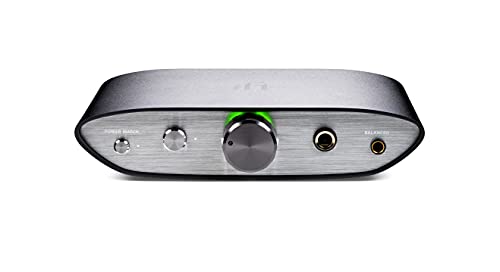
The quick answer: start with the TOPPING D50 III if you want a dedicated desktop DAC with native DSD512 support, balanced outputs, and a remote control for a separates system. If you listen mainly through headphones and want a warmer presentation, the iFi Zen DAC V2 is the pick, with native DSD256 and a built-in headphone amplifier. The FiiO K11 suits a compact desk where one box must handle both DAC and headphone duties, while the Cambridge Audio DacMagic 200M fits a larger hi-fi setup with several digital sources.
Quick Picks
Our Short List of 3
All 3 Picks at a Glance
| Product | Specs | Action |
|---|---|---|
| TOPPING D50 III | Check price on Amazon | |
| iFi Zen DAC V2 | Check price on Amazon | |
 FiiO K11 | Check price on Amazon |
How to Choose
Native DSD support and the DSD ceiling
DSD, short for Direct Stream Digital, stores music as a very fast stream of single-bit samples rather than the multi-bit words used by PCM formats such as FLAC and WAV. DSD64 runs at 2.8224 MHz, and each step up the ladder doubles the rate through DSD128 and DSD256 to DSD512. A DAC that lists native DSD512 can accept the highest-rate files in most personal libraries without converting them first. A DAC that tops out at DSD256 still suits a library of mostly DSD64 and DSD128, which covers the great majority of DSD albums sold as downloads. Check your own files before you shop, and note the highest DSD rate you actually own. Headroom above that rate is sensible, but DSD512 adds nothing audible when your library stops at DSD128.
Native DSD versus DSD over PCM
Some DACs accept DSD only as DoP, which stands for DSD over PCM. In DoP mode the DSD data travels inside a PCM-shaped container, and the DAC unpacks it on arrival. The audio data itself is unchanged, so DoP is not a quality compromise. The practical difference is the ceiling: DoP usually tops out at DSD256 over USB and DSD64 over optical and coaxial, while native DSD can reach DSD512. If your library includes DSD256 or DSD512 files, look for native DSD support over USB in the specifications. If your files are DSD64, either method works, and other features should decide the purchase.
USB input quality and driver support
For a digital music library stored on a computer, the USB input does almost all of the work. A modern XMOS-based USB stage is the common choice in desktop DACs, and it is what allows high-rate PCM and native DSD to travel from a computer to the converter. On Windows, high-rate DSD playback usually needs the manufacturer’s driver, often an ASIO driver, while macOS and Linux generally work without extra software. Before buying, check the DAC has a current driver for your operating system and that your player supports your planned output mode. A DAC that needs a driver you cannot install is a poor fit no matter how good its specifications look. Newer DACs use USB-C and older designs use USB-B; either is fine with a suitable cable.
Line outputs, balanced connections, and your amplifier
A desktop DAC is only one part of a system, so its outputs must match what comes next. RCA outputs suit almost every integrated amplifier, powered speaker, and headphone amplifier. Balanced outputs, usually XLR or 6.35 mm TRS, suit longer cable runs and balanced inputs, and they can reduce noise picked up along the cable. A DAC with both gives you the most flexibility when you rearrange a desk or upgrade an amplifier later. Also check the output level: some DACs offer a fixed line level, while others offer a variable preamp mode that controls volume directly into a power amplifier or powered speakers. Preamp mode suits a simple desk system, but it adds a volume control to manage when you switch sources.
Headphone amplifier or pure DAC
Some desktop DACs are pure converters with line outputs only, and they need a separate headphone amplifier or a speaker amplifier to make any sound. Others include a headphone amplifier, so they can drive headphones directly from the front panel. Neither design is better in general; the right choice depends on your system. If you already own a headphone amplifier or an integrated amplifier you like, a pure DAC keeps the signal path simple. If you listen mainly through headphones at a desk and want one box, a DAC with a built-in headphone amplifier is the simpler and tidier option. Check the listed headphone output power and impedance range, and make sure it covers your headphones, especially high-impedance or planar models.
Library software, tagging, and file organisation
A DSD library is only as usable as the software that plays it. Before choosing hardware, confirm that your player handles DSD in the way you expect: some players convert DSD to PCM before it reaches the DAC, which makes the DAC’s native DSD support irrelevant, while others pass DSD through untouched. Most library players include a native DSD or bit-perfect output mode, usually found in the audio output or device options. Tagging matters too, because DSD files often arrive with thin metadata, so use a player that can read and edit tags, or a small tagging tool before import. Keep a backup of the original files, store them in a folder structure you can navigate without the player, and avoid converting DSD files to another format just to make them play.
Size, display, and everyday controls
A desktop DAC lives where you can see and reach it, so its physical design matters more than for a component hidden in a rack. A compact DAC fits beside a monitor, while a full-width unit suits a hi-fi shelf and usually brings more inputs and a larger display. A clear display showing the input, sample rate, and format helps you confirm at a glance that a DSD file is playing as DSD rather than being converted upstream. A remote control helps when the DAC sits across the room, and a front-panel volume knob matters if you use the DAC as a preamp. None of these features changes the sound, but they change how pleasant the DAC is to live with.
The Best DSD Desktop DACs for Digital Music Libraries Reviewed
TOPPING D50 III
The TOPPING D50 III is a compact dedicated desktop DAC built around two ESS ES9039Q2M converter chips, one per channel, with an XMOS XU316 USB stage that supports PCM up to 32-bit/768 kHz and native DSD512. That makes it the natural choice for a library that already includes DSD256 or DSD512 files. Inputs cover USB-C, optical, coaxial, and Bluetooth 5.1 with LDAC and aptX-family codec support for wireless listening. Outputs are stereo RCA and balanced 6.35 mm TRS, so it connects cleanly to a power amplifier, an integrated amplifier, or powered speakers.
The D50 III behaves as a DAC and preamp rather than a headphone amplifier: there is no headphone socket, so headphones need a separate amplifier connected to the line outputs. That is the right trade for a separates system, and the main thing to understand before buying. The front display shows the input and sample rate, the included remote handles input selection and volume in preamp mode, and a ten-band parametric equaliser can be adjusted through companion software over USB. Bluetooth is a bonus for casual streaming when the computer is off, since a DSD library travels over USB for full-rate playback. For a small separates system built around a digital library, the D50 III covers the formats, outputs, and controls that matter, with a DSD512 ceiling that leaves room to grow.
iFi Zen DAC V2
The iFi Zen DAC V2 is a desktop DAC and headphone amplifier in one compact unit, built around a Burr-Brown converter with true native DSD handling. Over USB it supports PCM up to 32-bit/384 kHz, DSD up to DSD256, and DXD, with full MQA decoding as well. That DSD256 ceiling covers DSD64 and DSD128 libraries with room to spare, though DSD512 owners need a higher-ceiling DAC. The Burr-Brown converter gives this unit a warmer, more relaxed presentation than the ESS-based DACs in this guide, which suits long sessions and recordings that can sound harsh through a very analytical converter.
A single USB 3.0 input takes audio from the computer, and the unit is powered over that same connection, so there is no separate power brick on the desk. Outputs include a 6.3 mm single-ended headphone socket, a 4.4 mm balanced headphone output, RCA line outputs, and a balanced 4.4 mm line output on the rear. PowerMatch adjusts gain for sensitive in-ear monitors or harder-to-drive headphones, and TrueBass adds a gentle low-frequency lift for headphones that sound thin. The main limitation is the single USB input, with no optical or coaxial connection, so a CD transport or television cannot connect directly. For a computer-first listener wanting one small box for headphones and a DSD library, that trade is easy to accept.
FiiO K11
The FiiO K11 is a compact desktop DAC and headphone amplifier built around a single Cirrus Logic CS43198 converter, with USB, optical, and coaxial inputs and a clear VA display. Over USB it supports PCM up to 32-bit/384 kHz and native DSD256, which covers the DSD rates in most downloadable libraries. The headphone stage is the headline: a 4.4 mm balanced output and a 6.35 mm single-ended output, with three gain levels and a stated output that handles headphones across a wide impedance range, from sensitive in-ear monitors to full-size models. An RCA line output feeds powered speakers or a separate amplifier, and a coaxial digital output is available in USB mode.
Compared with the iFi Zen DAC V2, the K11 adds optical and coaxial inputs, a sample-rate display, and a more powerful balanced headphone stage, at the cost of the warmer Burr-Brown tuning. Against the pure DACs in this guide, it trades the DSD512 ceiling for a complete one-box headphone solution. It runs from an external 12 V supply rather than USB bus power, and it has no Bluetooth input, so wireless listening needs another device. For a desk where one compact box must serve headphones, speakers, and a DSD library, the K11 is a practical and flexible choice, and its display confirms that a DSD file is playing at its native rate.
Cambridge Audio DacMagic 200M
The Cambridge Audio DacMagic 200M is the full-size option in this guide, a half-width hi-fi component that works as a DAC, a headphone amplifier, and a preamp. It uses twin ESS ES9028Q2M converters in a dual-mono layout, one per channel, and supports PCM up to 32-bit/768 kHz and native DSD up to DSD512 over USB, with DSD over PCM up to DSD256. Besides the TOPPING D50 III, it is the only unit here that reaches DSD512, and it pairs that ceiling with the broadest inputs: two optical, two coaxial, one USB Type-B, and Bluetooth with aptX. Outputs include balanced XLR, unbalanced RCA, and a 6.3 mm headphone socket, with switchable digital filters for subtly different presentations.
The 200M suits a listener whose library is one source among several: a computer connects over USB for full-rate DSD, a CD player or streamer uses the optical and coaxial inputs, and a phone can stream over Bluetooth for convenience over the highest rate. Windows users need a Cambridge Audio USB driver for full USB capability, while macOS users can generally connect without extra software. The headphone amplifier suits late-night listening, though its output is more modest than the FiiO K11 stage. For a living-room or study system where the DAC must anchor several sources and a DSD library, the DacMagic 200M offers the most complete connections in this guide.
What to Check Before You Buy
Start by auditing your own library: list the formats you own, note the highest DSD rate, and count how many albums sit at each rate. That check decides whether DSD256 is enough or DSD512 is worth seeking. Next, map your system: what amplifier or powered speakers will the DAC feed, which outputs do they accept, and will you listen through headphones, speakers, or both. A pure DAC with no headphone socket is the wrong buy for a headphones-only desk, just as a DAC with a single USB input is the wrong buy for a system with a CD transport and a streamer.
Then check the software path from file to DAC. Confirm that your player has a native DSD or bit-perfect output mode, that the driver for your operating system is settled, and that the DAC display shows the format in play so you can verify the chain. Check the inputs you need beyond USB, the cable types, and whether the DAC needs an external power supply or runs from USB. Finally, confirm the return and warranty terms, and re-check the listing close to purchase. A DAC is a long-lived component, so a careful match to your library and system matters more than the highest number on a specification sheet.
FAQ
Do I need a DSD DAC if my library is mostly FLAC?
No. FLAC files are PCM, and any competent desktop DAC plays them well. A DSD-capable DAC earns its place only when your library contains DSD files or you plan to build one. If your collection is entirely PCM, choose on inputs, outputs, and headphone power instead, and treat DSD support as useful headroom.
What is the difference between DSD64, DSD128, DSD256, and DSD512?
These labels describe the sample rate of the DSD stream. DSD64 runs at 2.8224 MHz, and each step doubles the rate, through DSD128 and DSD256 to DSD512 at 22.5792 MHz. Higher rates capture more ultrasonic detail in theory, but most commercial DSD releases are DSD64 or DSD128, and the audible difference between rates is small beside the quality of the original recording and mastering.
Can I play DSD files over optical or coaxial connections?
Only at limited rates, usually as DoP. Optical and coaxial inputs on most desktop DACs support DSD64 over DoP, while full-rate native DSD needs USB. If your DSD library lives on a computer, plan to use USB as the main connection and treat optical and coaxial as inputs for other sources such as a CD player or television.
Does a desktop DAC need a separate amplifier?
A pure DAC such as the TOPPING D50 III has line outputs only, so it needs an amplifier, powered speakers, or a separate headphone amplifier to produce sound. A DAC with a built-in headphone amplifier, such as the iFi Zen DAC V2 or the FiiO K11, can drive headphones directly, and its RCA outputs can still feed powered speakers. Check the outputs on the model you choose and match them to your system.
Will a DSD DAC improve the sound of ordinary streaming music?
A good desktop DAC can improve on a laptop’s built-in audio for any source, by moving conversion away from the electrically noisy environment inside a computer. The improvement comes from the converter, the analogue stage, and the cleaner power supply, not from DSD itself. Ordinary streaming music is PCM, so it will not use the DSD path at all, and the benefit you hear depends on your headphones or speakers as much as on the DAC.
Bottom Line
For most digital music libraries, the TOPPING D50 III is the strongest starting point: native DSD512, balanced and RCA outputs, and preamp control for a separates system. Headphone listeners who prefer a warmer presentation and a single-box setup should look at the iFi Zen DAC V2, while the FiiO K11 suits a compact desk needing optical and coaxial inputs alongside a strong balanced headphone stage. The Cambridge Audio DacMagic 200M is the choice for a larger hi-fi system with several digital sources and a DSD library that deserves a DSD512 ceiling. Whichever you choose, match the DAC to the DSD rates you own, confirm the software path is bit-perfect, and check the listing again before you buy.
Disclosure: As an Amazon Associate, we may earn from qualifying purchases.