Our Short List of 3

- Best for: Students and office workers who want a stated 10-hour claim with a touchscreen.
- 15.6-inch FHD anti-glare touchscreen display
- AMD Ryzen 7 5825U processor
- 16GB RAM and 512GB SSD
- 10-hour long battery life stated in the listing
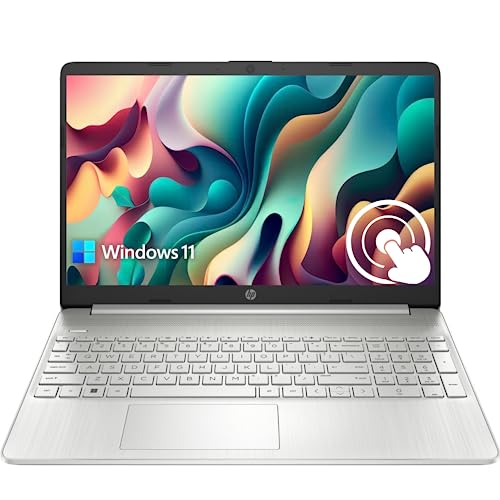
- Best for: Heavy multitaskers who want the longest stated hours and the most memory here.
- 15.6-inch HD anti-glare touchscreen display
- Intel Core processor up to 4.4GHz
- 32GB RAM and 1TB SSD storage
- Up to 11 hours long battery life stated in the listing

- Best for: Everyday home and student use where fast charging matters as much as battery life.
- 15.6-inch FHD display
- Intel Pentium 6500Y processor up to 3.4GHz
- 12GB RAM and 256GB SSD
- Long battery life stated in the listing
All 5 Picks at a Glance
| Product | Specs | Action |
|---|---|---|
| 1. Lenovo IdeaPad Slim 3 Touchscreen Laptop |
| Check price on Amazon |
| 2. HP Pavilion 15.6-Inch Touchscreen Laptop |
| Check price on Amazon |
| 3. TEKTAIPC 15.6 Inch Laptop Computer |
| Check price on Amazon |
 4. Lenovo Ideapad Business Laptop |
| Check price on Amazon |
 5. HP Core i7 15.6-Inch Laptop |
| Check price on Amazon |
Key takeaways
- Compare five laptops whose listings promise long battery life, including 10-hour and 11-hour models, and pick the right one for work, study, and travel.
Battery life decides how a laptop fits real days away from an outlet. A machine that needs a charger by midday changes how you work, study, and travel, so the battery wording in the listing itself matters more than any headline specification. The five laptops below all state battery-life wording in their listings, from a stated 10-hour model to an 11-hour touchscreen pick, so each one is judged on a claim its seller actually made.
Every pick here is described only from what its listing states: display, processor, memory, storage, and the battery-life claim itself. No battery figure in this guide comes from article prose or from a sibling listing, and each model carries its own confirmed listing code so you can check the current listing before you buy.
Quick Picks
As an Amazon Associate we earn from qualifying purchases.
| Product | Best for | Key spec from title |
|---|---|---|
| Lenovo IdeaPad Slim 3 Touchscreen Laptop | Stated hours plus a touchscreen | 10-Hr Long Battery Life |
| HP Pavilion 15.6-Inch Touchscreen Laptop | Longest stated hours in this guide | Up to 11 Hours Long Battery Life |
| TEKTAIPC 15.6 Inch Laptop Computer | Everyday use with fast charging | Long Battery Life |
| Lenovo Ideapad Business Laptop | Office work with a software bundle | Long Battery Life |
| HP Core i7 15.6-Inch Laptop | Demanding work with strong memory | Long Battery Life |
How to Choose
Read the Battery Claim Literally
Battery wording in a listing comes in different strengths, and the differences matter. A stated number of hours, such as 10 hours or up to 11 hours, is a concrete claim you can compare directly with another stated number. A general phrase such as long battery life is a promise without a number, so treat it as a signal rather than a measurement. Capacity figures in watt-hours describe the size of the battery, not how long it lasts, and a bigger number does not always mean a longer day. Compare only like with like, and check whether the claim covers typical use or a best-case setting before you decide.
Match the Processor to the Workload
The processor shapes what a laptop can do comfortably, and battery life often trades against raw speed. A modest efficient processor suits writing, browsing, video calls, and coursework, and it usually sips power while doing them. A stronger processor handles heavier multitasking, large spreadsheets, and demanding creative work, but it can drain the battery faster under load. Look at the processor named in the listing and ask what your hardest regular task is, not what the fastest task might be. The right match keeps the machine responsive without wasting the battery you bought it for.
Weigh Memory and Storage Together
Memory and storage answer different questions, and both affect how a laptop feels day to day. Memory decides how many browser tabs, documents, and apps can stay open at once without slowing down, and 16GB gives comfortable headroom for most people. Storage decides how much you can keep on the machine itself, from documents and photos to downloaded media, and a solid-state drive keeps loading times short. A laptop with generous memory but cramped storage, or the reverse, will frustrate you in different ways. Balance the two against what you actually keep and run.
Screen Size and Weight Shape Daily Use
A 15.6-inch screen is the common middle ground in this guide: large enough for side-by-side documents and comfortable video, yet still portable in a standard bag. A 14-inch screen is easier to carry and fits smaller desks, while a 17.3-inch screen suits a fixed spot at home more than daily travel. Touchscreens add direct control for scrolling and tapping, which some people love and others never use. Think about where the laptop will live most days, how far you carry it, and whether a touchscreen changes how you work before you pick a size.
The 5 Best Options
1. Lenovo IdeaPad Slim 3 Touchscreen Laptop
- Best for: Students and office workers who want a stated 10-hour claim with a touchscreen.
- 15.6-inch FHD anti-glare touchscreen display
- AMD Ryzen 7 5825U processor
- 16GB RAM and 512GB SSD
- 10-hour long battery life stated in the listing
Students and office workers who want a stated 10-hour claim with a touchscreen.
The listing compares the processor with a rival chip rather than stating a direct benchmark, so judge it on the processor name alone.
The Lenovo IdeaPad Slim 3 pairs a Ryzen 7 processor with a 15.6-inch full high-definition touchscreen and a stated 10-hour long battery life, which makes it the clearest hours-based claim among the slim models here. Sixteen gigabytes of memory and a 512GB solid-state drive give it room for heavy multitasking and local files, while the numeric keypad suits number-heavy work and the anti-glare display helps in bright rooms. It is built for business, home, and school use in one machine.
Watch out for: The listing compares the processor with a rival chip rather than stating a direct benchmark, so judge it on the processor name alone.
2. HP Pavilion 15.6-Inch Touchscreen Laptop
- Best for: Heavy multitaskers who want the longest stated hours and the most memory here.
- 15.6-inch HD anti-glare touchscreen display
- Intel Core processor up to 4.4GHz
- 32GB RAM and 1TB SSD storage
- Up to 11 hours long battery life stated in the listing
Heavy multitaskers who want the longest stated hours and the most memory here.
The display is high-definition rather than full high-definition, so fine text looks less sharp than on the full high-definition models in this guide.
The HP Pavilion carries the longest stated battery claim in this guide at up to 11 hours, paired with a generous 32GB of memory and a 1TB solid-state drive that leave plenty of room for demanding multitasking and large files. Its 15.6-inch high-definition touchscreen uses anti-glare glass, and the processor runs up to 4.4GHz for heavier bursts of work. Type-C and HDMI ports cover modern docks and external displays, and the silver finish keeps it presentable in shared spaces.
Watch out for: The display is high-definition rather than full high-definition, so fine text looks less sharp than on the full high-definition models in this guide.
3. TEKTAIPC 15.6 Inch Laptop Computer
- Best for: Everyday home and student use where fast charging matters as much as battery life.
- 15.6-inch FHD display
- Intel Pentium 6500Y processor up to 3.4GHz
- 12GB RAM and 256GB SSD
- Long battery life stated in the listing
Everyday home and student use where fast charging matters as much as battery life.
The processor is modest, so demanding creative work and heavy multitasking will feel slower than on the stronger processors in this guide.
The TEKTAIPC is the straightforward everyday laptop in this guide, with a Pentium processor, 12GB of memory, and a 256GB solid-state drive behind a 15.6-inch full high-definition display. Its listing states long battery life and adds fast charging, a useful pairing when you do run low and need a quick top-up between tasks. The slim portable form suits business, home, and student use, and the specification list stays focused on the basics rather than extras that add bulk or cost.
Watch out for: The processor is modest, so demanding creative work and heavy multitasking will feel slower than on the stronger processors in this guide.
4. Lenovo Ideapad Business Laptop
- Best for: Office workers who want a current business configuration with office software included.
- 15.6-inch FHD display
- Intel quad-core processor
- 8GB DDR5 RAM and 128GB PCIe storage
- Long battery life stated in the listing
Office workers who want a current business configuration with office software included.
Storage is limited at 128GB, so plan on cloud storage or an external drive for large files.
The Lenovo Ideapad business laptop keeps its specification list lean: a 15.6-inch full high-definition display, an Intel quad-core processor, 8GB of DDR5 memory, and a 128GB solid-state drive, with long battery life stated in the listing. The included one-year subscription to a common office suite adds value for anyone setting up a work machine from scratch, and the 2026-2027 edition framing marks it as a current business configuration. It is the most office-focused pick here, built around documents, email, and calls rather than entertainment.
Watch out for: Storage is limited at 128GB, so plan on cloud storage or an external drive for large files.
5. HP Core i7 15.6-Inch Laptop
- Best for: Demanding work and study where a strong processor and large storage matter most.
- 15.6-inch FHD display with webcam
- Intel Core i7-1255U processor up to 4.7GHz
- 16GB RAM and 1TB PCIe SSD
- Long battery life stated in the listing
Demanding work and study where a strong processor and large storage matter most.
There is no touchscreen, so anyone who relies on touch input should choose one of the touchscreen models instead.
The HP Core i7 laptop pairs a high-performance Core i7-1255U processor running up to 4.7GHz with 16GB of memory and a 1TB solid-state drive, the strongest storage pairing among the non-touchscreen picks here. Its 15.6-inch full high-definition display includes a webcam for video calls, and the listing states long battery life for business and academic use. The 2026 edition framing and Windows 11 complete a current, general-purpose machine that suits demanding work without giving up all-day ambitions.
Watch out for: There is no touchscreen, so anyone who relies on touch input should choose one of the touchscreen models instead.
Which One Fits Your Situation
All-Day Classes and Study Sessions
If your day runs from morning lectures to evening assignments without a reliable outlet, pick by the stated hours first. The Lenovo IdeaPad Slim 3 states 10 hours and the HP Pavilion states up to 11 hours, and both carry touchscreens for quick scrolling through notes. Bring the charger anyway on the longest days, and keep screen brightness moderate, since display brightness is one of the largest drains on any laptop battery.
Working From Cafes and Shared Spaces
Cafe work rewards a laptop that looks tidy, connects easily, and keeps going through a long session. The HP Pavilion covers docks and displays with Type-C and HDMI, while the Lenovo Ideapad business model keeps the specification list focused on documents and calls. Choose the Pavilion when you juggle many apps at once, and the Ideapad when your work is mostly writing, email, and video meetings.
Travel Days With Few Outlets
Travel days punish heavy laptops and reward honest battery claims. The slim TEKTAIPC travels light and adds fast charging, so a short stop can restore useful charge, while the Lenovo IdeaPad Slim 3 gives a stated 10-hour claim for longer stretches between outlets. Pack the charger in the bag regardless, keep the laptop in a padded sleeve, and shut down fully for flights rather than trusting sleep mode to preserve charge.
A Family Laptop That Moves Room to Room
A shared family laptop needs a screen everyone can read, enough storage for many users, and a battery that survives trips between rooms. The HP Core i7 model offers a large 1TB drive and a strong processor for homework, video calls, and household admin alike. Set up separate user accounts for each family member, and keep the machine on a hard flat surface while charging so vents stay clear and the battery stays cool.
Common Mistakes
- Treating a watt-hour capacity figure as a battery-life promise, when capacity describes battery size and not how long it lasts.
- Comparing a stated number of hours with a vague long battery life phrase as if they were the same kind of claim.
- Choosing the fastest processor available without asking whether your regular tasks need it, then losing battery life to speed you never use.
- Ignoring storage size and discovering too late that documents, photos, and downloads do not fit on a small drive.
- Assuming every laptop in a roundup has a touchscreen, when only some listings state one.
Frequently Asked Questions
What does long battery life mean in a laptop listing?
It means the seller claims the laptop runs for a long time away from an outlet, but without a number it is a general promise rather than a measurement. A listing that states 10 hours or up to 11 hours gives you a concrete figure to compare. Always read the exact wording in the listing, and remember that real run time depends on brightness, workload, and wireless use.
Is a stated number of hours a guarantee?
No, a stated number is the claim made in the listing, usually under test conditions that may differ from your daily use. Heavy multitasking, high brightness, and constant wireless use shorten run time, while light writing and reading stretch it. Treat the stated hours as a comparison point between models, not a promise that every day will match the figure exactly.
Does a bigger battery always last longer?
Not necessarily. A larger capacity battery holds more energy, but a power-hungry processor or a bright high-resolution display can drain it faster than an efficient machine with a smaller battery. The processor, display, and workload matter as much as capacity. Compare stated hours and efficiency together rather than judging by one number alone.
Should I choose a touchscreen for battery life?
A touchscreen does not by itself decide battery life, and both touchscreen and non-touchscreen models in this guide state long battery life. Choose a touchscreen when tapping and scrolling directly helps your work, and skip it when you rarely touch the screen. Either way, compare the stated battery wording first and treat the touchscreen as a separate comfort choice.