Our Short List of 3

- Best for: A first gaming laptop on a modest budget, or a student machine that also plays modern games.
- Processor: Intel Core i5-13420H
- Graphics: NVIDIA GeForce RTX 4050 Laptop GPU, 6GB
- Display: 15.6-inch Full HD IPS, 144Hz
- Memory: 8GB DDR5

- Best for: Buyers who want a durable mid-tier laptop with generous memory and storage and no immediate upgrades.
- Processor: AMD Ryzen 7 7735HS, 8 cores, up to 4.7GHz boost
- Graphics: NVIDIA GeForce RTX 4050, 6GB GDDR6
- Display: 15.6-inch Full HD, 144Hz, full sRGB coverage
- Memory: 16GB DDR5-4800

- Best for: A single laptop for gaming, study, and work in the middle tier.
- Processor: AMD Ryzen 7 8845HS, 8 cores
- Graphics: NVIDIA GeForce RTX 4050, 6GB GDDR6
- Display: 15.6-inch Full HD, 144Hz
- Memory: 16GB RAM
All 5 Picks at a Glance
| Product | Specs | Action |
|---|---|---|
| Acer Nitro V 15 ANV15-51-51H9 |
| Check price on Amazon |
| ASUS TUF Gaming A15 FA507NU-DS74 |
| Check price on Amazon |
| Lenovo LOQ 15 83DX00B2US |
| Check price on Amazon |
 MSI Katana 15 B13VGK-484US |
| Check price on Amazon |
 MSI Katana 15 B13VGK-2000US |
| Check price on Amazon |
Key takeaways
- Compare five gaming laptops across entry, mid-range and high-end tiers, from RTX 4050 value picks to an RTX 4070 QHD machine, and match one to your budget.
A gaming laptop purchase is really a budget decision dressed up as a hardware decision. Every buyer has a ceiling, and the honest question is what that ceiling buys: which graphics chip, how much memory, how fast the screen, and where the manufacturer quietly cut corners to hit the tier. Pick the wrong balance and you end up with a fast graphics chip starved by too little memory, or a beautiful screen attached to a machine that throttles after twenty minutes of play.
This guide covers five laptops that span the full range, from the most affordable way into modern games to a higher-tier machine built for demanding titles at higher resolution. Each pick is named with the exact configuration listed on Amazon, so you can check the model code, the memory, and the storage before you buy.
Quick Picks
As an Amazon Associate we earn from qualifying purchases
| Product | Best for | Key spec from title |
|---|---|---|
| Acer Nitro V 15 ANV15-51-51H9 | First gaming laptop on a modest budget | Intel Core i5-13420H, RTX 4050, 15.6-inch Full HD 144Hz |
| ASUS TUF Gaming A15 FA507NU-DS74 | Durable everyday gaming with roomy storage | AMD Ryzen 7 7735HS, RTX 4050, 16GB DDR5, 1TB PCIe SSD |
| Lenovo LOQ 15 83DX00B2US | Balanced mid-tier play and school or work use | AMD Ryzen 7 8845HS, RTX 4050, 15.6-inch Full HD 144Hz |
| MSI Katana 15 B13VGK-484US | Stepping up to stronger graphics | Intel Core i7-13620H, RTX 4070, 16GB DDR5, 1TB NVMe SSD |
| MSI Katana 15 B13VGK-2000US | High-tier play on a sharper display | Intel Core i7-13620H, RTX 4070, 15.6-inch QHD 165Hz |
How to Choose
Match the graphics chip to the games you actually play
The graphics chip decides which games run smoothly and at what settings, so start there and work backwards. An RTX 4050 handles popular competitive titles and most modern games at Full HD with sensible settings, which is why three picks in this guide carry it. An RTX 4070 with more video memory gives real headroom for demanding open-world games, higher settings, and higher resolutions. Do not pay for a stronger chip than your games need, and do not buy a weaker one hoping settings sliders will close the gap. List the three games you play most, check what they ask of a graphics card, and let that set your floor.
Treat memory and storage as part of the graphics decision
A gaming laptop with too little memory stutters no matter how good its graphics chip looks on paper. Sixteen gigabytes of RAM is the sensible baseline for modern gaming, and the entry pick in this guide ships with eight, which means a memory upgrade should be part of your plan if you choose it. Storage matters just as much: a 512GB drive fills fast once two or three large games are installed, while a 1TB drive gives breathing room. Check whether the listing states two memory slots or an accessible second storage slot before you buy, because an upgradeable machine stays useful far longer than a sealed one.
Read the screen like a specification, not a decoration
The display decides how the games you already run actually look and feel. A 144Hz panel makes fast competitive games feel noticeably smoother than a standard 60Hz screen, and all five laptops here clear that bar. Resolution is the next split: Full HD keeps frame rates high and suits the entry and mid tiers, while the QHD panel on the top pick shows more detail but asks more of the graphics chip. Panel type matters too, since an IPS display holds its colours and viewing angles better than a cheaper panel. Match the screen to the graphics chip, because a sharp screen on a weak chip only shows you what you cannot run.
Know where the cheaper tiers cut corners
Lower-tier gaming laptops save money somewhere, and knowing where helps you judge whether the saving is worth it. Common trade-offs are a smaller memory configuration, a slower or smaller drive, a plastic chassis, fewer ports, and a basic cooling system that runs louder under load. None of these is a deal-breaker on its own, but two or three together change the daily experience. Check the port list for the connections you need, confirm the keyboard is backlit if you play in dim rooms, and remember that a laptop you carry daily should be judged on weight and battery behaviour as well as frame rates.
The 5 Best Options
Acer Nitro V 15 ANV15-51-51H9
- Best for: A first gaming laptop on a modest budget, or a student machine that also plays modern games.
- Processor: Intel Core i5-13420H
- Graphics: NVIDIA GeForce RTX 4050 Laptop GPU, 6GB
- Display: 15.6-inch Full HD IPS, 144Hz
- Memory: 8GB DDR5
A first gaming laptop on a modest budget, or a student machine that also plays modern games.
The 8GB memory configuration is the tightest in this guide, so confirm the upgrade path and budget for a memory upgrade.
The Nitro V 15 is the most affordable way into this group, and it earns that place honestly: a 13th-generation Intel Core i5 processor and an RTX 4050 graphics chip cover modern games at Full HD, and the 144Hz IPS display keeps fast games feeling responsive. It is the pick for a first gaming laptop, for a student setup, or for anyone who wants to play current titles without stretching to a higher tier. The trade-off is the eight gigabytes of memory, which is workable today but is the first thing you will want to upgrade.
Watch out for: The 8GB memory configuration is the tightest in this guide, so confirm the upgrade path and budget for a memory upgrade.
ASUS TUF Gaming A15 FA507NU-DS74
- Best for: Buyers who want a durable mid-tier laptop with generous memory and storage and no immediate upgrades.
- Processor: AMD Ryzen 7 7735HS, 8 cores, up to 4.7GHz boost
- Graphics: NVIDIA GeForce RTX 4050, 6GB GDDR6
- Display: 15.6-inch Full HD, 144Hz, full sRGB coverage
- Memory: 16GB DDR5-4800
Buyers who want a durable mid-tier laptop with generous memory and storage and no immediate upgrades.
The display is Full HD rather than QHD, so it suits high frame rates better than maximum detail.
The TUF Gaming A15 pairs an eight-core AMD Ryzen 7 processor with the same RTX 4050 graphics as the entry pick, but adds twice the memory and twice the storage, which is exactly the combination that keeps a laptop feeling fast a year after purchase. Its chassis line is rated for military-grade toughness testing, so it suits a bag, a desk, and a dorm room equally well. The Full HD display runs at 144Hz with full sRGB coverage, and Wi-Fi 6E keeps wireless play stable when the network is crowded.
Watch out for: The display is Full HD rather than QHD, so it suits high frame rates better than maximum detail.
Lenovo LOQ 15 83DX00B2US
- Best for: A single laptop for gaming, study, and work in the middle tier.
- Processor: AMD Ryzen 7 8845HS, 8 cores
- Graphics: NVIDIA GeForce RTX 4050, 6GB GDDR6
- Display: 15.6-inch Full HD, 144Hz
- Memory: 16GB RAM
A single laptop for gaming, study, and work in the middle tier.
Some listings for this model appear as seller bundles that include a hub accessory, so confirm exactly what is included and who the seller is before buying.
The LOQ 15 sits in the middle of this group with a newer eight-core AMD Ryzen 7 processor, an RTX 4050, and a balanced specification that works as well for study and office tasks as it does for evening gaming sessions. Sixteen gigabytes of memory and a 512GB drive cover current games, and the 144Hz Full HD screen, HDMI port, and USB-C port cover the connections most desks need. It is the quiet middle choice: nothing flashy, nothing missing, and a sensible fit for a buyer who wants one machine for everything.
Watch out for: Some listings for this model appear as seller bundles that include a hub accessory, so confirm exactly what is included and who the seller is before buying.
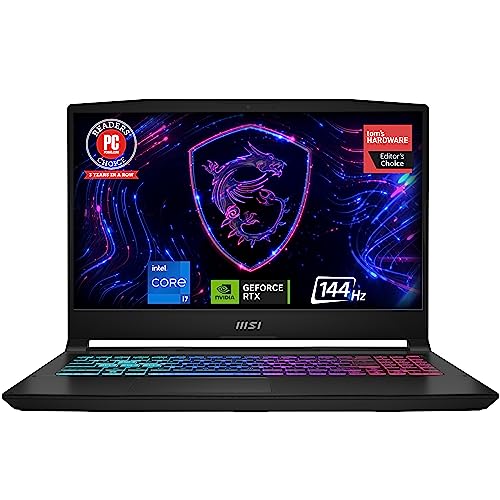
MSI Katana 15 B13VGK-484US
- Best for: Demanding games at high settings in the upper mid tier, with graphics headroom to spare.
- Processor: Intel Core i7-13620H
- Graphics: NVIDIA GeForce RTX 4070
- Display: 15.6-inch Full HD, 144Hz
- Memory: 16GB DDR5
Demanding games at high settings in the upper mid tier, with graphics headroom to spare.
The listing does not state a graphics power figure, so do not assume its power limit matches other RTX 4070 laptops.
The Katana 15 is where this guide steps up a tier. Its Intel Core i7 processor and RTX 4070 graphics chip carry eight gigabytes of video memory, which opens the door to demanding games at higher settings than any RTX 4050 pick can manage comfortably. Sixteen gigabytes of DDR5 memory and a 1TB NVMe drive mean no immediate upgrades, and the Cooler Boost 5 dual-fan cooling is built for long sessions. The Full HD 144Hz display keeps frame rates high, making this the pick for a buyer whose budget reaches past the entry tier and who wants the extra graphics headroom to last.
Watch out for: The listing does not state a graphics power figure, so do not assume its power limit matches other RTX 4070 laptops.
MSI Katana 15 B13VGK-2000US
- Best for: The highest tier in this guide, for detailed play at higher resolution on a fast screen.
- Processor: Intel Core i7-13620H, 10 cores
- Graphics: NVIDIA GeForce RTX 4070, 8GB GDDR6
- Display: 15.6-inch QHD (2560 x 1440), 165Hz
- Memory: 16GB DDR5
The highest tier in this guide, for detailed play at higher resolution on a fast screen.
A QHD display asks more of the graphics chip, so expect to tune settings in the most demanding titles rather than maxing everything.
The second Katana in this guide is the highest-tier pick, and the difference is the screen: a 15.6-inch QHD display running at 165Hz, paired with the same Intel Core i7 processor and RTX 4070 graphics as its sibling. That combination is built for detailed, fast play at higher resolution, where the extra pixels and the faster refresh rate both show. Sixteen gigabytes of DDR5 memory, a 1TB NVMe drive, and Cooler Boost 5 cooling round out a machine that asks for the largest budget in this group and gives the sharpest picture in return.
Watch out for: A QHD display asks more of the graphics chip, so expect to tune settings in the most demanding titles rather than maxing everything.
Which One Fits Your Situation
You are buying your first gaming laptop
Choose the Acer Nitro V 15. It covers modern games at Full HD with an RTX 4050 and a 144Hz screen, which is the core experience, and its only real compromise is memory. Plan a memory upgrade down the line and you have a proper gaming machine at the most accessible tier in this guide.
You want one laptop for gaming, study, and work
Choose the Lenovo LOQ 15 or the ASUS TUF Gaming A15. The LOQ 15 has the newer processor and a clean, balanced specification, while the TUF Gaming A15 adds a 1TB drive and a tougher chassis. Either one handles a full day of classes or office work and an evening of gaming without feeling like a compromise in either role.
You play demanding games and want graphics headroom
Choose the MSI Katana 15 B13VGK-484US. Its RTX 4070 graphics and eight gigabytes of video memory handle demanding titles at higher settings than the RTX 4050 picks, and the 1TB drive and 16GB of memory mean the machine is ready as sold. It is the sensible step up when the budget reaches the upper mid tier.
You want the sharpest picture in this guide
Choose the MSI Katana 15 B13VGK-2000US. The QHD 165Hz display is the clearest and fastest screen here, and it is matched to an RTX 4070 that can drive it. Pick this one if a detailed, smooth picture matters more to you than keeping the budget in the lower tiers, and you are happy to pay for the top tier to get it.
Common Mistakes
- Buying on the graphics chip name alone while ignoring memory: an 8GB machine stutters where a 16GB machine with the same chip runs smoothly.
- Choosing a small drive and then discovering two large games fill it: check the storage size against the games you actually install.
- Picking a QHD screen with an entry-tier graphics chip, which leaves you turning settings down to recover frame rates.
- Skipping the port and connectivity check, then finding the laptop lacks the HDMI, USB-C, or wired network connection your desk needs.
- Ordering without confirming the exact model code: similar model names hide different processors, memory sizes, and screen types.
Frequently Asked Questions
Which graphics chip is enough for modern games at Full HD?
An RTX 4050 with six gigabytes of video memory is enough for popular competitive titles and most modern games at Full HD with sensible settings. It is the chip in three picks here for that reason. Step up to an RTX 4070 when you play demanding open-world games at high settings or want more headroom for the next few years.
How much memory should a gaming laptop have?
Sixteen gigabytes is the sensible baseline for modern gaming, and four of the five laptops in this guide ship with it. Eight gigabytes still works for lighter titles, but it is the first limit you will hit, so treat a memory upgrade as part of the plan if you buy the entry pick.
Does a faster screen matter if I mostly play single-player games?
A 144Hz or faster screen still makes movement and camera pans feel smoother in single-player games, though the difference is most obvious in fast competitive titles. Resolution matters more for slow, detailed games, which is why the QHD pick in this guide suits story-driven play as well as fast action.
Should I choose a bigger drive or a faster graphics chip first?
Choose the graphics chip first, because it decides which games run well and cannot be upgraded later. Storage is usually the easier fix: many gaming laptops accept a second drive or a larger replacement, while the graphics chip is fixed for the life of the machine.